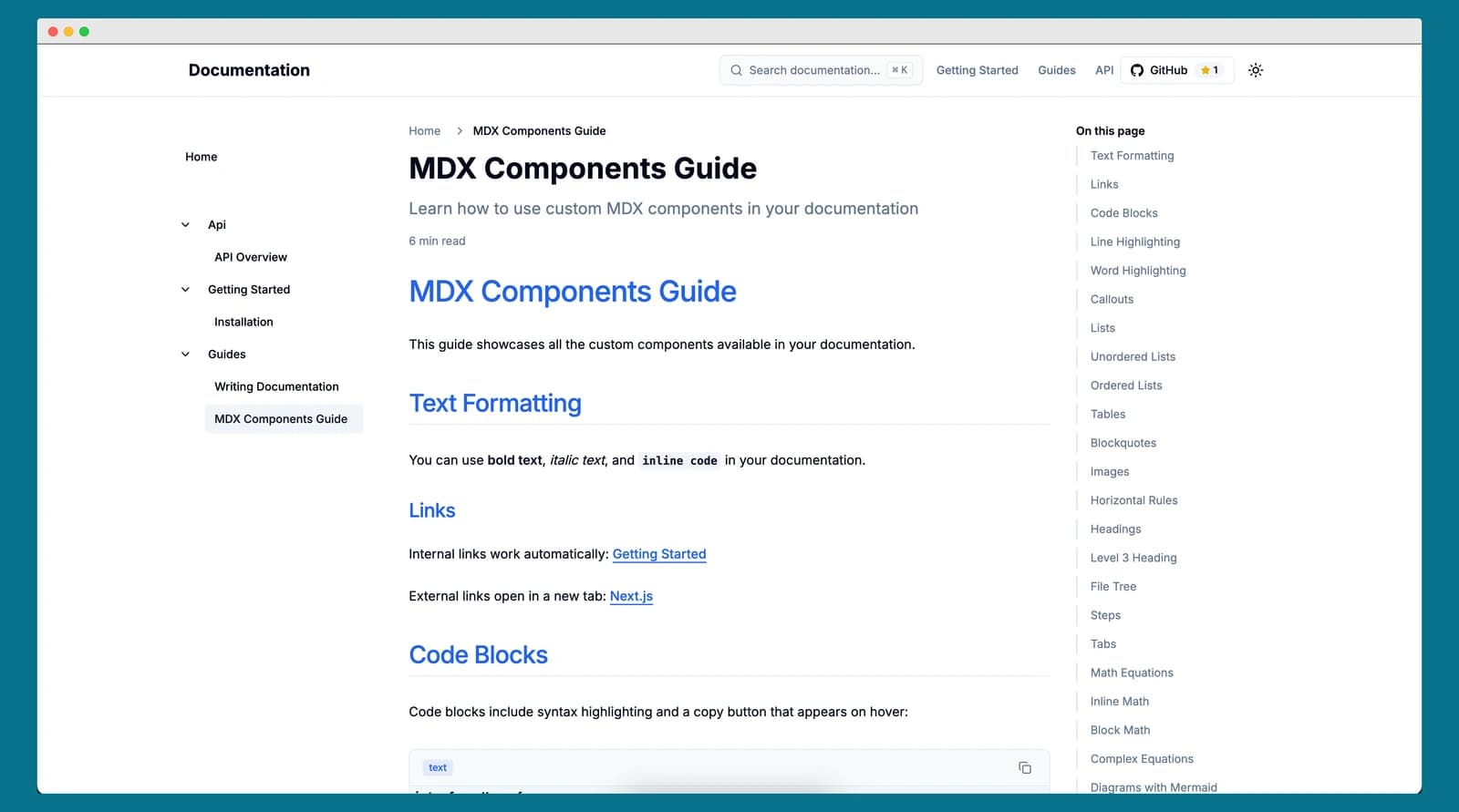

You know what nobody talks about? How annoying documentation setup is.
Not the writing part—I actually like writing docs. What I hate is the hour-long yak shave before you can write a single word. Installing doc frameworks, configuring themes, setting up search, making sure it looks decent on mobile... and you haven't even started documenting your actual project yet.
I kept hitting this wall. Every new project, same dance. "Oh, I should document this." Then I'd spend a weekend comparing Docusaurus vs MkDocs vs VuePress, reading setup guides, tweaking config files. By Sunday evening, I'd have a hello-world docs site and zero actual documentation.
There had to be a better way.
What features does a good documentation generator need?
I made a mental list every time I set up docs. It went like this:
For me:
- Fork a repo, add my Markdown files, done
- No database. No complex config files. Just files.
- TypeScript because I don't trust myself
- Fast dev server (waiting for rebuilds kills flow)
For users:
- Fast. Like, stupid fast.
- Works on phones (people debug at 2 AM on their phone)
- Dark mode (it's 2025, come on)
- Search that actually works
- Code blocks that don't look like trash
Nice-to-haves:
- Diagrams (Mermaid)
- Math equations (KaTeX)
- Custom components (sometimes Markdown isn't enough)
How is the documentation generator built with Next.js 16?
I went with Next.js 16. Mostly because I know it well, but also because Turbopack is genuinely fast. And server components make static generation weirdly simple.
The core idea was stupid simple: drop Markdown files in a content folder, they become pages. That's it. No routing config. No page registry. Just files.
content/
├── getting-started/
│   ├── index.md
│   └── installation.md
├── guides/
│   └── writing-docs.md
└── api/
    └── overview.md
Those files become /getting-started, /getting-started/installation, /guides/writing-docs, /api/overview. Obvious. Predictable. Zero config.
What features make this docs generator stand out?
Search without a backend. I used FlexSearch—runs entirely in the browser. Index builds at compile time, search is instant. No API calls, no loading states. Just type and see results.
MDX for everything. Sometimes you need more than text. With MDX, you can use React components inline. Need a warning callout? Custom tabs? Just drop in a component:
<Callout type="warning" title="Heads Up">
  This will delete everything. Yes, everything.
</Callout>Clean, readable, and it renders as an actual styled warning box. Way better than blockquote hacks.
Code blocks that don't suck. I used Shiki because it uses the same highlighting engine as VS Code. Your code looks exactly like it does in your editor. Plus I added:
- Copy button (because typing examples is tedious)
- Line highlighting (to draw attention)
- Filename display (for context)
function calculateTotal(items: Item[]) {
  // This line is highlighted
  const subtotal = items.reduce((sum, item) => sum + item.price, 0)
  // These lines too
  const tax = subtotal * 0.1
  const total = subtotal + tax
  return total
}See those highlighted lines? Built-in. Just add {2,4-6} to your code fence.
Dark mode that actually works. Used next-themes. Respects system preference. No flash of wrong theme. Everything adapts—even Mermaid diagrams and code blocks. Just works.
How does it handle SEO, performance, and type safety?
SEO: Auto sitemap, RSS feed, Open Graph tags, structured data. All the stuff that makes Google happy. You write frontmatter, it handles the rest.
Performance: Everything's static. No database queries. Turbopack makes builds fast. Whole site is just HTML, CSS, JS. Simple. Fast. Works everywhere.
TypeScript: Caught so many bugs. Frontmatter validation, document types, navigation types. If it compiles, it probably works. Worth the occasional type gymnastics.
What did I learn building this documentation tool?
Defaults > options. Every config option is a decision. Good defaults mean people can skip most decisions and just write.
Speed is a feature. When dev is instant and builds are fast, you actually want to preview changes. Slow tools make you avoid iterating.
Show, don't tell. This docs site? It documents itself. Every feature is demonstrated in the docs. If something doesn't work well enough to document itself, it's not good enough.
What were the messy parts of the first version?
I'm not gonna lie—the first version was chaos. I had:
- Hardcoded paths everywhere
- No error handling
- Mixed UI with logic
- Comments like "TODO: fix this properly"
Classic vibe coding. But I went back and cleaned it up. Pulled out utilities. Added proper types. Wrote tests. Made it something I'd be okay with other people using.
That's the thing about side projects—you can ship the messy version fast, but you gotta go back and polish it if you want people to actually use it.
What features are planned next?
I'm using this for my own projects now. Already found some rough edges, smoothed them out. Added features I realized I needed.
Maybe I'll add:
- Version switching (for versioned APIs)
- Multi-language support (i18n)
- Comments widget
- Analytics dashboard
But honestly? It does what I need. Fork it, add content, deploy. Documentation in minutes, not hours.
How can you try it yourself?
If you're tired of complex doc setups, give it a shot:
- Fork github.com/rabinarayanpatra/docs-generator
npm install- Add Markdown files to
content/ npm run dev
Four steps. That's it.
And hey, if you find bugs or have ideas, PRs welcome. I built this because I needed it, but I'd love to see what you do with it.
Tech stuff: Next.js 16, React 19, TypeScript, Tailwind CSS, MDX, FlexSearch, Shiki, Mermaid, KaTeX. Full list in the README.
The real story: I was procrastinating on documenting a different project, so I built this instead. Classic developer move.
For the tools used in this project, see the Next.js 16 documentation, MDX documentation, FlexSearch, Shiki syntax highlighter, and Mermaid diagramming.
Keep Reading
- Goodbye middleware.ts, Hello proxy.ts: The Next.js 16 Migration Guide — The proxy.ts change in Next.js 16 that affects every Next.js project, including this docs generator.
- My Thoughts on Vibe Coding — The creative coding mindset that led to building tools like this docs generator.