
I have wired Envers into Spring Boot projects three times in the last five years and every time it felt like work that should have been a single annotation. Hibernate 7.4 finally makes it one. The new @Audited annotation lives in org.hibernate.annotations (the core package, not the Envers module), and it is the first piece of a much larger feature called the StateManagement SPI.
This post walks through the full setup in a Spring Boot 4 project: how to override the Hibernate version to get 7.4, how to wire the @Changelog entity that supplies changeset ids, how to annotate an entity to start auditing, and how to query history with the new AuditLog interface. The feature is incubating, meaning the API can shift before the final release, but the surface is small enough that the migration cost is bounded if it does.
If you already use Envers, the migration path is gradual. You can keep auditing existing entities with Envers and adopt the new annotation only on new ones until the dust settles.
What is the @Audited annotation in Hibernate 7.4?
The new @Audited annotation marks an entity class (or a collection field) as audited, meaning Hibernate keeps a historical record of every change to it. It lives in org.hibernate.annotations.Audited and was added in Hibernate 7.4 as an @Incubating feature, shipped first in 7.4.0.CR1 on May 7, 2026.
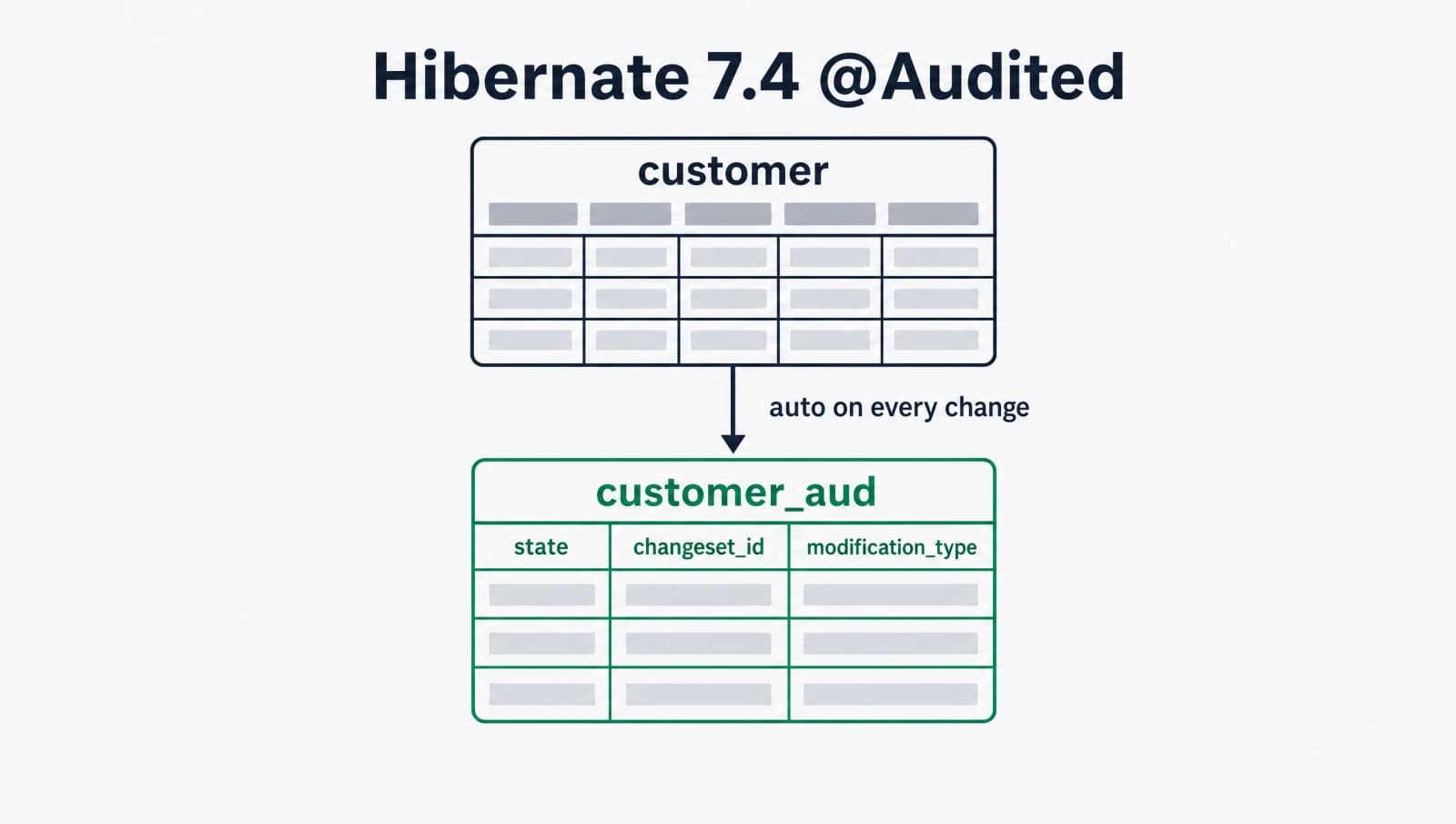
When you annotate an entity with @Audited, Hibernate creates two tables instead of one. The primary table holds the current state, exactly like before. A separate audit log table holds a row for every change. Each audit row contains:
- The full state of the entity at the moment of the change (minus any fields you mark with
@Excluded). - A
changesetIdcolumn that groups changes into atomic batches. - A
modificationTypecolumn encoded as0for creation,1for modification, and2for deletion.
The changesetId is supplied by one of three mechanisms, in order of preference: a @Changelog entity in your domain model (the recommended path), a custom ChangesetIdentifierSupplier registered via configuration, or, as a last resort, Instant.now(). The Hibernate javadoc itself flags relying on the Instant.now() fallback as not recommended.
You query history three ways. You open a session with SessionBuilder.atChangeset(id) to transparently read entity state as of that changeset (regular HQL queries just work). You use the AuditLog interface for programmatic access to revision history and cross-entity queries. Or you open a session with AuditLog.ALL_CHANGESETS and write custom HQL using the new changesetId() and modificationType() functions.
This is the entire model. No revision-info entity. No revision listener. No conditional auditing strategy. Just an annotation, a changelog entity, and a query interface.
How does Hibernate 7.4 @Audited differ from Envers?
The Envers module (introduced in Hibernate 3.6 over a decade ago) lives in org.hibernate.envers and ships as a separate jar. It uses a revision-tracking model with RevisionEntity and @RevisionNumber, writes audit tables prefixed with _AUD, and queries through AuditReader. It works and is mature, but it is also crusty: configuration is XML-shaped, the API surface is wide, and getting current-user-in-audit-trail right always involves a custom listener.
The new annotation rebuilds the same idea on a smaller surface. Key differences:
- Package:
org.hibernate.annotations.Audited(new core annotation) versusorg.hibernate.envers.Audited(legacy Envers annotation). Both annotations are spelled@Audited, so the import you choose decides which engine handles the entity. - Module: the new annotation is in
hibernate-core. No extra dependency needed if you already have Hibernate 7.4 on your classpath. Envers ships inhibernate-enversand must be added separately. - Changeset metadata: Envers uses a
RevisionEntitywith@RevisionNumberand@RevisionTimestamp. The new annotation uses a@Changelogentity with@ChangesetIdand@Timestamp. The shape is similar but the field annotations are first-class on the new side. - Audit table layout: Envers writes a
_AUDsuffixed table per entity with revision linkage. The new model writes a parallel audit table withchangesetIdplusmodificationTypecolumns directly. Different layout, different query SQL. - Querying: Envers exposes
AuditReaderretrievable from theEntityManager. The new model exposesAuditLogthroughAuditLogFactory.create()and supports transparent point-in-time reads viaSessionBuilder.atChangeset(). - Maturity: Envers is GA, battle-tested, used in production for a decade. The new annotation is incubating, so the API can shift between 7.4 and 7.5.
The Hibernate team has stated the 7.4 release is backward compatible with Envers, meaning your existing Envers-audited entities keep working unchanged when you upgrade. You can layer the new @Audited annotation on new entities while leaving the old ones on Envers, then migrate over time.
How do you set up the audit feature in a Spring Boot project?
You override the Hibernate version managed by Spring Boot, because Spring Boot 4.0 ships Hibernate 7.0 and Spring Boot 4.1 has not been released yet. The override is a single property in your build file.
For Maven (pom.xml):
<properties>
  <java.version>24</java.version>
  <hibernate.version>7.4.0.CR1</hibernate.version>
</properties>For Gradle (build.gradle.kts):
ext["hibernate.version"] = "7.4.0.CR1"

dependencies {
    implementation("org.springframework.boot:spring-boot-starter-data-jpa")
}Spring Boot picks up the override and Hibernate Core, Hibernate JPA, and Hibernate Annotations all align on 7.4.0.CR1.
If you already had Envers on the classpath, leave it. The new annotation is in core. You can keep both jars side by side and import explicitly. If you intentionally do not want Envers anymore, exclude it once you have migrated every entity.
Verify the version on application startup. Hibernate logs it at INFO level on the bootstrap line:
INFO o.h.Version - HHH000412: Hibernate ORM core version 7.4.0.CR1
There is no extra configuration required for the audit feature to activate. The presence of a @Changelog entity and any @Audited entity is enough.
How do you define a @Changelog entity for changeset ids?
Add a single class to your domain model annotated with @Changelog and @Entity. It must declare an @Id field with @ChangesetId and a timestamp field with @Timestamp. Hibernate handles the rest, persisting one instance per transaction and using its primary key as the changeset id for every audited change in that transaction.
A minimal version:
package com.example.audit;

import jakarta.persistence.Entity;
import jakarta.persistence.GeneratedValue;
import jakarta.persistence.GenerationType;
import jakarta.persistence.Id;
import jakarta.persistence.Table;
import java.time.Instant;
import org.hibernate.annotations.Changelog;
import org.hibernate.annotations.ChangesetId;
import org.hibernate.annotations.CreationTimestamp;
import org.hibernate.annotations.Timestamp;

@Entity
@Changelog
@Table(name = "changeset")
public class Changeset {

    @Id
    @ChangesetId
    @GeneratedValue(strategy = GenerationType.IDENTITY)
    private Long id;

    @Timestamp
    @CreationTimestamp
    private Instant createdAt;

    public Long getId() { return id; }
    public Instant getCreatedAt() { return createdAt; }
}@CreationTimestamp populates createdAt automatically on insert, which the @Changelog Javadoc explicitly cites as the recommended way to initialize the timestamp field. The Instant type maps cleanly to a PostgreSQL timestamp column.
Once this class is on the classpath, Hibernate auto-registers it as the changeset id supplier. You do not need to set org.hibernate.cfg.StateManagementSettings.CHANGESET_ID_SUPPLIER manually. Only one entity per application may be annotated with @Changelog, so this is your single source of truth for changeset metadata.
To enrich the audit trail with the current user and an optional comment, add fields and a @ChangesetListener. The listener fires on every changeset insertion and gives you a hook to populate the user from your security context:
package com.example.audit;

import org.hibernate.audit.ChangesetListener;
import org.springframework.security.core.context.SecurityContextHolder;

public class CurrentUserChangesetListener implements ChangesetListener {

    @Override
    public void prePersist(Object changeset) {
        if (changeset instanceof Changeset c) {
            var auth = SecurityContextHolder.getContext().getAuthentication();
            c.setCreatedBy(auth != null ? auth.getName() : "system");
        }
    }
}You register the listener once during SessionFactory build via the Hibernate Integrator SPI, the same way you would have wired any other Hibernate listener.
How do you annotate an entity to start auditing it?
Annotate the entity class with @Audited. That is the entire setup. Hibernate generates the audit log table on schema export, populates it on every change, and you do not have to write a single line of audit-specific code anywhere else.
A complete example for a Customer aggregate:
package com.example.customer;

import jakarta.persistence.Column;
import jakarta.persistence.Entity;
import jakarta.persistence.GeneratedValue;
import jakarta.persistence.GenerationType;
import jakarta.persistence.Id;
import jakarta.persistence.Table;
import org.hibernate.annotations.Audited;
import org.hibernate.annotations.Excluded;

@Entity
@Audited
@Table(name = "customer")
public class Customer {

    @Id
    @GeneratedValue(strategy = GenerationType.IDENTITY)
    private Long id;

    @Column(nullable = false)
    private String name;

    @Column(nullable = false, unique = true)
    private String email;

    @Excluded
    @Column(nullable = false)
    private String passwordHash;

    // getters and setters
}The @Excluded annotation on passwordHash keeps that column out of the audit log, which is what you want for password hashes, PII you do not need to track historically, or large binary blobs. Everything else is recorded on every change.
When Hibernate exports the schema, it creates two tables: the regular customer table and a parallel audit log table. Hibernate names the audit table conventionally, similar to customer_aud by default, and the @Audited annotation accepts custom table name overrides if you need them. The audit table contains the same state columns minus excluded ones, plus a changeset_id column and a modification_type column.
A typical row sequence after a create-update-delete cycle on a single customer:
SELECT * FROM customer_aud WHERE id = 42 ORDER BY changeset_id;

 id | name      | email          | changeset_id | modification_type
----+-----------+----------------+--------------+-------------------
 42 | Alice Doe | alice@ex.com   |            1 | 0
 42 | Alice Doe | alice@xyz.com  |            2 | 1
42 | Alice Doe | alice@xyz.com | 3 | 2The 0/1/2 encoding is from the source javadoc directly. You can decode it in queries using the new modificationType() HQL function.
How do you query audit history with the AuditLog interface?
Obtain an AuditLog instance from AuditLogFactory.create(), run your history queries, and close it when done. The AuditLog interface is AutoCloseable and manages its own internal session, so a try-with-resources block is the cleanest pattern.
A repository method that returns the full revision history of a customer:
package com.example.customer;

import java.util.List;
import org.hibernate.audit.AuditLog;
import org.hibernate.audit.AuditLogFactory;
import org.springframework.stereotype.Repository;

@Repository
public class CustomerAuditRepository {

    private final AuditLogFactory factory;

    public CustomerAuditRepository(AuditLogFactory factory) {
        this.factory = factory;
    }

    public List<Customer> getHistory(Long customerId) {
        try (AuditLog auditLog = factory.create()) {
            return auditLog.getHistory(Customer.class, customerId);
        }
    }
}The getHistory(Class, Object) method returns every revision of the entity in chronological order, including the final deletion row if the entity has been deleted. Each returned instance is a snapshot of the entity at that changeset, not a live managed object.
For more specific queries (e.g., who deleted what last quarter), open a session with the AuditLog.ALL_CHANGESETS magic value and write custom HQL using the new functions:
try (var session = sessionFactory.withOptions()
        .atChangeset(AuditLog.ALL_CHANGESETS).open()) {

    var deletions = session.createSelectionQuery("""
            select c.id, c.email, changesetId(c), changeset.createdBy
            from Customer c
            join Changeset changeset on changesetId(c) = changeset.id
            where modificationType(c) = 2
              and changeset.createdAt > :since
            """, Object[].class)
        .setParameter("since", lastQuarterStart)
        .getResultList();
}changesetId(c) returns the changeset of the audit row. modificationType(c) returns the 0/1/2 code. Joining against the Changeset entity lets you correlate with whatever metadata you put on your changelog (user, comment, request id).
How do you read entity state at a past changeset?
Open a session with SessionBuilder.atChangeset(changesetId) and run regular HQL queries. Every entity load, every query, every association traversal returns the state as of that changeset, not the current state.
public Customer customerAtChangeset(Long customerId, Long changesetId) {
    try (var session = sessionFactory.withOptions()
            .atChangeset(changesetId).open()) {

        return session.createSelectionQuery(
                "from Customer where id = :id",
                Customer.class)
            .setParameter("id", customerId)
            .uniqueResult();
    }
}This is the killer feature versus Envers, which required different APIs to query past state. Here the same HQL works whether the session is rooted at the current state or a historical one, because the session itself carries the temporal anchor.
Use cases I have already mapped to this:
- Audit trail UI: render a customer detail page as it looked on a specific date by passing the changeset id from a date picker.
- Debug session reconstruction: when a customer reports a bug from yesterday, open a session at yesterday's last changeset and run the user's flow against the historical data.
- Compliance exports: for GDPR Article 30 records of processing, you can prove exactly what data existed when, without parsing audit log tables yourself.
One important caveat from the source: atChangeset() sessions are read-only. Attempting a flush or commit raises an exception. This is by design (you cannot retroactively edit history), but it means you cannot use the same session for both historical reads and current writes.
What should you do this week?
I would not migrate production audit code to 7.4 yet. It is @Incubating, the API can shift before final release, and Envers is still production-grade. But I would:
- Spin up a 7.4 sandbox project and try the annotation on one entity. The full setup above takes about thirty minutes.
- File feedback on anything that feels off (the Hibernate team is active on the issue tracker and incubating-annotation feedback is the whole point of the CR phase).
- Plan the migration path for after the 7.4 final release. The Envers-to-new-annotation walk is straightforward because both can coexist.
If you start a new Spring Boot 4 project from scratch right now and want auditing, the choice is harder. Envers is mature but verbose. The new annotation is clean but unstable. I would still pick Envers today for production, the new annotation for greenfield experiments.
Either way, the days of writing your own audit-trail listeners and updating-by-hand audit columns should be behind you. Hibernate has caught up to what every team eventually builds by hand.
For more on the new feature, see the Hibernate 7.4 What's New page, the Hibernate Audited.java source on GitHub, and the official Envers documentation for the legacy module.
Keep Reading
- Spring Boot 4 AOT Data Repositories: The Underrated Feature. Companion piece on Spring Boot 4 data layer improvements that pair well with the new audit setup.
- PostgreSQL 18 Temporal Foreign Keys with Spring Boot JPA. Database-side temporal data. Complements the application-side audit log with row-level effective dating.
- Hibernate Lazy Initialization Guide. Same kind of Hibernate-runtime detail post if you want more of this depth.