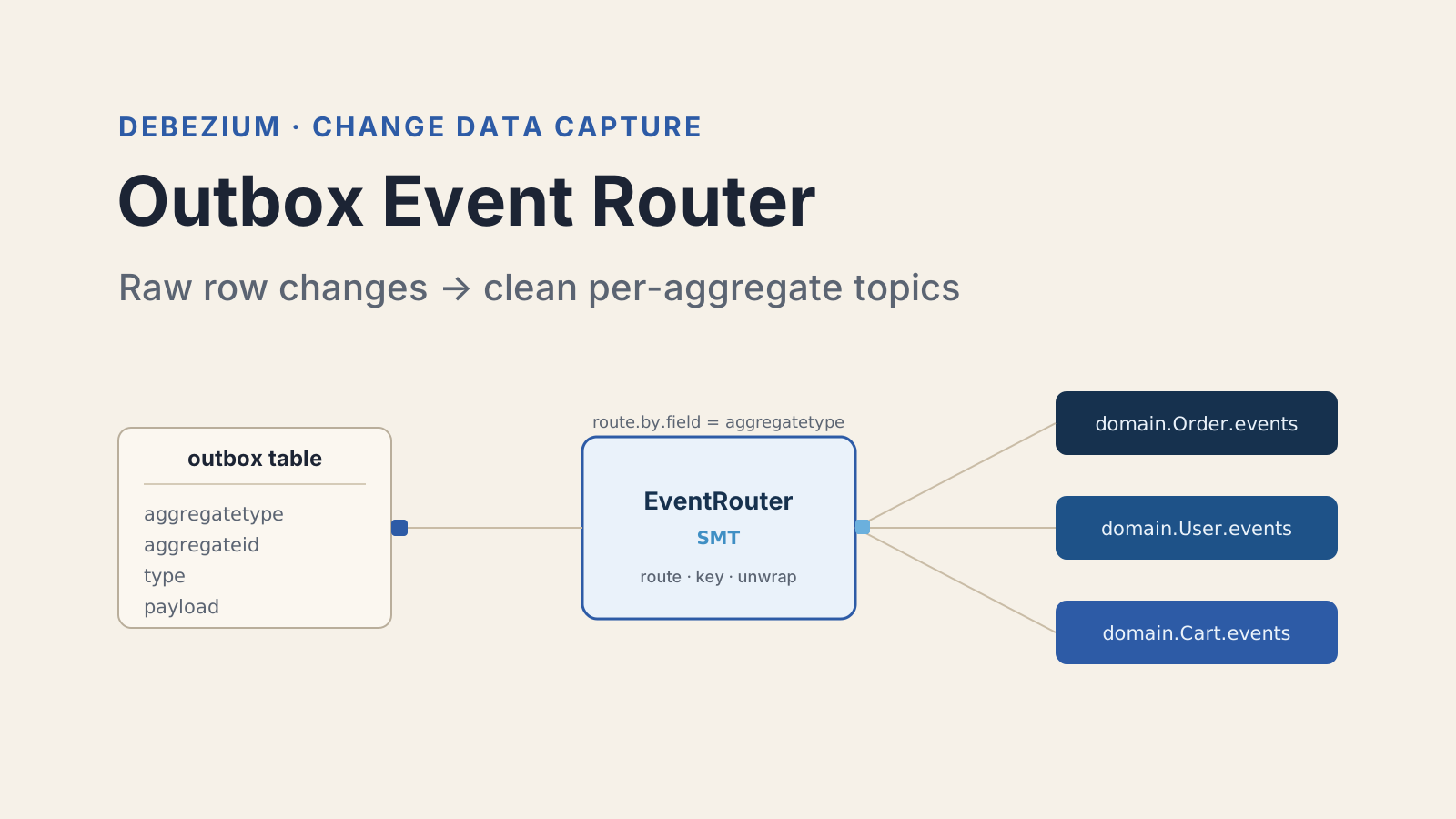

The outbox pattern gets you a table full of events written in the same transaction as your business data. That solves the dual-write problem. But a Debezium connector pointed at that table emits raw row-change events, envelopes and all, on a single ugly topic. Nobody wants to consume that.
The piece that turns those raw row changes into clean, per-aggregate domain messages is the Outbox Event Router SMT. It is the single most useful transform Debezium ships, and it is also the one people misconfigure the most. This guide is the config reference I wish I had the first time I wired it up. If you need the pattern itself first (why the outbox table exists, how the transaction works), read my walkthrough of implementing the outbox pattern with CDC and come back here for the routing details.
What does the Debezium Outbox Event Router actually do?
The Debezium Outbox Event Router is a single message transform, class io.debezium.transforms.outbox.EventRouter, that reshapes raw outbox-table change events into clean messages on per-aggregate topics. It runs inside the Kafka Connect pipeline, after Debezium captures the insert and before the record hits Kafka.
Think of it as three jobs stacked together. It picks the destination topic from a column in the row. It sets the Kafka message key from another column. And it unwraps the event so the payload column becomes the message value instead of a nested change-event envelope.
By default it assumes your outbox table has these columns:
| Column | Purpose | Default type |
|---|---|---|
id | unique event id, used for dedup | uuid |
aggregatetype | drives the topic name | varchar |
aggregateid | becomes the Kafka message key | varchar |
type | the event type (OrderCreated, etc.) | varchar |
payload | the actual event body | json / jsonb |
You are not locked into those names. Every one of them is remappable. But if you control the table schema, matching the defaults means less config to get wrong.
How do you add the EventRouter SMT to a connector?
You add it as a named transform in the connector config, then set the transform type to the EventRouter class. Everything else is options prefixed with that transform name.
Here is the minimum viable version on a Postgres connector, assuming default column names:
{
  "transforms": "outbox",
  "transforms.outbox.type": "io.debezium.transforms.outbox.EventRouter",
  "table.include.list": "public.outbox"
}That is genuinely all you need to start. With no other options, the SMT reads aggregatetype, routes to outbox.event.<aggregatetype>, keys the message by aggregateid, and uses payload as the value. The table.include.list is not part of the SMT, but you want it: without scoping the connector to the outbox table, Debezium captures every table in the schema and the transform errors on rows that do not look like outbox events.
One thing that bites people immediately. The EventRouter expects to see the row that was inserted, so it needs the new-record state. If you are also chaining ExtractNewRecordState, order matters. Put the outbox transform first, because it already handles the unwrap itself. Stacking a second flattening transform in front of it usually strips the envelope fields the router needs.
How do you route events to per-aggregate topics?
Routing is controlled by three options that work as a small pipeline: read a field, match it with a regex, substitute it into a template. The defaults route by aggregate type into a predictable topic name.
route.by.field(defaultaggregatetype): the column whose value drives the topic name.route.topic.regex(default(?<routedByValue>.*)): a regex with a named capture group that pulls the routing value out.route.topic.replacement(defaultoutbox.event.${routedByValue}): the topic name template. The capture group name is substituted in.
So a row with aggregatetype = Order lands on outbox.event.Order. If you want a flatter naming scheme, override the replacement:
{
  "transforms.outbox.route.by.field": "aggregatetype",
  "transforms.outbox.route.topic.replacement": "domain.${routedByValue}.events"
}Now Order goes to domain.Order.events. The regex is worth knowing about for one real case: if your aggregate type values carry a prefix you do not want in the topic name, capture only the part you want. A route.topic.regex of svc_(?<routedByValue>.*) turns svc_Order into a routing value of Order.
The message key is set separately through table.field.event.key (default aggregateid). This is the part that keeps per-entity ordering intact. Every event for the same order carries the same key, so Kafka lands them on the same partition and consumers see them in write order. If you leave the key column empty, you lose that guarantee, so treat aggregateid as required, not optional.
How do you add metadata as Kafka headers or envelope fields?
You expose extra columns with table.fields.additional.placement, which takes a comma-separated list of column:placement:alias entries. The placement is either header or envelope, and that choice changes where consumers read the value.
Say your outbox table has an eventtype column and a tracecontext column you want to propagate. You want the event type inside the message value and the trace context as a Kafka header:
{
  "transforms.outbox.table.fields.additional.placement":
    "type:envelope:eventType,tracecontext:header:traceparent"
}Two rules I learned the hard way. header puts the value on the Kafka record header, which is perfect for cross-cutting metadata like trace ids that infrastructure reads without deserializing the body. envelope folds the value into the message value alongside the payload, which is what you want for domain fields a consumer actually maps into an object. Pick header for plumbing, envelope for data.
The alias (the third part) is the name the field or header gets on the output side. It is optional, but I always set it. Relying on the raw column name leaks your database schema into your event contract, and renaming the column later silently breaks every consumer.
How do you expand the JSON payload and handle deletes?
Two options handle the payload shape and the delete case: table.expand.json.payload and route.tombstone.on.empty.payload. Both default to false, and both are safe to leave off until you need them.
By default the payload column is passed through as-is. If you stored it as a JSON string, consumers receive a string and have to parse it themselves. Turn on expansion to get a real structured record:
{
  "transforms.outbox.table.expand.json.payload": "true"
}With that set, the SMT parses the payload into a proper Kafka Connect struct, so downstream schemas and converters see typed fields instead of one big string. The catch is that it only works when the payload is valid JSON. Malformed content makes the transform fail the record, so this pairs best with a jsonb column that the database already validates on write.
Deletes are the other edge. The outbox table is usually append-only, so you rarely delete rows. But if you do (say a cleanup job prunes old events), Debezium emits a delete change event. Turn on route.tombstone.on.empty.payload to convert those into proper Kafka tombstone records (a null value on the aggregate key), which is what log-compacted topics expect for key removal. If your outbox topics are not compacted, leave it off.
What does a complete connector configuration look like?
Here is a full Postgres connector config with the Event Router doing real work: custom routing, header metadata, JSON expansion, and message keying. This is close to what I have shipped in production.
{
  "name": "outbox-connector",
  "config": {
    "connector.class": "io.debezium.connector.postgresql.PostgresConnector",
    "database.hostname": "postgres",
    "database.port": "5432",
    "database.user": "debezium",
    "database.dbname": "orders",
    "topic.prefix": "orders-svc",
    "table.include.list": "public.outbox",
    "tombstones.on.delete": "false",
    "transforms": "outbox",
    "transforms.outbox.type": "io.debezium.transforms.outbox.EventRouter",
    "transforms.outbox.route.by.field": "aggregatetype",
    "transforms.outbox.route.topic.replacement": "domain.${routedByValue}.events",
    "transforms.outbox.table.field.event.key": "aggregateid",
    "transforms.outbox.table.field.event.payload": "payload",
    "transforms.outbox.table.expand.json.payload": "true",
    "transforms.outbox.table.fields.additional.placement":
      "type:envelope:eventType,tracecontext:header:traceparent"
  }
}To verify it works, insert a row and watch the topic. A row with aggregatetype = Order and aggregateid = 42 should produce a message on domain.Order.events, keyed by 42, with the payload expanded into structured fields and a traceparent header attached. If the message lands on outbox.event.Order instead, your route.topic.replacement override is not being picked up, usually because the transform name in the property key does not match the one in the transforms list.
What are the common pitfalls with the Event Router?
Most Event Router problems trace back to a schema mismatch between the table and the config. Here are the ones I hit most, in rough order of how often they cost me an afternoon.
The connector captures more than the outbox table. Always set table.include.list to just the outbox table. Otherwise the transform sees regular business-table changes and throws because they lack aggregatetype.
The message key is null. Check that table.field.event.key points at a populated column. A null key destroys per-aggregate ordering, and it is easy to miss because messages still flow.
JSON expansion fails silently on bad data. If table.expand.json.payload is on and one row has a malformed payload, that record errors and can stall the connector. Validate at write time with a jsonb column, and consider a dead-letter queue on the connector.
Transform ordering with ExtractNewRecordState. The Event Router already unwraps the change event. Chaining a second flatten transform in front of it strips the fields it needs. If you must combine them, the outbox transform goes first.
Topic auto-creation is off. Per-aggregate routing means new aggregate types create new topics. If your broker disables auto topic creation, a brand new aggregate type produces messages that go nowhere until you create the topic. Pre-create them or enable Kafka Connect topic creation.
The Event Router is a small transform with a big payoff. Once the config matches your table, it disappears into the background and just produces clean domain events forever. The mistake I see teams make is treating it as an afterthought bolted onto the connector at the end. Design your outbox table columns around the router's defaults from day one, and the config shrinks to almost nothing.
For the full option list and version-specific behavior, see the Debezium Outbox Event Router documentation and the Debezium outbox quickstart on GitHub.
Keep Reading
- How to Implement the Outbox Pattern with CDC in Microservices. Start here for why the outbox table exists and how the transactional write works before you configure the router.
- Zero Trust Microservices with Spring Security. Once your services talk over Kafka topics, this covers securing the service-to-service boundary.