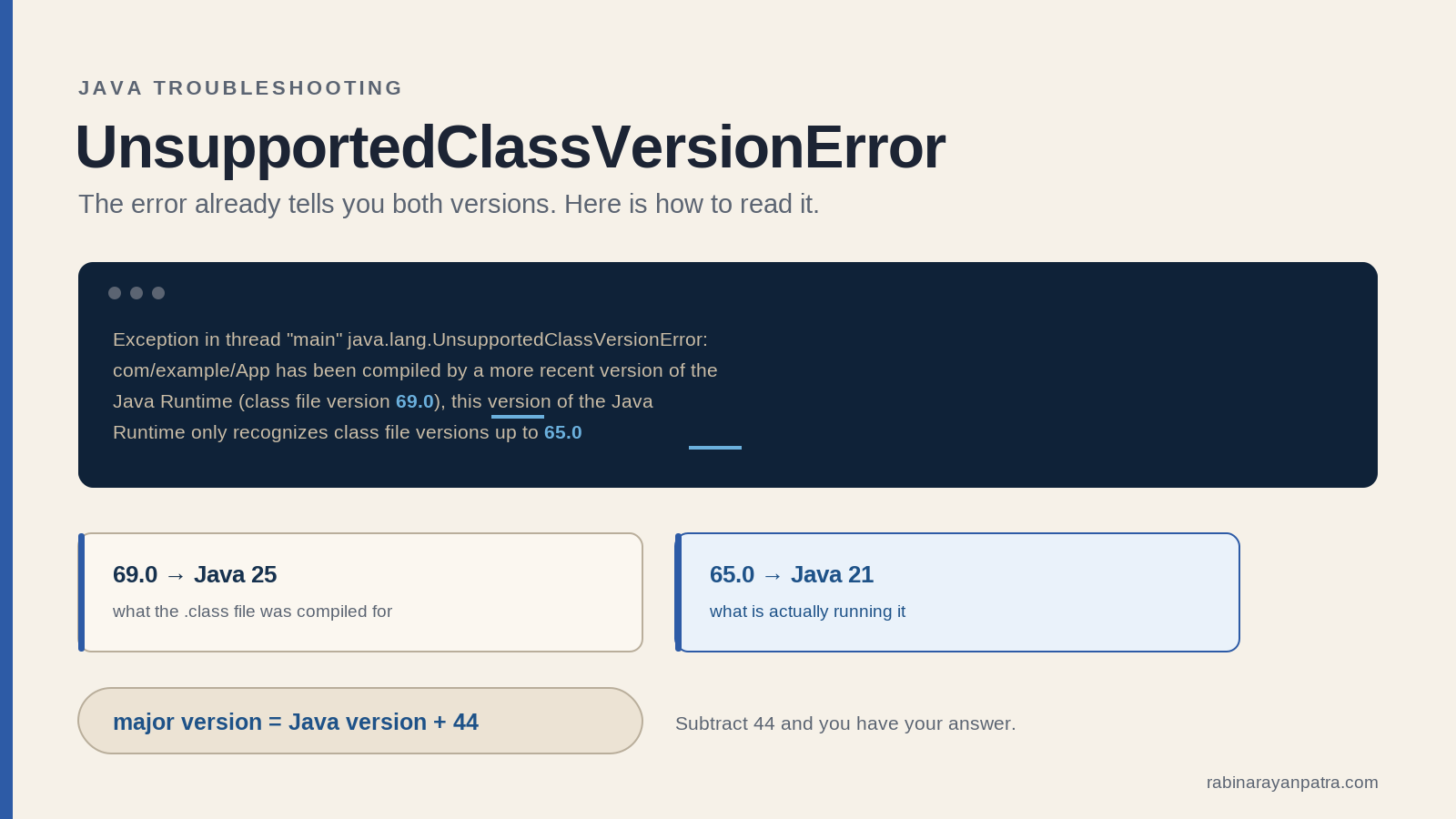

UnsupportedClassVersionError is one of those errors that looks cryptic for about ninety seconds, and then never confuses you again. The message contains both numbers you need. Nobody ever explains which is which.
I hit it again last month on a CI pipeline that had worked for a year, and spent longer than I want to admit editing the wrong setting. So this is the version of the answer I wanted at the time: how to decode the message, the full version table, the eight places the mismatch comes from, and why it sometimes comes back after you have "fixed" it.
What does UnsupportedClassVersionError actually mean?
It means the JVM loaded a .class file compiled for a newer Java version than that JVM supports. Java bytecode is backward compatible but not forward compatible: a Java 25 JVM happily runs class files from Java 8, but a Java 21 JVM cannot run anything compiled for Java 25.
Every .class file starts with the magic number 0xCAFEBABE followed by a minor and a major version. The JVM reads that header before it reads a single instruction, which is why this fails at class load time rather than when you call the method.
Here is the full message, which is more helpful than its reputation suggests:
Exception in thread "main" java.lang.UnsupportedClassVersionError:
com/example/App has been compiled by a more recent version of the
Java Runtime (class file version 69.0), this version of the Java
Runtime only recognizes class file versions up to 65.0Two numbers, two meanings:
class file version 69.0is what your code was compiled for.recognizes class file versions up to 65.0is what is trying to run it.
The fix is always to make those two agree. Everything below is about which one to move.
How do you decode the class file version numbers?
Subtract 44. The major version equals the Java feature version plus 44, and that relationship has held since Java 1.1 without exception.
So 69.0 is Java 25, 65.0 is Java 21, and the message above says: compiled with Java 25, running on Java 21.
Here is the table for everything you are realistically going to meet:
| Java version | Class file major version | Released |
|---|---|---|
| Java 8 | 52.0 | 2014 |
| Java 11 | 55.0 | 2018 |
| Java 17 | 61.0 | 2021 |
| Java 21 | 65.0 | 2023 |
| Java 22 | 66.0 | 2024 |
| Java 23 | 67.0 | 2024 |
| Java 24 | 68.0 | 2025 |
| Java 25 | 69.0 | 2025 |
| Java 26 | 70.0 | 2026 |
| Java 27 | 71.0 | 2026 |
| Java 28 | 72.0 | in development |
The three you will actually see in error messages are 52.0, 61.0, and 65.0, because Java 8, 17, and 21 are where most production estates sit. The ones causing new errors right now are 69.0 and 71.0, as build agents pick up Java 25 and 27 while deployment targets lag behind.
How do you find which Java version compiled a class file?
Use javap -verbose and read the major version line. It works on any class file, including ones inside a JAR you did not build.
javap -verbose -cp app.jar com.example.App | grep -E "major|minor" minor version: 0
major version: 69If you only have a loose class file:
javap -verbose App.class | head -5For a quick scan of a whole JAR without unpacking it, check the runtime side first and compare:
java -versionopenjdk version "21.0.5" 2024-10-15 LTSJava 21 accepts up to 65.0. The JAR wants 69.0. There is your mismatch, confirmed from both directions in two commands.
One more useful check when you suspect a single dependency rather than your own code. The class named in the error message is the one that failed, and it is often not yours:
com/fasterxml/jackson/databind/ObjectMapper has been compiled by a
more recent version of the Java Runtime (class file version 69.0)...That means a library shipped Java 25 bytecode into a project you are running on 21. Your build target is fine. The dependency's is not, and you either downgrade the dependency or raise your runtime.
How do you fix it by raising the runtime?
Change the JVM that runs the code so it is at least as new as the version that compiled it. This is the right answer in most cases because Java is backward compatible, so nothing in your source has to change.
Where you make the change depends on what launches the JVM.
Docker. The base image tag is by far the most common cause I see. The build stage and the runtime stage drift apart:
# Build with 25...
FROM eclipse-temurin:25-jdk AS build
COPY . /src
WORKDIR /src
RUN ./mvnw -B package -DskipTests

# ...and then run it on 21. This is the bug.
FROM eclipse-temurin:21-jre
COPY --from=build /src/target/app.jar /app.jar
ENTRYPOINT ["java", "-jar", "/app.jar"]The fix is one character short of trivial, and it is the line people never look at because the build succeeded:
FROM eclipse-temurin:25-jreLocal machine. Point JAVA_HOME at the newer JDK. On macOS:
export JAVA_HOME=$(/usr/libexec/java_home -v 25)
java -versionGitHub Actions. Check every setup-java step, not just the first one. Build and test jobs often pin different versions, and the failure only shows up in whichever one runs the artifact:
- uses: actions/setup-java@v5
  with:
    distribution: temurin
java-version: '25'How do you fix it by lowering the compile target?
Set the compiler to emit bytecode for the older runtime. Reach for this only when you genuinely cannot move the runtime, because it is the more invasive of the two options.
Maven. Use <release>, not <source> and <target>:
<properties>
  <maven.compiler.release>21</maven.compiler.release>
</properties><release> is the one that matters. <source> and <target> set the language level and bytecode level but still compile against the current JDK's API, so you can build successfully against a Java 25 java.base and then get a NoSuchMethodError at runtime on 21. <release> pins the API too. If you have inherited a build using <source> and <target>, replacing them with <release> is worth doing regardless of this error.
Gradle. Use a toolchain, which pins the whole JDK rather than just the output level:
java {
    toolchain {
        languageVersion = JavaLanguageVersion.of(21)
    }
}The toolchain wins over whatever JAVA_HOME says, which is usually what you want and occasionally the reason your local build disagrees with CI.
The catch: lowering the target fails outright if your code uses newer language features. Records, pattern matching for switch, or anything else past the target level will stop compiling, and at that point you are back to raising the runtime whether you wanted to or not.
Also remember it applies to everything you own. Lowering your application's target does nothing if an internal shared library in the same repo still emits 69.0.
Why does the error come back after you think you fixed it?
Because there are eight places that set these two numbers, and you almost certainly changed a different one than the one that mattered.
The compile side is set by the maven-compiler-plugin release, the Gradle toolchain, your IDE's project SDK, and whichever setup-java step runs the build. The runtime side is set by JAVA_HOME, the Docker base image tag, the app server or platform JRE, and whichever setup-java step runs the artifact.
Two of these are worth calling out because they are silent:
Your IDE does not read your build file for this. IntelliJ and Eclipse keep their own project SDK and language level. You can have <release>21</release> in the POM and an IDE compiling to 69.0 into target/classes, which then gets picked up by a run configuration. The build is correct. The thing you ran was not the build.
The Gradle toolchain overrides JAVA_HOME. Developers who set JAVA_HOME to fix this locally are surprised when nothing changes. The toolchain is deliberately hermetic, which is a good property that happens to make this specific debugging session confusing.
When the error survives a fix, verify empirically rather than by reading config. Rebuild clean, then run javap -verbose on the actual artifact you are about to deploy. The bytes in the file are the only source of truth. Every config file is a claim about what those bytes should be.
What if the minor version is 65535?
Then the class file was compiled with preview features enabled, and normal version arithmetic does not save you. A class file with minor version 65535 loads only on the exact same JDK feature release that produced it.
This is deliberate. Preview features are not stable across releases, so the JVM refuses to load them anywhere else. The important consequence: upgrading the runtime does not fix it if you overshoot. A class file compiled with --enable-preview on Java 25 fails on Java 21 and equally on Java 27.
  minor version: 65535
major version: 69If you see that pairing, check for --enable-preview in your compiler args and --enable-preview in your launch args. Either recompile without preview features, or pin both build and runtime to the identical feature release and accept that every JDK upgrade is now a coordinated one. For anything you ship to other people, recompile without them.
Is this error ever worth designing around?
Mostly no, but there is one habit that prevents nearly all of it: pin the Java version in exactly one place and derive everything else from it.
A single .java-version file, or one property in the parent POM, referenced by the Dockerfile, the CI matrix, and the toolchain block. The eight settings do not go away, but they stop being able to disagree independently. Most teams I have seen hit this repeatedly are teams where the version is typed out as a literal in four different files, and someone updated three of them.
What still strikes me about this error is that it is one of the few in Java that tells you the complete answer in the message and still gets misread constantly. Not because the message is bad, but because nothing labels which number is which side. Two words in the JVM's output would have retired a decade of forum threads.
For the specification details, see the JVM specification on the class file format, the ClassFile API javadoc, and the class file version table on Java Almanac.
Keep Reading
- How to Migrate Micronaut 4 to Micronaut 5 with JDK 25. A real JDK 25 migration, where this error is a step rather than a surprise.
- Java 25 Virtual Threads: A Practical Guide. One of the reasons teams are moving runtimes forward in the first place.
- Java 25 Performance: How Compact Object Headers Save 20% Memory. Another argument for raising the runtime instead of lowering the target.