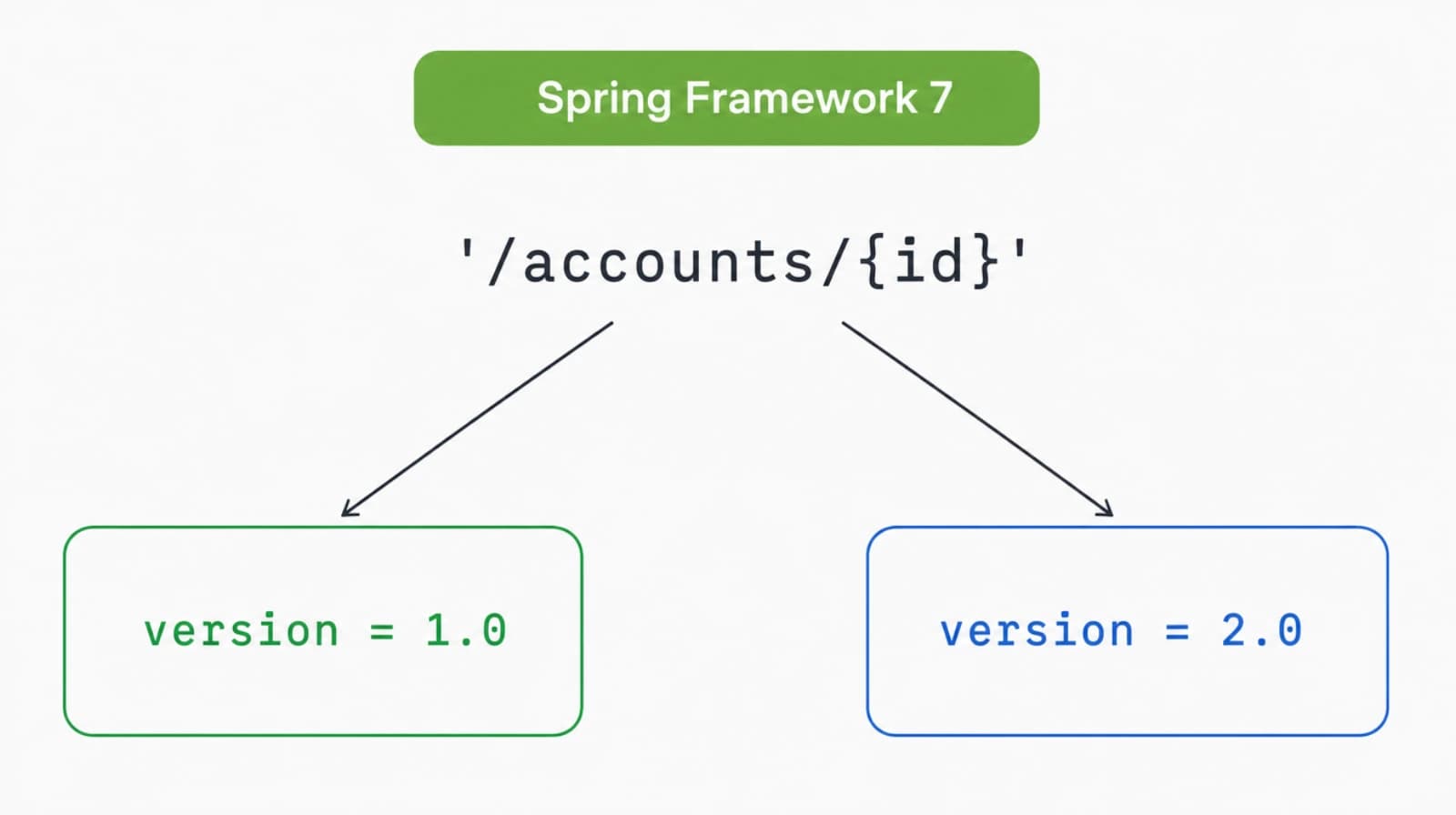

For years, versioning a Spring REST API meant picking your own poison. Custom interceptors, duplicate controllers, or a pile of headers= conditions on every mapping. Spring Framework 7, the core of Spring Boot 4, ends that. Versioning is now a first-class feature baked into request mapping.
I rebuilt a multi-version API on Spring Boot 4 last month and deleted about 300 lines of routing glue in the process. This guide is the playbook I wish I'd had: every strategy, real controller code, a curl trace per approach, and the deprecation headers that tell clients when to move on.
What changed for API versioning in Spring Framework 7?
Spring Framework 7 added a version attribute to @RequestMapping and every shortcut variant, so one path can fan out to multiple handlers by version. Before this, request mapping had no concept of a version at all. You bolted versioning on from the outside with interceptors or separate controller classes per release.
The new model has three moving parts. A resolver pulls the version out of the request. A parser turns that raw string into a comparable semantic version. A strategy matches it against the version declared on each mapping and picks the closest handler. All three are configurable, and the defaults cover the common cases.
Here's the smallest possible example. Same path, two versions, two methods:
@RestController
@RequestMapping("/accounts")
public class AccountController {

    @GetMapping(path = "/{id}", version = "1.0")
    public AccountV1 getAccountV1(@PathVariable Long id) {
        return accountService.findV1(id);
    }

    @GetMapping(path = "/{id}", version = "2.0")
    public AccountV2 getAccountV2(@PathVariable Long id) {
        return accountService.findV2(id);
    }
}A request for version 1.0 hits the first method. A request for 2.0 hits the second. No if checks, no manual parsing, no shared dispatcher method. The version is part of the mapping, exactly like the path and the HTTP method.
How do you turn on API versioning in Spring Boot 4?
You turn on versioning by implementing WebMvcConfigurer and overriding configureApiVersioning, which hands you an ApiVersionConfigurer. Nothing routes by version until you declare which resolver to use. The version attribute on a mapping is inert without a configured strategy.
@Configuration
public class ApiVersioningConfig implements WebMvcConfigurer {

    @Override
    public void configureApiVersioning(ApiVersionConfigurer configurer) {
        configurer.useRequestHeader("X-API-Version")
                  .addSupportedVersions("1.0", "2.0");
    }
}That's the entire wiring for header-based versioning. useRequestHeader names the header to read. addSupportedVersions declares the versions you accept, which lets Spring reject anything unknown with a clean 400 instead of a confusing 404.
If you'd rather stay in properties, Spring Boot 4 exposes the same switch:
spring.mvc.apiversion.use.header=X-API-VersionBy default a version is required. A request with no version triggers MissingApiVersionException and a 400 response. An unsupported version triggers InvalidApiVersionException, also a 400. You can relax both, and I'll cover that under pitfalls, because the default trips up first-time users.
How does the version attribute route requests?
The version attribute routes a request by comparing the resolved request version against the version declared on each candidate mapping, then choosing the best match. Spring parses both sides with SemanticApiVersionParser, which reads major.minor.patch and fills missing parts with zero. So "1" becomes 1.0.0 and "1.2" becomes 1.2.0.
Matching is not a naive string equality. If a request asks for 1.5 and your handlers declare 1.0 and 2.0, the request resolves to the highest version less than or equal to 1.5, which is 1.0. That single rule is what makes baseline versioning work, and it's why you don't need a handler for every point release.
The flow is the same no matter which strategy you choose. Only the first box, the resolver, changes. Pick where the version lives in the request and the rest of the pipeline stays identical.
Which versioning strategy should you pick?
Spring Framework 7 ships four resolver strategies, and you choose one with a single method on ApiVersionConfigurer. Each reads the version from a different place in the request. The handler code never changes. Only the config line and the way clients call you differ.
Request header
Header versioning keeps the URL clean and puts the version in a custom header. This is my default for service-to-service APIs.
configurer.useRequestHeader("X-API-Version")
.addSupportedVersions("1.0", "2.0");curl -H "X-API-Version: 2.0" http://localhost:8080/accounts/42Path segment
Path-segment versioning puts the version directly in the URL, which makes it visible, bookmarkable, and easy to route at a proxy. You declare which segment holds the version by index and add a URI variable for it in the mapping.
configurer.usePathSegment(1)
.addSupportedVersions("1.0", "2.0");@GetMapping(path = "/api/{version}/accounts/{id}", version = "2.0")
public AccountV2 getAccount(@PathVariable Long id) {
return accountService.findV2(id);
}curl http://localhost:8080/api/2.0/accounts/42Segment index is zero-based against the path. In /api/2.0/accounts/42 the segments are api, 2.0, accounts, 42, so the version sits at index 1.
Query parameter
Query-parameter versioning reads the version from the query string. It's trivial to test in a browser and trivial to forget in a cache key, so weigh that tradeoff.
configurer.useQueryParam("version")
.addSupportedVersions("1.0", "2.0");curl "http://localhost:8080/accounts/42?version=2.0"Media type
Media-type versioning reads a parameter off the Accept header, which is the most REST-purist option and the hardest for casual clients to send.
configurer.useMediaTypeParameter(MediaType.APPLICATION_JSON, "version")
.addSupportedVersions("1.0", "2.0");curl -H "Accept: application/json;version=2.0" http://localhost:8080/accounts/42My rule of thumb: header for internal APIs, path segment for public APIs where humans read the URLs, and skip query and media type unless you have a specific reason. The worst choice is no choice, where different endpoints use different strategies and clients can't predict which one applies.
What's the difference between fixed and baseline versions?
A fixed version matches one exact version, while a baseline version matches that version and everything above it until a higher handler takes over. You write a fixed version as "1.2" and a baseline version with a trailing plus, "1.2+". The difference is how many releases a single handler is responsible for.
Picture an endpoint that hasn't changed since 1.0 and another that got a new shape in 2.0:
@RestController
@RequestMapping("/accounts")
public class AccountController {

    @GetMapping(path = "/{id}", version = "1.0+")
    public AccountV1 getAccount(@PathVariable Long id) {
        return accountService.findV1(id);
    }

    @PostMapping(version = "2.0+")
    public AccountV2 createAccount(@RequestBody CreateAccount body) {
        return accountService.createV2(body);
    }
}The GET handler answers 1.0, 1.5, 1.9, and anything up to the next declared version. The POST handler owns 2.0 and up. You only write a new method when the contract actually changes, not on every version bump. That's the whole point of baseline matching, and it's why a real API with ten releases might have three or four handlers per route instead of ten.
Fixed versions still matter. Use them when a single release introduced a breaking change you want pinned to one exact handler, so a typo in a client's version string fails loudly instead of silently falling through to an older shape.
How do you deprecate an API version with Sunset headers?
You deprecate a version by registering a StandardApiVersionDeprecationHandler and configuring a deprecation date, a sunset date, and a migration link per version. Spring then attaches three response headers to every matching request: Deprecation from RFC 9745, Sunset from RFC 8594, and a Link pointing at your migration docs. Clients that watch for these headers learn a version is going away without reading your changelog.
@Configuration
public class ApiVersioningConfig implements WebMvcConfigurer {

    @Override
    public void configureApiVersioning(ApiVersionConfigurer configurer) {
        StandardApiVersionDeprecationHandler handler =
                new StandardApiVersionDeprecationHandler();

        handler.configureVersion("1.0")
               .setDeprecationDate(ZonedDateTime.parse("2026-06-01T00:00:00Z"))
               .setSunsetDate(ZonedDateTime.parse("2026-12-01T00:00:00Z"))
               .setSunsetLink(URI.create("https://api.example.com/docs/migrate-to-2.0"));

        configurer.useRequestHeader("X-API-Version")
                  .addSupportedVersions("1.0", "2.0")
                  .setDeprecationHandler(handler);
    }
}Now a call to the deprecated version carries the warning in its response:
curl -i -H "X-API-Version: 1.0" http://localhost:8080/accounts/42HTTP/1.1 200 OK
Deprecation: Mon, 01 Jun 2026 00:00:00 GMT
Sunset: Tue, 01 Dec 2026 00:00:00 GMT
Link: <https://api.example.com/docs/migrate-to-2.0>; rel="sunset"
Content-Type: application/jsonThe version still works. Deprecation is a signal, not a shutdown. When the sunset date passes and you're confident traffic has moved, you drop the 1.0 handler and remove "1.0" from the supported versions. Clients that ignored the headers get a clean 400, and you have the access logs to prove you warned them.
How was this done before Spring 7?
Before Spring 7 you versioned by hand, and every approach had a sharp edge. The most common pattern was duplicate controllers, one class per version, wired to different base paths:
@RestController
@RequestMapping("/v1/accounts")
public class AccountControllerV1 { /* ... */ }

@RestController
@RequestMapping("/v2/accounts")
public class AccountControllerV2 { /* ... */ }That works until you have twenty endpoints across four versions and a bug fix has to land in three of them. The other common hack abused the headers condition on a mapping:
@GetMapping(path = "/accounts/{id}", headers = "X-API-Version=1")
public AccountV1 getV1(@PathVariable Long id) { /* ... */ }String equality only. No 1.0 versus 1 normalization, no baseline ranges, no 1.5 falling back to 1.0. You hand-rolled every comparison. Teams that wanted real semantics wrote a custom HandlerInterceptor to parse and validate versions, then threaded the result through ThreadLocal or request attributes. It was a lot of code to maintain, and it lived nowhere near the mappings it controlled.
The built-in approach wins on every axis I care about. Versioning lives on the mapping where you can see it, comparison is semantic, baseline matching cuts handler count, and deprecation headers come free. The 300 lines I deleted were exactly this kind of glue.
What pitfalls should you watch for?
The first pitfall is the required-version default, which surprises everyone. A request with no version returns a 400, not your newest handler. If you want missing versions to fall back instead of failing, set a default and mark versions optional:
configurer.useRequestHeader("X-API-Version")
          .addSupportedVersions("1.0", "2.0")
          .setVersionRequired(false)
.setDefaultVersion("2.0");With setVersionRequired(false) and no default, Spring falls back to the most recent supported version, which may not be what you want during a migration. Always pair optional versions with an explicit setDefaultVersion so the fallback is a decision, not an accident.
The second pitfall is supported-version detection. By default Spring initializes the supported set from the versions it finds on your controller mappings, so a typo like version = "20" silently becomes a supported version. If you want a locked allowlist, call detectSupportedVersions(false) and declare every version with addSupportedVersions yourself. I do this on public APIs so nothing ships a version by accident.
The third pitfall is OpenAPI tooling. As of mid-2026, springdoc support for the new version attribute is still catching up, so two handlers on the same path can confuse schema generation. Until your springdoc version understands the version dimension, group your docs per version or document the version header manually in your OpenAPI config. Test your generated spec before you assume it rendered both versions.
The last one is strategy drift. Once you pick a resolver, every endpoint must use it. A header-versioned API with one path-versioned endpoint will route inconsistently and break client SDKs that assume one scheme. Decide the strategy at the start of the project and enforce it in review.
Is built-in versioning worth migrating to?
Yes, and it changes how you think about API evolution, not just how you wire it. When adding a version is one attribute and one method, you stop dreading breaking changes and start shipping them cleanly, because the cost of carrying an old contract next to a new one dropped to almost nothing. That's the real shift in Spring Framework 7. The mechanics are simple. The freedom they buy is the point.
Start with header versioning and a required version on a single endpoint. Add a 2.0 handler with a baseline range. Wire a deprecation handler with a sunset date six months out. Once that loop feels natural, you'll version everything this way and wonder how you tolerated the interceptor era.
For the authoritative details, read the official Spring blog announcement on API versioning and the Spring Framework reference on MVC API versioning. For the header semantics, see RFC 9745 (Deprecation) and RFC 8594 (Sunset).
Keep Reading
- How to Configure CORS in Spring Boot. Get cross-origin headers right before you expose a versioned API.
- How to Test Spring Boot with Testcontainers. Write integration tests that exercise each API version against a real database.
- Spring Security's Component Revolution. Secure the versioned endpoints you just built.
- Modern Java with Spring Boot. The language features that make Spring Boot 4 controllers cleaner.