
In my previous org, we were a few days from a launch deadline when staging started falling over under load tests. I spent the first few hours convinced it was bad SQL. I combed through slow query logs, rolled back two recent migrations, and came up empty. The QA team kept pinging me, the PM kept asking for an ETA, and I had no answer.
Turned out it was one line in a YAML file. Connection pool size set to 500 on a 4-core Postgres box.
That is the kind of config that looks sensible until you do the math. Hibernate's Hikari pool default is 10. We had bumped it to 500 because someone had read a Stack Overflow answer about "scaling Postgres" and wanted headroom. Multiply that across ten app pods and you are not running a database anymore, you are running a fork bomb. Postgres forks a process per connection, each one eating around 10 MB of RAM, and they all fight for the same four CPU cores. Throughput collapsed long before we hit any real query bottleneck.
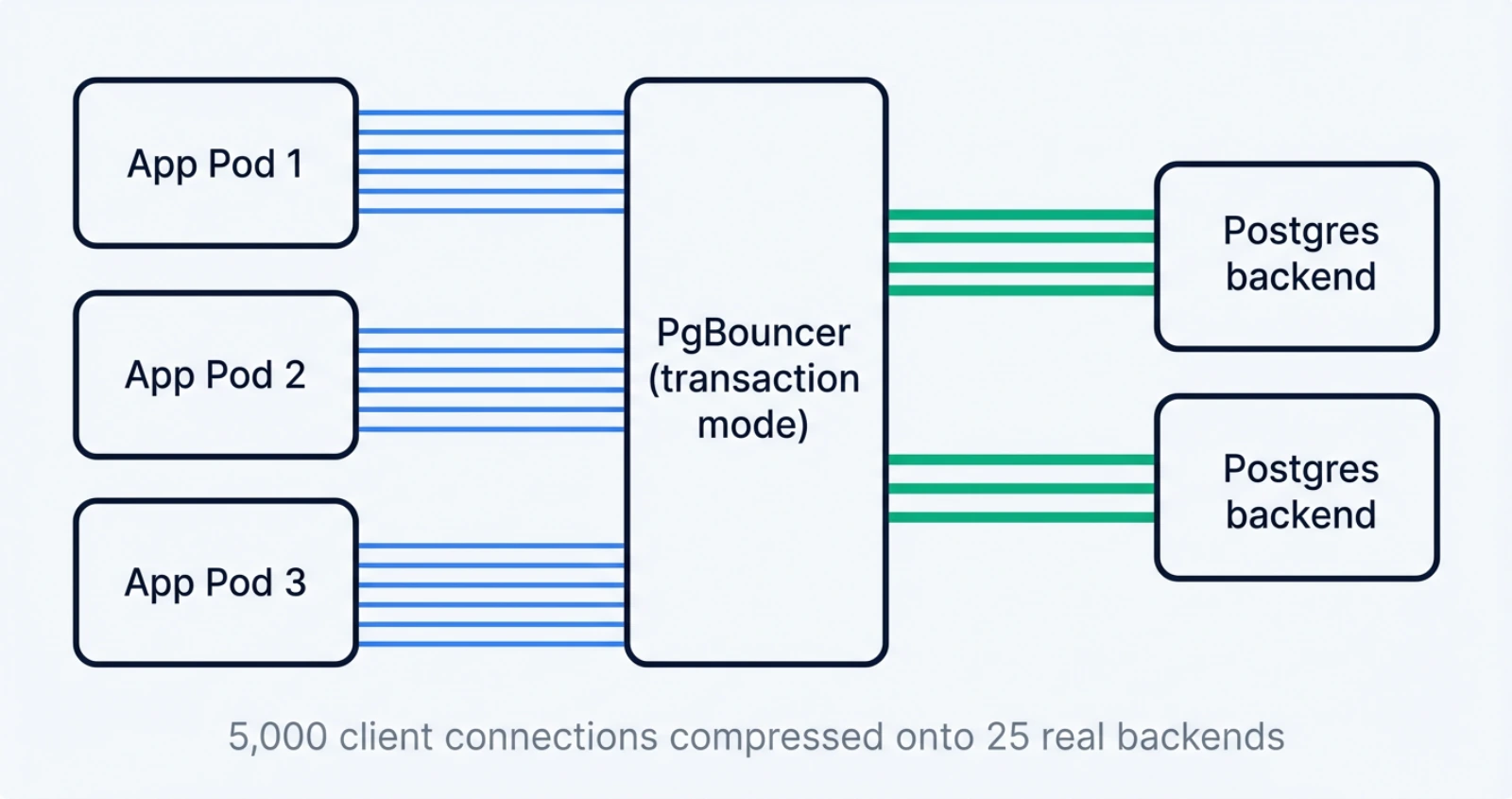
The fix that saved that launch was PgBouncer in transaction pooling mode. Five thousand app connections multiplexed onto 25 real Postgres connections. Same throughput. A fraction of the load. We shipped on time, and I spent the next month writing internal docs so the next person would not learn this the hard way.
This post is the long version of those docs. Pool size is the one config that quietly decides if your service survives production traffic, and it is one of the most consistently misconfigured knobs I see in code reviews. I will walk through why Postgres has hard limits, how to size your pool from first principles, what PgBouncer actually does, the sharp edges in transaction mode that will bite you, a config snippet you can copy, and when to reach for something beyond PgBouncer.
Why does Postgres choke on too many connections?
Postgres choke on too many connections because every connection is a full operating-system process, and processes are not free. The supervisor (postmaster) calls fork() for each new client, and the child becomes a backend that accumulates its own private state: relation cache, plan cache, prepared statement cache, work_mem allocations, temp buffers, and page table entries. Linux copy-on-write makes the initial fork cheap, but the steady-state cost is real and it scales linearly with connection count.
The popular "10 MB per connection" figure is a Heroku-style rule of thumb, not a constant. Andres Freund, a Postgres committer, did the careful measurement in 2020 and found a wider range. An idle connection without huge_pages shows around 16 MiB RSS, but the true Proportional Set Size overhead is closer to 7.6 MiB. With huge_pages=on, the true overhead drops to about 1.3 MiB. AWS measured idle connections on RDS Postgres at about 1.5 MB, climbing to 10.8 MB after a single SELECT and 14.5 MB after a query that touches temp tables. The right way to think about it is "1 to 15 MB per connection depending on what the client just did and how the kernel is configured", not a flat number.
Memory is the easy part. The harder problem is CPU and snapshot scalability. Pre-Postgres-14, every transaction called GetSnapshotData() which scanned the entire process array. Andres Freund and the Citus team measured this with pgbench on Postgres 12. With one active connection and zero idle, they hit 33,457 TPS. Add 10,000 idle connections and the same workload dropped to 14,496 TPS, a 57% loss. CPU profiling showed half the time in GetSnapshotData(). Postgres 14 fixed most of this and roughly doubled throughput at high idle counts, but the overhead is still real, and plenty of teams are running on managed Postgres versions that are pinned to older majors.
There is one more multiplier that catches people off guard. The work_mem setting is per operation, not per connection. The official docs put it plainly: a complex query might run several sort and hash operations at the same time, with each one allowed to use work_mem before spilling to disk. The default is 4 MB, but a query with three hash joins on a single backend can pull 12 MB on its own. Multiply that by 500 backends doing real work and you understand why staging melted.
That is why max_connections defaults to 100. The Postgres wiki on Number Of Database Connections says it directly: you can often support more concurrent users by reducing the number of database connections and using some form of connection pooling. Raising max_connections is rarely the right move, because Postgres pre-allocates shared memory and other resources at startup based on it. You make every connection slower in exchange for being able to open more of them, which is the opposite of what you want.
How big should your Postgres connection pool actually be?
The answer is "much smaller than you think". The HikariCP wiki and the PostgreSQL wiki both cite the same formula:
connections = ((core_count * 2) + effective_spindle_count)This number originally came from Oracle's Real-World Performance group, who found that shrinking pool size dropped response time from around 100 ms to around 2 ms in their tests, roughly a 50x improvement. Brett Wooldridge, the author of HikariCP, distilled it into one line that I now repeat every chance I get: "You want a small pool, saturated with threads waiting for connections."
The "effective spindle count" part needs a 2026 translation. It used to mean the number of physical disks, because spinning rust let you do real parallel I/O while one disk was seeking. On modern storage the number is closer to zero. NVMe with a hot working set in the buffer cache is effectively zero spindles. Cloud-attached SSDs like AWS gp3, GCP pd-ssd, or Azure Premium SSD v2 behave like one or two spindles under bursty load. Cold scans on cheap storage (think gp2 with the burst budget exhausted) start to look more like the old spindle model where you can usefully overlap I/O wait with CPU work.
Let me work through my exact incident numbers because they make the math vivid. I had a 4-core Postgres box, ten app pods, and Hikari pool size set to 500 per pod. Theoretical maximum client connections from the app fleet: 10 pods times 500 connections, equals 5,000. Postgres max_connections was the default 100. Even if we had raised it to 500, we would have been ten times over. The HikariCP formula for that 4-core box with a hot dataset on NVMe gives (4 * 2) + 0 = 8 useful active backends across the entire fleet. That is less than one active backend per pod.
The fix was not "raise max_connections", it was the opposite. Each pod kept a small Hikari pool of 5 to 10 connections pointed at PgBouncer on port 6432. PgBouncer multiplexed those 5,000 client connection slots onto roughly 25 real Postgres backends. We did not lose throughput because the bottleneck was never the number of physical connections, it was the cost of having too many of them.
Little's Law is the math behind Wooldridge's axiom. L = lambda * W, where L is concurrent in-flight requests, lambda is arrival rate, and W is service time. If your database serves a query in 5 ms and you need 10,000 queries per second, you need 10,000 * 0.005 = 50 concurrent connections. Adding more does not increase throughput. It adds queueing inside Postgres (lock contention, context switching) which increases W, which increases required L, and you spiral into a queue that grows faster than it drains. Dan Slimmon has a nice write-up applying Little's Law to scaling decisions that I send to anyone who wants to argue with the formula.
Heroku publishes a useful operational rule of thumb. When their pooler connects to a Postgres instance, it can open up to 75% of the database plan's connection limit, leaving 25% for direct connections from the app and admin tools. That ratio is a sane default to copy. If max_connections is 100, set PgBouncer's max_db_connections to 75 or so, and reserve the rest for psql sessions and migration jobs.
What is PgBouncer and how does transaction mode work?
PgBouncer is a single-process, asynchronous, lightweight connection pooler that sits between your application and Postgres and pretends to be Postgres on its end. Your app talks to it on port 6432 (the convention) and it speaks the Postgres wire protocol back to a small number of real backends. The PgBouncer features doc claims around 2 KB of memory per client connection, which is what makes the math work: you can serve thousands of clients on a single core because each one is essentially just a small allocation and an epoll registration.
PgBouncer ships three pool modes. The verbatim definitions from pgbouncer.org/config.html are:
| Mode | When the backend is released back to the pool |
|---|---|
session | After the client disconnects (the default). |
transaction | After the transaction finishes (COMMIT or ROLLBACK). |
statement | After the query finishes. Multi-statement transactions are disallowed. |
Transaction mode is the sweet spot for almost every web or microservice workload. If your transactions are short (and they should be, you are not holding a transaction open across an HTTP request boundary, right?) then a single backend can serve many clients per second. With BEGIN to COMMIT lasting 5 ms and a 25-backend pool, you can handle on the order of 5,000 transactions per second on that pool, which is more than most apps will ever need.
Statement mode is too restrictive for anything that uses multi-statement transactions, which means it is too restrictive for anything that uses an ORM. Session mode gives you full Postgres compatibility but throws away the multiplexing benefit, so you might as well not use a pooler. Transaction mode is where the magic happens, and it is also where you have to know what you are doing, which is the next section.
Version compatibility matters more than people think. PgBouncer 1.21, released October 2023, added protocol-level prepared statement support to transaction mode. That single feature unblocked a huge class of applications that previously had to disable client-side prepared statements (with prepareThreshold=0 in JDBC, for example) to use a pooler. Version 1.24, January 2025, made prepared statement support default-on with max_prepared_statements = 200. The current stable as of April 2026 is 1.25.1, released December 2025, which fixes CVE-2025-12819 (an unauthenticated SQL execution via a malicious search_path in the StartupMessage) and a SCRAM auth regression. If you are running anything older than 1.25.1, upgrade.
PgBouncer is single-threaded by design. To use more than one CPU core on a busy host, you run multiple PgBouncer processes bound to the same port via SO_REUSEPORT, and the Linux kernel distributes incoming connections across them. To keep query cancellation working correctly across processes, configure the peers section so any process can route a cancel message to the one holding the original connection. Crunchy Data has a good writeup on running multiple PgBouncers at scale, and Zalando's engineering blog covers their central-deployment pattern with dedicated CPU cores.
Which Postgres features break in PgBouncer transaction mode?
Transaction mode breaks anything that depends on session-scoped state, because the next transaction from the same client may be served by a completely different backend. The list is finite and well-documented, but every team I have worked with has been bitten by at least one of these.
Server-side prepared statements were the historical pain point. Before PgBouncer 1.21, when a client called PREPARE foo and then sent another EXECUTE foo in a new transaction, the second call could land on a backend that had never seen foo, and you would get a prepared statement does not exist error in production at 3 a.m. The standard JDBC workaround was prepareThreshold=0 in the connection string, which disabled client-side prepared statement caching entirely. PHP teams set PDO::ATTR_EMULATE_PREPARES = true for the same reason. Both workarounds gave up the planning-time savings of prepared statements, which on complex queries is a big deal. Crunchy measured a 15-table self-join going from 174.896 ms of planning time without prepared statements to 0.020 ms with them, roughly an 8,700x speedup.
PgBouncer 1.21 fixed this for the protocol path. PgBouncer now intercepts the wire-protocol Parse, Bind, Describe, and Execute messages, renames each prepared statement to its own internal name like PGBOUNCER_1, and re-issues the Parse on whichever backend it routes the next transaction to. Your client sees the statement working transparently. Pgjdbc, npgsql, pgx, asyncpg, and psycopg3 all use this protocol path, so they get the speedup automatically once you enable max_prepared_statements.
Here is the gotcha that catches people: SQL-level PREPARE foo AS SELECT ... is not intercepted, only protocol-level prepared statements are. If your code literally sends the text PREPARE to the database, PgBouncer treats it like any other SQL and the next transaction will not see it. This caveat is on the PgBouncer FAQ but easy to miss.
SET and SET LOCAL behave differently in transaction mode. SET LOCAL statement_timeout = '5s' is transaction-scoped and works fine because it dies at COMMIT. SET statement_timeout = '5s' is session-scoped and breaks, because the next transaction may land on a different backend that does not have the GUC set. The fix is to either use SET LOCAL, or pass settings via the connection string with options=-c statement_timeout=5s, which applies them at backend startup.
LISTEN and NOTIFY are flat-out broken in transaction mode. LISTEN registers a session-scoped subscription on a backend you no longer own after the transaction ends. The right answer is to keep a separate non-pooled connection (going directly to Postgres on port 5432) for any worker that needs to listen for notifications. Heroku's docs make this explicit and I have seen the same advice in every production-grade pooling guide.
Advisory locks split into two categories. pg_advisory_lock is session-scoped and broken in transaction mode for the same reason LISTEN is. pg_advisory_xact_lock is transaction-scoped and works fine because it releases at COMMIT or ROLLBACK. Rails users, in particular, have to set advisory_locks: false in database.yml when using PgBouncer transaction mode, because Rails uses session-scoped advisory locks for migration coordination by default.
WITH HOLD cursors are designed to outlive a transaction, which is the exact thing transaction mode does not support. The next transaction may not see the same backend, so the cursor is gone. The fix is to drop WITH HOLD and consume the cursor inside the transaction, or to use session mode for that specific connection.
Temp tables behave the way you would expect: CREATE TEMP TABLE foo ON COMMIT DROP works because the table dies with the transaction, and ON COMMIT PRESERVE ROWS breaks because the table is session-scoped. If your job needs a temp table that lives across transactions, you need a different pattern, often a regular table with a job ID column and a cleanup process.
How do you configure PgBouncer for production?
You configure it by changing the connection string and writing a pgbouncer.ini that matches your Postgres ceiling. The connection string change is the easy part. Your apps go from connecting directly to the database:
postgres://app:pwd@db.internal:5432/myappTo connecting through PgBouncer:
postgres://app:pwd@pgbouncer.internal:6432/myappYour application code does not change. PgBouncer pretends to be Postgres, your driver does not know the difference.
Here is a pgbouncer.ini snippet that would have prevented my incident, sized for the same 4-core Postgres box:
[databases]
myapp = host=db.internal port=5432 dbname=myapp

[pgbouncer]
listen_addr = 0.0.0.0
listen_port = 6432

pool_mode = transaction
max_client_conn = 5000
default_pool_size = 25
max_db_connections = 30
reserve_pool_size = 5
reserve_pool_timeout = 3.0
server_idle_timeout = 60
max_prepared_statements = 200

auth_type = scram-sha-256
auth_file = /etc/pgbouncer/userlist.txt

admin_users = pgbadmin
stats_users = pgbadminWalking through the knobs that matter:
pool_mode = transactionis the multiplexing setting we have been talking about.max_client_conn = 5000is the ceiling on app-side connections. Set it well above your actual demand because the per-client memory is tiny.default_pool_size = 25is the number of real Postgres backends per (user, database) pair. This is the number you derive from the HikariCP formula plus a small buffer.max_db_connections = 30is the hard cap on backends to a single database, regardless of pool count. Set it under your Postgresmax_connectionsminus reserved superuser slots.reserve_pool_size = 5allows five extra backends to spin up under sustained load, after the wait time below.reserve_pool_timeout = 3.0means a client that waits more than 3 seconds for a connection triggers the reserve pool.server_idle_timeout = 60recycles backends that sit idle for a minute, freeing Postgres-side memory.max_prepared_statements = 200enables protocol-level prepared statements. Default since 1.24, but set it explicitly so you can read the value off the file.
Authentication should always be scram-sha-256 in 2026. The older md5 hash format is effectively obsolete and you will fail a security review the day someone notices it. The auth_user plus auth_query pattern lets PgBouncer look up arbitrary users from pg_authid on demand instead of pre-loading every user into userlist.txt, which is helpful when you have a large or dynamic user list. The default auth_query per the PgBouncer docs is:
SELECT rolname,
  CASE WHEN rolvaliduntil < now() THEN NULL ELSE rolpassword END
FROM pg_authid
WHERE rolname = $1 AND rolcanloginThe monitoring story is where PgBouncer earns its keep. Connect to the special database called pgbouncer on port 6432 with a user listed in admin_users or stats_users, and you get a small command set that tells you everything about pool health. The four commands I run constantly are SHOW POOLS, SHOW STATS, SHOW CLIENTS, and SHOW SERVERS. A real SHOW POOLS row looks like this (formatted as a code block, values illustrative):
 database  | user | cl_active | cl_waiting | sv_active | sv_idle | sv_used | maxwait | pool_mode
-----------+------+-----------+------------+-----------+---------+---------+---------+-------------
myapp | app | 142 | 3 | 18 | 7 | 0 | 0.04 | transactionDecoded: 142 clients are connected and busy, 3 are queued waiting for a backend, 18 backends are actively running queries, 7 are idle in the pool, the longest waiting client has been waiting 0.04 seconds. If cl_waiting stays above zero for sustained periods, your pool is too small. If maxwait climbs above one second, your users are noticing.
For ongoing observability, deploy the prometheus-community/pgbouncer_exporter on port 9127. It scrapes SHOW LISTS, SHOW STATS, SHOW POOLS, and SHOW DATABASES on an interval and exposes them as Prometheus metrics. The three alerts I would set on day one are: pgbouncer_pools_client_waiting > 0 for more than 30 seconds, pgbouncer_pools_server_active / default_pool_size > 0.8 sustained, and pgbouncer_stats_total_wait_time rising over a 5-minute window. Heroku's empirical guidance is that connection queueing emerges past around 15,000 to 20,000 transactions per second on a single PgBouncer process, so add a second process via SO_REUSEPORT before you cross that threshold.
You will also want a small set of Postgres-side queries to diagnose what is happening on the database when PgBouncer says it is overloaded. The two I keep in my snippets file:
-- Count active backends by state
SELECT state, count(*)
FROM pg_stat_activity
GROUP BY state;

-- Find idle-in-transaction sessions older than 5 minutes
SELECT pid, usename, client_addr, state,
       now() - state_change AS state_age, query
FROM pg_stat_activity
WHERE state = 'idle in transaction'
AND now() - state_change > interval '5 minutes';The first one tells you whether your max_connections headroom is real. The second one finds the application bug that holds a transaction open across a long-running call, which is the silent killer of pool health because it pins a backend forever and cascades into queue growth.
For deployment, three patterns. Sidecar per pod is the simplest and works fine for small fleets. A central PgBouncer Deployment behind a Service is what Zalando does, with multiple replicas using SO_REUSEPORT and pinned to dedicated CPU cores so the kernel's network interrupts do not fight your application workloads for the same hyperthreads. AWS RDS Proxy is the managed option if you do not want to run any infrastructure, with the trade-off being less visibility and a more opinionated set of features.
When should you outgrow PgBouncer?
You outgrow PgBouncer when one of three things stops being true: the workload fits into one process, the deployment topology is simple enough that running PgBouncer as a sidecar or central deployment is fine, or you do not need query-aware features like read-replica routing or sharding. Once any of those break, you start looking at alternatives.
PgCat is the Rust answer. Multi-threaded by default, sharding-aware (with explicit SET SHARD TO 'N', comment-based sharding, or auto-parsed via a SQL parser), and with built-in load balancing across primary and replicas. Instacart and PostgresML use it in production, with PostgresML claiming "scaling to 1 million requests per second" on their hardware. PgCat speaks the PgBouncer admin protocol, so existing monitoring tooling carries over. The latest tagged release is v1.2.0 from August 2024 with subsequent patch tags into November 2024, and the release cadence has slowed since then. It is still actively used in production but worth tracking the project before adopting.
Supavisor is Supabase's pooler, written in Elixir on the BEAM. Its design point is multi-tenant fan-out: it can hold millions of lightweight client slots in BEAM scheduler memory and map them onto a small pool of real Postgres connections. Supabase has demoed roughly one million concurrent client connections. It supports named prepared statements, query cancellation, and primary-replica routing. Supabase marks it as "Public Beta" and uses it as the default for new Supabase projects.
Odyssey is Yandex's multi-threaded C pooler, used in their managed Postgres service. A 2025-07-16 release added HBA file support, SCRAM channel binding, and a pool_discard_query option. Linux x86_64 only, which constrains where you can run it.
AWS RDS Proxy is the managed-cloud option. AWS claims it reduces failover time for Aurora and RDS by up to 66%. It supports transaction-style multiplexing but with AWS-specific session-pinning rules: certain SQL features (like SET, temp tables, certain transactions) force the proxy to pin a client to a backend and disable multiplexing for that session. Pricing is $0.015 per ACU-hour on Aurora Serverless v2 (8 ACU minimum) or $0.015 per vCPU-hour on Provisioned (2 vCPU minimum). It is the right answer for Lambda-heavy workloads where running a PgBouncer sidecar makes no sense.
One common confusion to clear up. Google Cloud SQL Auth Proxy is not a connection pooler. It is an authenticated TCP proxy that handles IAM-based authentication and TLS, and you still need PgBouncer or app-side Hikari behind it. I have seen teams treat it like RDS Proxy and wonder why their connection counts are not going down.
When pooling alone is no longer enough, the next floor is sharding. Notion's engineering blog has two excellent posts on their sharding journey, including the great re-shard from 32 to 96 physical Postgres databases backing 480 logical shards, all fronted by PgBouncer. Their trigger was VACUUM stalls and TXID wraparound risk, not pool exhaustion specifically, but the topology is what most large Postgres deployments end up with: a wide fleet of physical databases, application-level sharding, and a pooler in front of each shard.
I will not invent benchmark numbers comparing these. Public head-to-head benchmarks under controlled conditions are limited and the workload-sensitivity is high. The honest answer is that for most teams, PgBouncer transaction mode on the latest stable is plenty, and the question of "which alternative" is a problem you will have when the metrics tell you it is.
What do I wish past-me had known?
Pool size is a load-bearing config. Default to small, saturate with waiters, and add a pooler before you think you need one. The "make the number bigger" instinct is exactly backwards for Postgres connections, because the cost of a connection is mostly fixed and the benefit of more of them tops out faster than you expect. The HikariCP formula is not the final word, but it is a much better starting point than whatever Stack Overflow tells you, and it forces you to think about your actual hardware instead of guessing.
If you are running Postgres in production and have not measured your pg_stat_activity counts and your pool's cl_waiting over the last week, that is your homework for this week. Almost every team I have looked at in the last two years has been running with a pool that is either too big and quietly hurting throughput, or too small and silently queueing requests during traffic spikes. The fix is usually a one-line config change and an evening of monitoring.
What is your current Postgres pool size, and how did you arrive at it? I would love to hear in the comments or on the Twitter thread linked from this post.
For more on pool sizing, see the PostgreSQL wiki on Number Of Database Connections and the HikariCP About Pool Sizing page. For PgBouncer specifics, the official config reference and the features matrix are the only sources you should trust, and Andres Freund's Postgres connection memory measurement plus the Citus connection scalability analysis give you the empirical foundation behind every number in this post.
Keep Reading
- Hibernate Lazy Initialization: A Practical Guide — Adjacent DB tuning territory: how the JPA/Hibernate side of your app affects connection lifetime and pool pressure.
- Implementing the Outbox Pattern with CDC for Microservices — When pooling is solved, the next class of database problems is dual-writes and consistency across services.
- Spring Boot Testcontainers Guide — Test your pool config against a real Postgres in CI instead of an embedded H2 that lies about everything.