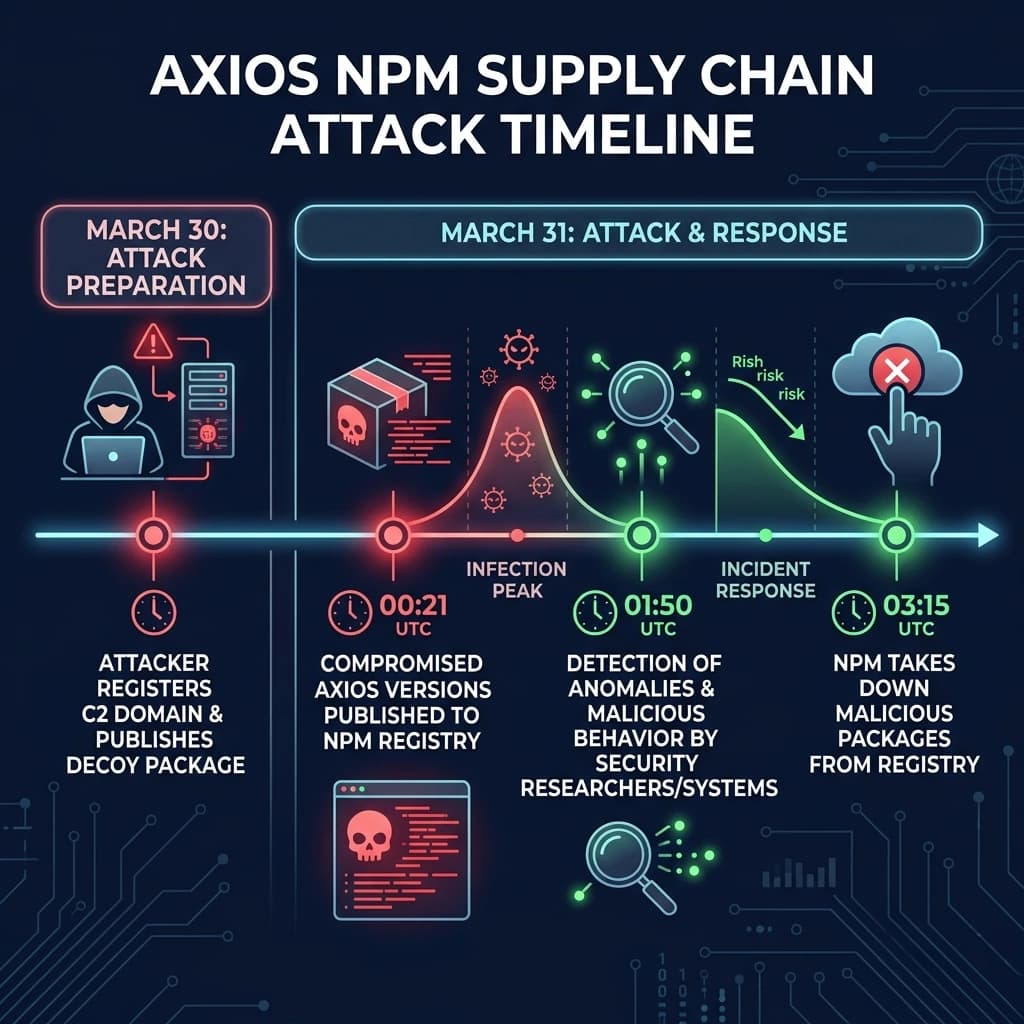

At 00:21 UTC on March 31, 2026, someone published axios@1.14.1 to npm. Within seconds, machines across the globe started phoning home to a server in Panama.
The Axios HTTP client has roughly 100 million weekly downloads. It sits in the dependency tree of almost every Node.js project you've ever touched. And for about 3 hours, anyone who ran npm install got a North Korean Remote Access Trojan installed on their machine.
I spent the past two days pulling apart the malicious payload, reading every post-mortem I could find, and checking my own projects. Here is everything I know.
What exactly happened to the Axios npm package?
On March 31, 2026, a North Korean state-sponsored hacking group compromised the npm credentials of @jasonsaayman, the lead maintainer of Axios. They used those credentials to publish two malicious versions:
- axios@1.14.1 (tagged
latest) at 00:21 UTC - axios@0.30.4 (tagged
legacy) at 01:00 UTC
Both versions contained a hidden dependency called plain-crypto-js that installed a cross-platform RAT (Remote Access Trojan) through npm's postinstall hook. The RAT connected back to the attacker's command-and-control server within 1.1 seconds of npm install finishing.
Here is the full timeline:
| Time (UTC) | What Happened |
|---|---|
| Mar 30, 05:57 | Attacker publishes plain-crypto-js@4.2.0 (clean decoy to establish registry history) |
| Mar 30, 16:03 | C2 domain sfrclak.com registered via Namecheap |
| Mar 30, 23:59 | plain-crypto-js@4.2.1 published (the actual malicious version) |
| Mar 31, 00:05 | Automated scanners flag plain-crypto-js@4.2.1 as malware (6 minutes after publish) |
| Mar 31, 00:21 | axios@1.14.1 published via compromised account |
| Mar 31, 01:00 | axios@0.30.4 published (targeting legacy users) |
| Mar 31, 01:50 | Elastic Security Labs files GitHub Security Advisory |
| Mar 31, ~03:15 | npm unpublishes both malicious versions |
Total exposure window: about 2 hours and 54 minutes. Given that Axios gets pulled millions of times a day, that's a lot of infected machines.
How did the attacker compromise the Axios maintainer's account?
The attacker got hold of @jasonsaayman's npm credentials. We don't know the exact method yet (phishing, credential stuffing, or a reused password), but there were two dead giveaways that this wasn't legitimate:
1. The publishing email changed. The legitimate maintainer published using jasonsaayman@gmail.com. The malicious publish came from ifstap@proton.me.
2. The provenance chain broke. Here's the critical detail. Legitimate axios@1.14.0 was published using GitHub Actions OIDC with SLSA provenance attestations. This means npm could cryptographically verify that the package was built from the actual Axios repo. The malicious 1.14.1? Published directly from the CLI with zero provenance. That's like a bank wire going through without a signature.
This is the strongest argument for OIDC trusted publishing I've ever seen. If npm had enforced provenance checks, this attack would have been stopped cold.
How did the malicious code actually work?
This is where it gets technically interesting. The attacker didn't modify a single line of Axios source code. Instead, they used what I'm calling a "phantom dependency" technique.
The injection
They added one line to package.json:
{
  "dependencies": {
    "plain-crypto-js": "^4.2.1"
  }
}This package is never imported anywhere in the Axios codebase. It exists only to trigger npm's postinstall hook. When you run npm install, npm automatically executes any postinstall script defined in a dependency's package.json. The plain-crypto-js package had this:
{
  "scripts": {
    "postinstall": "node setup.js"
  }
}That's it. One line in dependencies, one postinstall script, and every machine that installed Axios became compromised.
The dropper (setup.js)
The setup.js file used two layers of obfuscation:
- Layer 1: Reversed Base64 encoding with padding character substitution
- Layer 2: XOR cipher using the key
OrDeR_7077with a position-dependent index calculation (7 * i^2 % 10)
All the important strings (URLs, commands, module names) were stored in an encoded array and decoded at runtime. The script checked os.platform() to determine which OS it was running on, then downloaded a platform-specific second-stage payload from the C2 server.
And here's the clever part. After execution, setup.js deleted itself using fs.unlink(__filename) and swapped the malicious package.json with a clean version. If you looked at node_modules/plain-crypto-js/ after the fact, you'd see nothing suspicious. Only your lockfile would tell the truth.
The RAT (Remote Access Trojan)
Three separate implementations, one per OS, all speaking the same C2 protocol:
macOS: An AppleScript downloaded a C++ binary via curl to /Library/Caches/com.apple.act.mond (disguised as an Apple system daemon).
Windows: A four-stage chain. VBScript downloads a .ps1 file. PowerShell gets copied to %PROGRAMDATA%\wt.exe (masquerading as Windows Terminal) and runs with -NoProfile -ep Bypass. A registry Run key gives it reboot persistence.
Linux: Direct curl download to /tmp/ld.py, executed detached via nohup python3.
All three beaconed home every 60 seconds using HTTP POST with Base64-encoded JSON. The User-Agent string was hardcoded as mozilla/4.0 (compatible; msie 8.0; windows nt 5.1; trident/4.0), which is an Internet Explorer 8 string from the Windows XP era. Spotting that on a macOS or Linux box in 2026 is... not subtle.
The RAT supported four commands:
| Command | What It Does |
|---|---|
kill | Self-terminate (but Windows persistence survives unless cleaned) |
runscript | Execute arbitrary code (PowerShell, AppleScript, or shell) |
peinject | Reflective .NET assembly loading on Windows, binary drop on macOS/Linux |
rundir | Filesystem enumeration (names, sizes, timestamps, child directories) |
On first beacon, the RAT sent back everything: hostname, username, OS version, timezone, boot time, hardware model, CPU type, and a full process list (up to 1,000 entries on macOS). The attacker had a complete picture of your machine within seconds.
Who was behind the Axios npm attack?
Both Microsoft and Google published independent attributions within 24 hours.
Microsoft attributed the attack to Sapphire Sleet, a North Korean state-sponsored group also tracked as BlueNoroff, STARDUST CHOLLIMA, and CryptoCore.
Google's Threat Intelligence Group (GTIG) attributed it to UNC1069, a financially motivated North Korean threat actor active since at least 2018. The macOS binary showed "significant overlap" with known samples of WAVESHAPER.V2, a backdoor previously used by this group.
SANS noted a possible connection to the TeamPCP campaign. Between March 19-27, 2026, TeamPCP compromised several other tools: the Trivy scanner, the KICS scanner, LiteLLM on PyPI, and Telnyx on PyPI. The evidence suggests TeamPCP may be an Initial Access Broker sitting on a stockpile of stolen publishing credentials.
This wasn't some random script kiddie. This was a state-sponsored operation with preparation, patience, and cross-platform engineering.
How do you check if your projects are affected?
If any of your projects ran npm install, npm update, or yarn install (without a committed lockfile) between 00:21 and 03:15 UTC on March 31, 2026, you need to check.
Step 1: Search your lockfiles
# npm
grep -E '"axios"' package-lock.json | grep -E '1\.14\.1|0\.30\.4'

# yarn
grep -E 'axios@' yarn.lock | grep -E '1\.14\.1|0\.30\.4'

# pnpm
grep -E 'axios' pnpm-lock.yaml | grep -E '1\.14\.1|0\.30\.4'Step 2: Check for the phantom dependency
npm ls plain-crypto-js
find node_modules -name "plain-crypto-js" -type dStep 3: Search across ALL your local projects
find ~ -type d -name "plain-crypto-js" -path "*/node_modules/*" 2>/dev/nullStep 4: Check for RAT artifacts on your machine
# macOS
ls -la /Library/Caches/com.apple.act.mond 2>/dev/null && echo "INFECTED"

# Linux
ls -la /tmp/ld.py 2>/dev/null && echo "INFECTED"On Windows, check for %PROGRAMDATA%\wt.exe and %TEMP%\6202033.vbs.
Step 5: Check network logs for C2 traffic
Look for outbound connections to sfrclak.com or 142.11.206.73 on port 8000. Also search for the distinctive User-Agent string: mozilla/4.0 (compatible; msie 8.0; windows nt 5.1; trident/4.0).
If you find any of these, assume full compromise. That means rotating every credential, API key, SSH key, and token that was accessible from that machine. I'm not exaggerating. The RAT could execute arbitrary code within seconds of connecting.
What should you do right now to protect your projects?
Even if you weren't hit, this is a wake-up call. Here's what I've done across all my projects this week.
Lock your dependencies
If you're not committing lockfiles (package-lock.json, yarn.lock, pnpm-lock.yaml), start today. A committed lockfile from before March 31 would have completely prevented this attack because npm ci refuses to install versions not in the lockfile.
# In CI/CD, ALWAYS use npm ci instead of npm install
npm cinpm ci is not just faster. It's a security boundary. It fails if the lockfile doesn't match package.json and never rewrites the lockfile. This means a compromised upstream version won't sneak in.
Enable min-release-age
This is a new feature that delays automatic adoption of freshly published package versions. If this had been enabled, the malicious Axios versions would never have been installed because they were less than 3 hours old.
# .npmrc
min-release-age=7dThis is now supported on npm (v11.10.0+), pnpm (v10.16+), Yarn (v4.10+), and Bun (v1.3+). I've set it to 7 days on all my projects. The tradeoff is that you wait a week for new versions, but honestly, how often do you need a dependency update within hours of release?
Kill postinstall scripts
The entire attack relied on npm automatically running postinstall scripts. You can disable this:
# .npmrc
ignore-scripts=trueOr per-install:
npm ci --ignore-scriptsThe downside is that some legitimate packages need postinstall scripts (like sharp for image processing or esbuild for native binaries). You'll need to run those manually or allowlist them. But for most projects, the security benefit outweighs the convenience.
Add dependency scanning to your CI
# GitHub Actions example
- name: Audit dependencies
  run: npm audit --audit-level=high

- name: Check for known malicious packages
run: npx socket-security/cli scanTools like Socket.dev, Snyk, and StepSecurity Harden-Runner can catch anomalous behavior (like unexpected network connections during npm install) before it reaches production.
How does this compare to past npm supply chain attacks?
Supply chain attacks on npm aren't new. But the scale keeps getting worse.
| Incident | Year | Weekly Downloads | Attack Vector | Payload |
|---|---|---|---|---|
| event-stream | 2018 | 1.5M | Social engineering (maintainer gave away access) | Cryptocurrency stealer |
| ua-parser-js | 2021 | 7M | Compromised credentials | Crypto miner + password stealer |
| colors.js / faker.js | 2022 | 20M | Maintainer self-sabotage (protest) | Infinite loop / data wipe |
| Axios | 2026 | 100M | Compromised credentials | Cross-platform state-sponsored RAT |
The jump from 20M to 100M weekly downloads is scary enough. But the real difference is who's behind it. The event-stream attack was one developer targeting one cryptocurrency wallet. The Axios attack was a nation-state operation with custom RATs for three operating systems, anti-forensic self-deletion, and a coordinated campaign that also hit Trivy, KICS, and several PyPI packages the same month.
We've crossed a line. Supply chain attacks are no longer a "low probability, low impact" risk. They are an active, ongoing threat from well-resourced adversaries.
Why does npm's architecture make supply chain attacks so dangerous?
I want to be honest about something. The npm ecosystem has a structural problem that makes attacks like this possible. And it's not just about bad password hygiene.
Transitive trust is the real issue. When you run npm install axios, you're not just trusting the Axios maintainers. You're trusting every dependency of Axios, and every dependency of those dependencies. A single compromised account anywhere in that tree can inject code into your build. The Axios attack exploited this by adding plain-crypto-js as a dependency. Most developers would never notice a new sub-dependency appearing.
Postinstall scripts run with full system access. When npm executes a postinstall hook, it runs with whatever permissions your user account has. There's no sandboxing, no permission prompt, no "this package wants to access your filesystem" dialog. It just runs.
The window between publish and detection is all the attacker needs. Automated scanners flagged plain-crypto-js within 6 minutes. But the malicious Axios version wasn't pulled for nearly 3 hours. For a package with 100M weekly downloads, that's plenty of time.
Compare this to other ecosystems. Go modules use checksums verified against a transparency log. Rust's crates.io doesn't support postinstall scripts. Python's PyPI is adding Trusted Publishers. npm has started moving in this direction with OIDC and provenance, but adoption is still optional.
What is the one thing I learned from this incident?
The Axios team was actually doing a lot of things right. They had moved to OIDC trusted publishing. They had GitHub Actions automating releases. The legitimate 1.14.0 had full provenance attestations.
But none of that mattered because npm still allowed a direct CLI publish to override everything. The attacker bypassed the entire CI/CD pipeline by publishing from a stolen token.
The fix isn't just "use better passwords" or "enable 2FA" (though you should absolutely do both). The fix is making provenance-verified publishing mandatory. If npm had rejected the 1.14.1 publish because it lacked OIDC provenance, this attack would have failed. Period.
I think we're heading there. npm has the infrastructure. The question is whether they'll make it a requirement before the next attack, or after.
In the meantime, I've added min-release-age=7d and ignore-scripts=true to every .npmrc in every project I maintain. I've verified my lockfiles are committed. And I've added Socket.dev to my CI pipelines. It's not foolproof, but it's a lot better than trusting that the 1,500 packages in my dependency tree all have uncompromised maintainer accounts.
Stay safe out there.
For the official post-mortems and technical analysis, see:
- Microsoft Security Blog on the Axios Compromise
- Google GTIG's Attribution Report
- Elastic Security Labs' Detailed Analysis
- SANS Institute's Breakdown
- GitHub Security Advisory GHSA-fw8c-xr5c-95f9
- Snyk's Supply Chain Attack Analysis
- StepSecurity's First Detection Report
- Wiz's Impact Assessment
- TechCrunch Coverage
- GitHub Issue #10604 (Original Community Report)
Keep Reading
- The Day a React Patch Broke the Internet — Another case where a security response caused more damage than the original threat. Same energy, different failure mode.
- AI-Driven Anomaly Detection with Spring AI — If you're thinking about detecting compromised dependencies at runtime, this post covers behavioral analysis patterns.
- Zero Trust Architecture in Spring Boot Microservices — Supply chain attacks are exactly why "trust nothing, verify everything" matters at every layer.