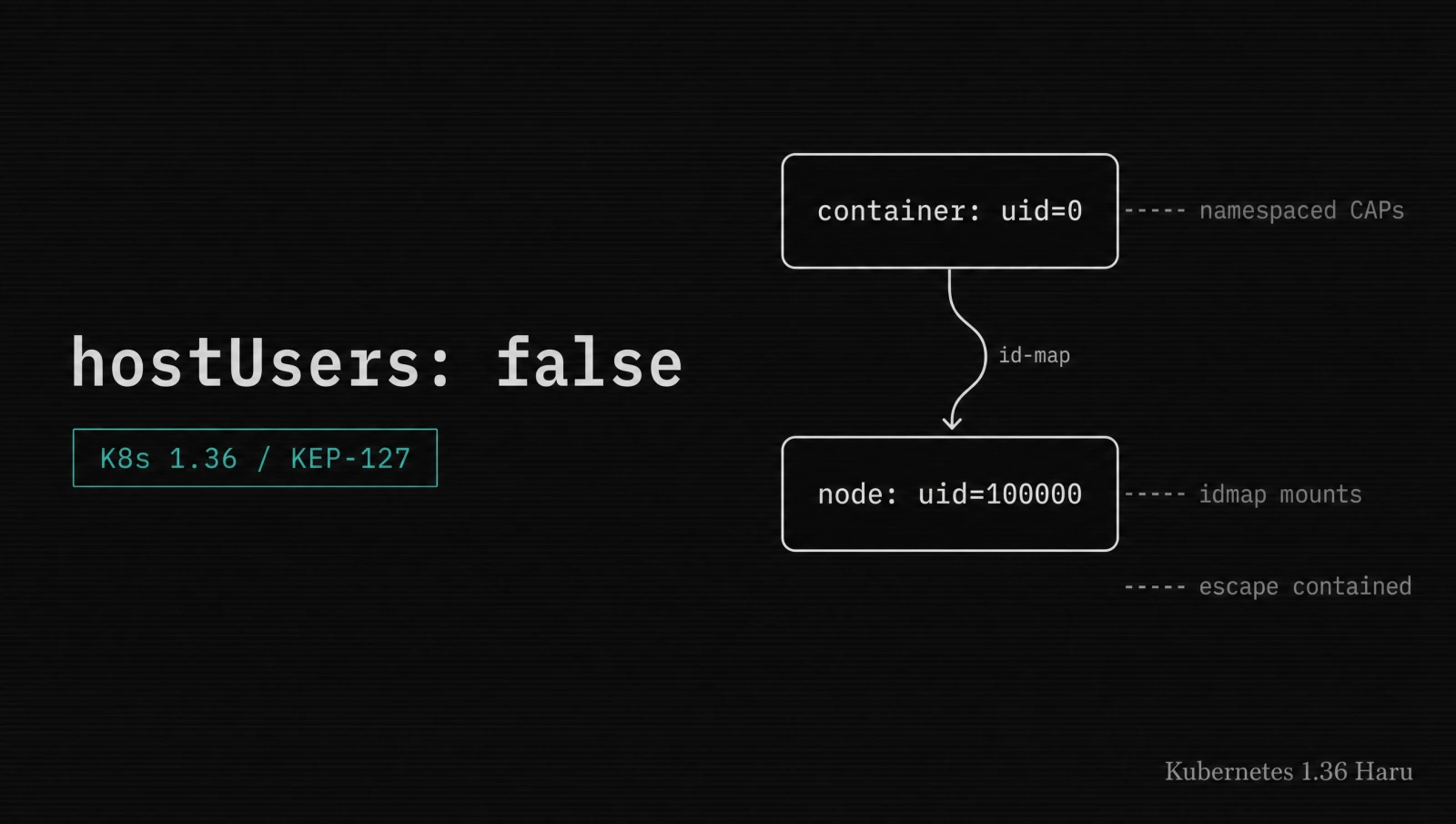

User namespaces in Kubernetes hit GA on April 22, 2026, with the v1.36 Haru release. The feature has been around as alpha since v1.25 and beta since v1.30, but until now the cost of opting in was high enough that nobody outside of GKE Sandbox and a few security-forward teams used it. As of v1.36 the gate is enabled by default, the kernel and runtime requirements are met by every up-to-date distribution, and the pod-spec change is a single field.
I turned this on across my own staging cluster the week the release dropped. This post walks the enablement the way I ran it: the prerequisite check that decides whether your nodes can opt in at all, the smallest possible pod manifest that exercises the feature, the verification step that proves the UID mapping is doing what you expect, and the migration plan for existing workloads that break under the change.
What changed with user namespaces in Kubernetes 1.36?
User Namespaces graduated to General Availability in Kubernetes 1.36 (the Haru release, April 22, 2026), with the matching feature gate enabled by default. The pod-spec field is hostUsers: false. When set, the kubelet asks the container runtime to create the pod in a new user namespace, and the runtime maps the container's UID 0 to a non-privileged UID on the host.
The KEP behind this is KEP-127. The headline behaviors that flipped from beta to stable in v1.36 are:
| Behavior | Before v1.36 | v1.36 (GA) |
|---|---|---|
| Feature gate | UserNamespacesSupport (beta) | Enabled by default, no gate |
hostUsers field | Beta in pod spec | Stable in pod spec |
Capabilities (e.g. CAP_NET_ADMIN) | Host-scoped, full power | Namespaced, container-local only |
| Volume UID/GID translation | Manual chown often required | Kernel handles transparently via idmap mounts |
| Sandbox feature requirement | Each guarded by sub-gates | Folded under the main gate |
| Pod-level resource resize | Separate alpha gate | Pod-level in-place resize lands stable in same release |
The two changes that matter most in practice are the namespaced capabilities and the transparent UID translation on mounted volumes. A pod with CAP_NET_ADMIN can still tweak its own network namespace, but cannot touch the host's. A pod that mounts a host volume sees files as owned by UID 0 inside the container while the host disk still records the actual UID. No chown step, no init container shuffling permissions, no setgid sticky-bit cleanup.
Why do user namespaces matter for container escape attacks?
User namespaces matter because they sever the link between "root in the container" and "root on the host". A process that achieves a container escape on a pod with hostUsers: false lands as an unprivileged UID on the node, which means the standard escape primitives (writing to /proc/sys, mounting host paths, opening privileged sockets, loading kernel modules) all fail at the kernel boundary.
The history here is long and bloody. Every six months a new CVE in runc, containerd, or a kernel subsystem hands an attacker root on the host because they were already root in the container and the host trusted that UID. The 2019 runc symlink escape (CVE-2019-5736) was patched in a week. The 2022 cgroups v1 race (CVE-2022-0492) took longer. Then there was the 2024 runc LeakyVessels chain. The pattern is the same every time: container UID 0 reaches a kernel surface, and the kernel applies host UID 0 semantics.
User namespaces close that pattern at the source. The container still has UID 0 inside its own namespace. The kernel still applies UID 0 semantics. But the inside-the-namespace UID 0 is mapped to a non-privileged outside-the-namespace UID, so the kernel's UID-0-only operations fail when the escape lands on the host. CAP_SYS_ADMIN on the inside means namespace-local admin. CAP_SYS_ADMIN on the host? The escaped process does not have it.
The blast-radius difference shows up clearly when you run the same exploit twice. I did this on a non-production cluster with a deliberately vulnerable image based on the Stripe Open Source Defense write-up. Without user namespaces the escape gave shell access to the node. With hostUsers: false the escape produced a shell as an unmapped UID with no write access to /etc, no ability to mount, and no ability to load kernel modules.
This is defense in depth, not a silver bullet. The pod can still be malicious, the container can still be DoS'd, and a kernel bug that bypasses namespaces entirely (which is rare but does happen) gets through anyway. Pod Security Admission still applies. runAsNonRoot still applies. Seccomp still applies. User namespaces are one more layer.
How do you check kernel and runtime prerequisites?
You check the prerequisites by reading three numbers from each node: the kernel version, the container runtime version, and the storage driver. The minimum supported combination is Linux 6.3, containerd 2.0 (or CRI-O 1.30), and a filesystem that supports idmap mounts. Older kernels can work back to 5.19 with a containerd 2.0 plus overlay-with-idmap config, but 6.3 is what the official kubernetes.io docs settle on for the GA path.
Run this on each node as a quick sanity check.
# Kernel version
uname -r
# Expected: 6.3 or newer for the supported GA path

# Container runtime
crictl version
# Expected: containerd 2.0.x or newer, or CRI-O 1.30.x or newer

# Storage driver
crictl info | jq '.config.containerd.runtimes' 2>/dev/null
# Or for CRI-O:
crio config 2>/dev/null | grep storage_driver

# Confirm the kernel exposes the namespace feature
ls /proc/self/ns/ | grep user
# Expected: userTwo compatibility traps to watch for:
- containerd 1.7 + Linux 5.15. The setting is honored, but you pay a measurable storage and latency penalty because overlayfs does not support idmap mounts on that kernel. Upgrade the kernel before you turn this on broadly.
- containerd 1.6 or older. The
hostUsers: falsefield is silently ignored. No error, no warning, no namespace. This is the worst failure mode because pods appear to be in a user namespace until you actually verify the UID mapping.
For managed Kubernetes the answer is usually simple: GKE, EKS, and AKS all ship node pools that meet the requirement on their current LTS images as of April 2026. Use the latest node image on each, and the feature is available without extra work.
For self-managed clusters on Ubuntu 22.04, the default kernel is 5.15, which means an HWE (hardware enablement) kernel upgrade is the smallest path. Ubuntu 24.04 ships 6.8 by default and is the easier choice. RHEL 9.4 ships 5.14, which means you need the 9.5 update for a 6.x kernel.
If even one node fails the prereqs, do not enable user namespaces on the whole cluster. Cordon and drain the non-compliant nodes first, or label them and use a node selector on the user-namespaced pods. Mixed clusters work, mixed-on-the-same-node configs do not.
How do you enable user namespaces on a pod?
You enable user namespaces by adding a single field to the pod spec: hostUsers: false. Everything else is automatic. The kubelet asks the container runtime to create the pod in a new user namespace, the runtime mints a UID range, and the kernel performs transparent UID translation on every namespaced operation including volume mounts.
The smallest demonstrable pod is this one.
# userns-demo.yaml
apiVersion: v1
kind: Pod
metadata:
  name: userns-demo
spec:
  hostUsers: false
  containers:
    - name: shell
      image: debian:bookworm-slim
      command: ['sleep', 'infinity']
      securityContext:
        runAsUser: 0
runAsGroup: 0Apply it.
kubectl apply -f userns-demo.yaml
kubectl wait --for=condition=Ready pod/userns-demo --timeout=60sNow check what the container thinks its UID is, and what the node thinks the same process's UID is.
# What the container sees
kubectl exec userns-demo -- id
# Expected: uid=0(root) gid=0(root) groups=0(root)

# What the node sees. Run on the node that hosts the pod.
PID=$(kubectl get pod userns-demo -o jsonpath='{.status.containerStatuses[0].containerID}' \
  | sed 's|.*://||' \
  | xargs -I{} crictl inspect {} \
  | jq -r '.info.pid')

# On the node:
cat /proc/$PID/status | grep -E "^Uid:"
# Expected: a UID far from 0, e.g. Uid: 100000 100000 100000 100000That second number is the proof that the namespace did its job. Container thinks it is UID 0. Host kernel thinks it is UID 100000 (or whatever range the runtime picked). Every kernel operation that requires real-UID-0 privileges fails on the host side.
For workloads that need more than the default 65536-UID range (large multi-tenant setups), the kubelet honors the --userns-uid-mapping config flag. I have never needed this. The default range is enough for almost every workload.
To opt out per pod, just omit the field. The default is hostUsers: true, which is the v1.35 behavior. To opt in for an entire namespace, use Kyverno or any other admission controller to inject the field. The smallest Kyverno policy is six lines and avoids the per-deployment churn.
# kyverno-userns.yaml
apiVersion: kyverno.io/v1
kind: ClusterPolicy
metadata:
  name: enforce-user-namespaces
spec:
  rules:
    - name: set-hostusers-false
      match:
        any:
          - resources:
              kinds: ['Pod']
              namespaces: ['team-a', 'team-b']
      mutate:
        patchStrategicMerge:
          spec:
hostUsers: falseHow do you verify the UID mapping works correctly?
You verify the UID mapping by writing a file from inside the container and reading the on-disk ownership from the node. If the in-container ownership shows UID 0 but the on-disk ownership shows a non-zero UID in the runtime's mapping range, the namespace is doing what it claims.
Set this up with an emptyDir volume.
# userns-verify.yaml
apiVersion: v1
kind: Pod
metadata:
  name: userns-verify
spec:
  hostUsers: false
  containers:
    - name: writer
      image: debian:bookworm-slim
      command: ['sleep', 'infinity']
      volumeMounts:
        - name: scratch
          mountPath: /scratch
  volumes:
    - name: scratch
emptyDir: {}Write a file from inside the container.
kubectl exec userns-verify -- sh -c 'echo hi > /scratch/test && ls -la /scratch/test'
# Expected: -rw-r--r-- 1 root root 3 ... /scratch/testNow find the file on the node and check the on-disk ownership.
# Get the host path of the emptyDir
PODUID=$(kubectl get pod userns-verify -o jsonpath='{.metadata.uid}')
NODE=$(kubectl get pod userns-verify -o jsonpath='{.spec.nodeName}')

# On the node:
sudo find /var/lib/kubelet/pods/$PODUID -name test -exec ls -la {} \;
# Expected: -rw-r--r-- 1 100000 100000 ... /var/lib/kubelet/pods/<uid>/volumes/.../testThat UID 100000 is the host-side view of the container's UID 0. If you see UID 0 on the on-disk side instead, the namespace did not take. Common causes: containerd is 1.6.x, the kernel does not support idmap mounts, or the filesystem of the kubelet directory does not support idmap. All three appear in the kubelet logs when they fail.
For a stronger test, try a privileged operation that should fail.
kubectl exec userns-verify -- sh -c 'mount -t tmpfs none /mnt 2>&1'
# Expected: mount: /mnt: permission deniedWithout user namespaces, root in a container can mount tmpfs inside the container's mount namespace. With user namespaces, the mount syscall lands as a non-privileged UID on the host kernel and fails. That permission-denied is the proof that namespaced capabilities are working.
How do you migrate existing workloads to user namespaces?
You migrate existing workloads by classifying them against three failure modes (low ports, shared-UID volumes, host paths), enabling hostUsers: false on the safe ones first, and rewriting the broken ones one at a time. Do not flip the whole namespace at once.
The three failure modes show up like this.
| Failure mode | Symptom | Fix |
|---|---|---|
| Bind to port < 1024 | bind: permission denied on container start | Add capabilities: { add: [NET_BIND_SERVICE] } to securityContext, or move to a port ≥ 1024 and front with a Service |
| Shared-UID host volume | Files appear owned by an unexpected UID inside the container, or chown errors | Use a Pod spec that owns the volume (recreate as emptyDir) or drop the host volume |
hostPath volume | Mount succeeds but file ops fail with EACCES | Re-platform off hostPath to a CSI driver or local PV, or grant explicit access via supplementalGroups |
For the low-port case, the fix is a one-line addition.
spec:
  hostUsers: false
  containers:
    - name: web
      image: my-nginx:latest
      ports:
        - containerPort: 80
      securityContext:
        capabilities:
add: [NET_BIND_SERVICE]The capability is namespaced under user namespaces, so it grants the bind privilege inside the container without granting any host-side capability.
For the shared-volume case, the right answer almost always is "do not share a host volume". If you absolutely need to share with another pod, share via a NetworkVolume (PVC) or a sidecar pattern. The on-disk UID mismatch that user namespaces introduce is the kernel doing its job; do not chown your way around it.
The migration sequence that worked on my own staging cluster was:
- Pick a low-stakes deployment with no host volumes and no low ports.
- Patch the deployment to add
hostUsers: false. - Wait one full traffic cycle. Watch pod restart count and the application's own error logs.
- If clean, move the next deployment.
- After half a dozen deployments without issue, layer a Kyverno policy that defaults the namespace to
hostUsers: falseand start auditing the holdouts.
That is the path the Kubernetes docs recommend and it is the path I would follow in production. The dangerous version is the all-at-once flip on a busy namespace, which surfaces the failure modes at the worst time.
What common problems should you watch for?
The common problems are containerd-1.6 silently ignoring the field, kernel versions that look new enough but lack idmap mounts on the kubelet's filesystem, and workloads with hidden CAP_SYS_ADMIN needs that fail in surprising ways.
For each, here is the signal and the fix.
# Signal 1: containerd ignores hostUsers: false silently
kubectl exec <pod> -- cat /proc/self/uid_map
# A namespaced pod prints something like:
#          0     100000      65536
# A non-namespaced pod prints:
#          0          0 4294967295
# If you set hostUsers: false and see the second line, the runtime ignored it.
# Fix: upgrade containerd to >= 2.0, or move to a node where it is.

# Signal 2: kubelet logs the idmap failure
journalctl -u kubelet -n 200 | grep -i idmap
# Common error: "failed to set up user namespace mount: idmap not supported"
# Fix: upgrade to a kernel >= 6.3 (5.19 is the absolute minimum), or move the
# kubelet root directory to a filesystem that supports idmap mounts.

# Signal 3: workload fails with CAP_SYS_ADMIN-like errors
kubectl logs <pod> | grep -E "operation not permitted|permission denied"
# This often means the workload needs a capability that is no longer host-scoped.
# Fix: add the specific capability to securityContext.capabilities.add. If the
# workload needs real host-side CAP_SYS_ADMIN, it is not a candidate for user
# namespaces. Use a privileged sidecar pattern instead.The other quiet problem is metrics. Pods that report container PIDs to a host-side telemetry collector (for example a host-mode Prometheus exporter for cgroup stats) need to translate the PID across the namespace. The standard exporters handle this fine. Home-grown collectors usually do not. Test your observability stack on at least one user-namespaced pod before you flip a whole namespace.
For deeper context on the security primitives that compose with user namespaces, see the zero trust microservices guide for the auth-side counterpart, the AI-driven anomaly detection guide for runtime detection that pairs with kernel isolation, and the TanStack supply chain attack postmortem for the kind of supply-chain blast radius this feature reduces.
For the original sources, see the Kubernetes 1.36 user namespaces GA announcement, the user namespaces concept documentation, the task documentation for enabling user namespaces on a pod, and KEP-127.
Keep Reading
- Zero Trust Microservices with Spring Security. The auth-side counterpart to kernel-level isolation. Both layers together close the practical attack paths into a pod.
- How to Migrate from Ingress NGINX After Kubernetes Retired It. The other K8s 1.36 era change you cannot defer. Pair the migration windows.
- AI-Driven Anomaly Detection for Security. Runtime detection layered on top of the kernel isolation user namespaces provide.
- TanStack npm Supply Chain Attack 2026. The kind of supply-chain compromise user namespaces reduce the blast radius of when the malicious code lands inside a container.