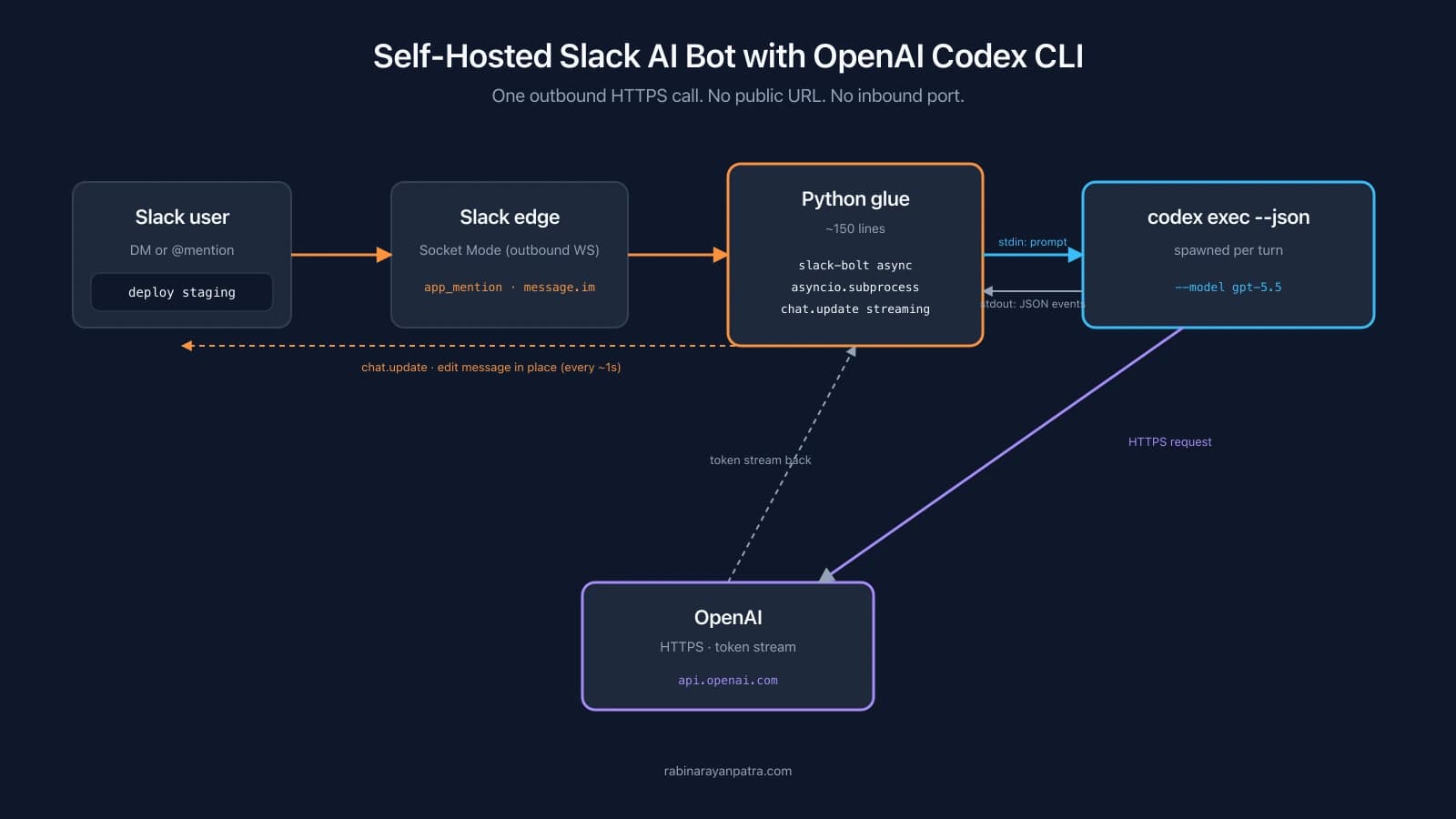

A Slack bot that DMs you back with the same agent you run from your terminal sounds like a weekend hack, but it is also the cheapest way to give yourself a coding agent that works from anywhere with Slack installed. No browser tab, no separate app, no token billing dashboard to check. You write deploy the staging branch in a Slack DM, the bot streams the plan back into the same message, and asks for permission before it runs kubectl apply.
This guide walks through building exactly that. The shape is a thin Python glue process that uses Slack Socket Mode to receive messages, spawns a CLI agent as a subprocess per turn, and edits the Slack reply in place as tokens stream out. The running example is OpenAI Codex CLI because that is what I shipped first, but the same architecture works with Anthropic Claude Code, Cursor's CLI, or any other agent that exposes a stdio interface. The driver is the only part that changes when you swap agents; the Slack glue, the approval flow, and any MCP tools you add stay identical.
The walkthrough is structured around three layered variants you can build in order: the basic auto-approve bot, the Slack-button approval gate, and the session-resume version that survives restarts. After that, a short section covers how to swap the Codex driver for Claude Code, Cursor, or anything else without touching the rest of the stack. You can stop at any layer. For most personal bots, basic plus approval is the sweet spot.
Why build your own Slack AI bot instead of using the official ChatGPT or Claude integration?
The official ChatGPT in Slack and the official Claude in Slack are great for chat. Neither can run code, edit files, or call your internal tools by default. A self-hosted bot wired to a CLI agent like Codex or Claude Code does all three out of the box, because both CLIs ship with shell, file-edit, and an MCP client that picks up any custom tools you register.
The control trade-off is also real. With a self-hosted bot you own the workspace directory the agent reads and writes, the approval rules for destructive commands, the model selection, and the conversation rollouts on disk. If your team has a private codebase or an internal API the bot needs to touch, none of that has to leave your host. The only network call in the whole pipeline is the outbound HTTPS from the agent CLI to its provider, and that traffic is the same as any other agent session you run from a laptop.
Cost is the third reason. ChatGPT Plus at twenty dollars a month includes a generous weekly Codex usage budget, and Claude Pro covers a similar quota on the Anthropic side. OpenAI moved Codex billing onto API-token alignment for paid plans in April 2026, and Claude Code respects your Pro plan in the same way. A personal bot that handles a few dozen short threads a week rarely brushes either cap. If you do exceed the plan limit you can switch to an API key for either provider and pay per token directly, with no other code changes.
How does the Slack and CLI agent pipeline actually work?
The pipeline has exactly one outbound network call at runtime, and Slack never reaches back into your network. Everything else is local pipes between a Python glue process and the agent subprocess.
The sequence for a single message in a thread looks like this:
- You type into Slack. The Slack edge serializes the event and pushes it over an outbound WebSocket that the bot opened on startup. That socket is the Socket Mode transport, and it is the only reason no public URL or inbound port is needed.
- The Python glue process catches the event in an async handler. It posts a placeholder message in the same thread (
thinking…) and remembers the channel and message timestamp. - The glue spawns the agent CLI as an async subprocess. For Codex that is
codex exec --json --model gpt-5.5 --cd <workspace> <prompt>; for Claude Code it isclaude -p "<prompt>" --output-format stream-json --verbose --include-partial-messages --add-dir <workspace>. In both cases standard output is a JSON Lines stream of events. - The agent CLI itself makes the single HTTPS call out to its provider (OpenAI for Codex, Anthropic for Claude Code). The token stream comes back over that HTTPS connection.
- The glue reads stdout line by line, parses each JSON event, accumulates text deltas, and once per second calls
chat.updateon the placeholder Slack message with the latest accumulated text. The reply edits in place rather than spamming new messages. - When the agent exits, the glue does one final
chat.updatewith the complete reply, then releases the per-thread lock so the next message in the same thread can run.
The event family depends on which agent CLI you run. Codex 2026 emits thread.started (carries the session identifier), turn.started and turn.completed (bracket each agent turn), the item.* family (covers agent messages, reasoning, command executions, file changes, MCP tool calls, plan updates), and error. Claude Code with --output-format stream-json --verbose --include-partial-messages emits system/init (session metadata, including session_id), stream_event lines with a nested event.delta payload (where delta.type == 'text_delta' carries token deltas), tool-use events, and system/api_retry when a call retries. Cursor's cursor-agent produces a similar shape under --output-format stream-json --stream-partial-output. The driver layer hides the difference from the rest of the bot.
How do you set up the Slack app from a manifest?
The fastest path is the manifest. You paste a single YAML block into Slack's app builder and it provisions the bot user, scopes, event subscriptions, and Socket Mode in one shot. The alternative is twenty clicks across six settings pages.
Open api.slack.com/apps, click Create New App, pick From an app manifest, choose your workspace, and paste this YAML:
display_information:
  name: My AI Bot
  description: CLI agent in Slack
  background_color: '#1d1d1d'
features:
  bot_user:
    display_name: My AI Bot
    always_online: true
  app_home:
    home_tab_enabled: false
    messages_tab_enabled: true
    messages_tab_read_only_enabled: false
oauth_config:
  scopes:
    bot:
      - app_mentions:read
      - channels:history
      - chat:write
      - im:history
      - im:read
      - im:write
      - users:read
settings:
  event_subscriptions:
    bot_events:
      - app_mention
      - message.im
  interactivity:
    is_enabled: true
socket_mode_enabled: trueAfter the app is created, you need two tokens. Go to Settings → Basic Information → App-Level Tokens, click Generate Token and Scopes, add the connections:write scope, and save the token. It starts with xapp- and is what Socket Mode uses to open the WebSocket. Then go to Settings → Install App, install to your workspace, and copy the Bot User OAuth Token at the top of the page. It starts with xoxb- and is what every chat.postMessage and chat.update call authenticates with.
DMs to the bot work as soon as the install completes. To use @mentions in a channel, run /invite @My AI Bot in that channel from your own account. Otherwise Slack silently drops the event because the bot is not a member.
How do you wire Codex CLI and run the basic bot?
Install Codex once, log it into ChatGPT, and write a fifty-line Python file that drives it from Slack events. The CLI ships through npm and the Python side needs only Slack Bolt and aiohttp. The same shape applies to any other agent CLI; we use Codex because it has the cleanest stateless exec mode for a per-turn spawn.
Install the CLI and authenticate:
npm i -g @openai/codex
codex login # opens a browser tab to ChatGPT, then writes ~/.codex/auth.jsonOn a headless machine, codex login prints a device-code URL. Open it on any other device, finish the OAuth flow there, and the headless host picks up the auth tokens automatically. The token file lives at ~/.codex/auth.json regardless of how you sign in.
The Python side is two packages and one script. Save this as requirements.txt:
slack-bolt>=1.18
aiohttp>=3.9
Then the bot itself. The version below is the auto-approve variant: every tool call the agent decides to run executes without asking. Start here so you can validate the Slack-to-agent pipeline end to end before adding the approval gate.
"""slackbot.py - Slack <-> CLI agent glue (auto-approve, Codex driver)."""
import asyncio, json, logging, os, re, time
from collections import defaultdict

from slack_bolt.async_app import AsyncApp
from slack_bolt.adapter.socket_mode.async_handler import AsyncSocketModeHandler

SLACK_BOT_TOKEN = os.environ['SLACK_BOT_TOKEN']
SLACK_APP_TOKEN = os.environ['SLACK_APP_TOKEN']
AGENT_BIN = os.environ.get('AGENT_BIN', 'codex')
AGENT_MODEL = os.environ.get('AGENT_MODEL', 'gpt-5.5')
AGENT_CWD = os.environ.get('AGENT_CWD', os.path.expanduser('~/agent-bot-workspace'))
os.makedirs(AGENT_CWD, exist_ok=True)

EDIT_INTERVAL = 1.0          # seconds between chat.update calls
MAX_SLACK_LEN = 39_000        # chat.update hard cap is 40k chars

logging.basicConfig(level=logging.INFO)
log = logging.getLogger('slackbot')

app = AsyncApp(token=SLACK_BOT_TOKEN)
thread_locks: dict[str, asyncio.Lock] = defaultdict(asyncio.Lock)


async def agent_stream(prompt: str):
    """Codex driver. Yields text chunks as Codex emits them."""
    proc = await asyncio.create_subprocess_exec(
        AGENT_BIN, 'exec', '--json',
        '--model', AGENT_MODEL, '--cd', AGENT_CWD, prompt,
        stdout=asyncio.subprocess.PIPE, stderr=asyncio.subprocess.PIPE,
    )
    try:
        async for raw in proc.stdout:
            line = raw.decode('utf-8', errors='replace').strip()
            if not line:
                continue
            try:
                ev = json.loads(line)
            except json.JSONDecodeError:
                continue
            kind = ev.get('type', '')
            if kind.startswith('item.') and ev.get('item', {}).get('type') == 'agent_message':
                delta = ev.get('delta') or ev.get('item', {}).get('text', '')
                if delta:
                    yield delta
            elif kind.startswith('item.') and 'command' in ev.get('item', {}).get('type', ''):
                yield f"\n_running: {ev['item'].get('command', '?')}_\n"
        await proc.wait()
        if proc.returncode:
            err = (await proc.stderr.read()).decode(errors='replace')
            yield f"\n_agent exit {proc.returncode}: {err[-400:]}_\n"
    finally:
        if proc.returncode is None:
            proc.terminate()


@app.event('app_mention')
@app.event('message')
async def handle_message(event, client):
    if event.get('bot_id') or event.get('subtype'):
        return
    channel = event['channel']
    text = re.sub(r'<@[A-Z0-9]+>', '', event.get('text', '')).strip()
    if not text:
        return
    thread_ts = event.get('thread_ts') or event['ts']

    async with thread_locks[f'{channel}:{thread_ts}']:
        placeholder = await client.chat_postMessage(
            channel=channel, thread_ts=thread_ts, text='_thinking…_'
        )
        msg_ts = placeholder['ts']
        accumulated, last_edit = '', 0.0
        try:
            async for chunk in agent_stream(text):
                accumulated += chunk
                if time.monotonic() - last_edit > EDIT_INTERVAL:
                    await client.chat_update(
                        channel=channel, ts=msg_ts,
                        text=accumulated[:MAX_SLACK_LEN] or '_…_',
                    )
                    last_edit = time.monotonic()
            await client.chat_update(
                channel=channel, ts=msg_ts,
                text=accumulated[:MAX_SLACK_LEN] or '_(empty reply)_',
            )
        except Exception as e:
            log.exception('agent run failed')
            await client.chat_update(channel=channel, ts=msg_ts, text=f'_error: {e}_')


async def main():
    log.info('slackbot starting')
    await AsyncSocketModeHandler(app, SLACK_APP_TOKEN).start_async()


if __name__ == '__main__':
asyncio.run(main())Notice the rename from CODEX_* to AGENT_* in the env vars. That is the only thing that changes between agents; the rest of handle_message, the Slack lock, and the streaming throttle are all agent-agnostic. The driver function agent_stream is the swap point.
Export the two tokens, source the file, run it. The shell will block on the WebSocket handler. DM the bot from Slack with a quick hi to confirm the pipeline. You should see a thinking… placeholder appear within a second, then the reply stream into that same message instead of posting a wall of new messages.
export SLACK_BOT_TOKEN=xoxb-...
export SLACK_APP_TOKEN=xapp-...
python3 -m venv .venv && source .venv/bin/activate
pip install -r requirements.txt
python slackbot.pyThe two design choices worth flagging. The per-thread asyncio.Lock serializes messages in the same Slack thread so two quick replies cannot clobber each other's chat.update calls. The one-second edit throttle stays under Slack's per-channel-per-second soft cap on chat.update. Crank EDIT_INTERVAL up to two if you see ratelimited errors in the logs.
How do you gate destructive tool calls with Slack Approve and Deny buttons?
Codex with --ask-for-approval on-request pauses on every tool call that could touch the filesystem or run shell. The bot prints the pending action as a Slack message with Approve and Deny buttons, waits for a click, then writes the decision back into Codex stdin. The pause is a real pause: the agent blocks until the answer arrives, so the user is the rate limit, not the network. Claude Code exposes the same shape through its permission_mode flag, with tool_use_request events on stdout in place of Codex's approval events.
The wire-level changes are small. Spawn the agent with the approval flag plus an open stdin so you can write the decision back. Keep a dictionary of pending approvals keyed by request id, with each entry holding an asyncio.Future. The Slack button click resolves the future, and the spawn loop writes the response JSON to the agent.
import uuid

pending: dict[str, tuple[asyncio.Future, str, str]] = {}


async def agent_stream_with_approval(prompt, channel, thread_ts, client):
    proc = await asyncio.create_subprocess_exec(
        AGENT_BIN, 'exec', '--json',
        '--ask-for-approval', 'on-request',
        '--model', AGENT_MODEL, '--cd', AGENT_CWD, prompt,
        stdin=asyncio.subprocess.PIPE,
        stdout=asyncio.subprocess.PIPE,
        stderr=asyncio.subprocess.PIPE,
    )

    async def handle_approval(ev):
        approval_id = ev.get('id') or str(uuid.uuid4())
        title = ev.get('kind') or ev.get('type', 'tool')
        details = ev.get('command') or ev.get('patch') or ev.get('args') or {}
        fut = asyncio.get_running_loop().create_future()
        pending[approval_id] = (fut, channel, thread_ts)
        await client.chat_postMessage(
            channel=channel, thread_ts=thread_ts,
            text=f'Agent wants to run: {title}',
            blocks=[
                {'type': 'section', 'text': {'type': 'mrkdwn',
                 'text': f'*Agent wants to run `{title}`*'}},
                {'type': 'section', 'text': {'type': 'mrkdwn',
                 'text': f'```{json.dumps(details, indent=2)[:2800]}```'}},
                {'type': 'actions', 'block_id': f'approve:{approval_id}',
                 'elements': [
                    {'type': 'button', 'style': 'primary', 'action_id': 'approve',
                     'text': {'type': 'plain_text', 'text': 'Approve'},
                     'value': approval_id},
                    {'type': 'button', 'style': 'danger', 'action_id': 'deny',
                     'text': {'type': 'plain_text', 'text': 'Deny'},
                     'value': approval_id},
                 ]},
            ],
        )
        try:
            decision = await asyncio.wait_for(fut, timeout=600)
        except asyncio.TimeoutError:
            decision = 'deny'
        finally:
            pending.pop(approval_id, None)
        response = {'id': approval_id, 'type': 'approval_response', 'decision': decision}
        proc.stdin.write((json.dumps(response) + '\n').encode())
        await proc.stdin.drain()

    async for raw in proc.stdout:
        line = raw.decode('utf-8', errors='replace').strip()
        if not line:
            continue
        try:
            ev = json.loads(line)
        except json.JSONDecodeError:
            continue
        kind = ev.get('type', '')
        if 'approval' in kind or kind == 'tool_use_request':
            asyncio.create_task(handle_approval(ev))
            continue
        if kind.startswith('item.') and ev.get('item', {}).get('type') == 'agent_message':
            delta = ev.get('delta') or ev.get('item', {}).get('text', '')
            if delta:
                yield delta
    await proc.wait()


@app.action('approve')
async def on_approve(ack, body):
    await ack()
    approval_id = body['actions'][0]['value']
    if approval_id in pending and not pending[approval_id][0].done():
        pending[approval_id][0].set_result('approve')


@app.action('deny')
async def on_deny(ack, body):
    await ack()
    approval_id = body['actions'][0]['value']
    if approval_id in pending and not pending[approval_id][0].done():
pending[approval_id][0].set_result('deny')Three things to know before you ship this in production. First, the precise approval JSON event names drift between agent versions, so dump one to your logs with codex exec --json --ask-for-approval on-request "echo hi" (or the Claude Code equivalent) and adjust the kind check if your build emits a different shape. Second, the pending dictionary lives in process memory. If the bot crashes while a button is unanswered, the click will silently no-op because the matching Future is gone. Persisting the table to sqlite is the durable fix, but for personal use, just re-send the original message after a restart. Third, the 600-second timeout auto-denies anything you forget to click, so destructive runs do not hang the agent forever.
The companion post on adding custom MCP tools builds on this approval flow and shows how to gate any tool you write yourself behind the same Approve and Deny block. If you only ever expose read-only MCP tools, you can skip approval entirely and run the basic variant.
How does the bot remember context across messages and restarts?
The basic variant rebuilds context every turn by re-fetching the Slack thread history and stuffing it into the prompt. That works, but it costs input tokens on every turn and forgets the agent's internal tool memory between turns. The stateful variant fixes both by storing an agent session identifier per Slack thread and resuming the same session on every new message.
Codex 2026 exposes resume as a subcommand: codex exec resume <session_id> continues a specific session, and codex exec resume --last continues the most recent one in the current workspace. The session identifier shows up in the thread.started event at the start of each run, and Codex writes the full rollout to ~/.codex/sessions/YYYY/MM/DD/rollout-<timestamp>-<uuid>.jsonl on disk. Claude Code stores its sessions under ~/.claude/sessions/ and resumes via a --resume <session_id> flag on the same subcommand. The mapping from a Slack thread to an agent session is what you store on your side.
A tiny sqlite schema is enough:
CREATE TABLE IF NOT EXISTS thread_sessions (
    slack_channel    TEXT NOT NULL,
    slack_thread_ts  TEXT NOT NULL,
    agent_session_id TEXT NOT NULL,
    created_at       REAL NOT NULL,
    last_used_at     REAL NOT NULL,
    PRIMARY KEY (slack_channel, slack_thread_ts)
);The driver becomes a few lines longer: look up the session before spawning, prefer <agent> exec resume <id> when a row exists, capture the new identifier from the first session event of every run, and write it back on completion. Fall back to a fresh spawn if resume errors out, which is what happens when the rollout file has been deleted or the flag is not supported on an older CLI build. With sqlite on disk and the rollouts on disk, the bot survives restarts and reboots without losing thread context.
A periodic garbage-collection task drops rows older than thirty days and matches a find ~/.<agent>/sessions -name '*.jsonl' -mtime +30 -delete cleanup you can run from cron. For most personal setups, disk usage is negligible and you can skip the GC entirely. If you only have one-shot threads with no follow-up, skip the stateful variant entirely; the per-turn re-prompt is cheap and stateless makes a stronger isolation guarantee.
How do you swap Codex for Claude Code, Cursor, or another CLI agent?
Rewrite the agent_stream function and update three environment variables. Everything else stays put. The Slack glue, the per-thread lock, the approval button handlers, the sqlite session table, and any MCP tools you have already configured all keep working without a single change.
The driver swap is mostly mechanical: each agent CLI has its own flag names, its own JSON event family, and its own session-resume convention. The table below shows the surfaces I have driven so far:
| Surface | OpenAI Codex CLI | Anthropic Claude Code | Cursor (cursor-agent) |
|---|---|---|---|
| Headless invocation | codex exec "<prompt>" | claude -p "<prompt>" | cursor-agent -p "<prompt>" |
| Streaming output | --json | --output-format stream-json --verbose --include-partial-messages | --output-format stream-json --stream-partial-output |
| Model flag | --model gpt-5.5 | --model claude-sonnet-4-6 (or sonnet/opus aliases) | --model <name> |
| Workspace flag | --cd <dir> | --add-dir <dir> (multiple allowed) | --workspace <path> |
| Approval flag | --ask-for-approval on-request | --permission-mode acceptEdits + --allowedTools "Bash,Read,Edit" | --approve-mcps and interactive prompts |
| Text-delta event | item.* with agent_message item | stream_event with event.delta.type == "text_delta" | stream_event with delta payload |
| Session id surface | thread.started.thread_id | system/init event (session_id) and top-level session_id in JSON | system/init event (session_id) |
| Resume | codex exec resume <id> / --last | claude -p --resume <id> / --continue | cursor-agent -p --resume <id> / --continue |
| Auth storage | ~/.codex/auth.json | OAuth / keychain, or ANTHROPIC_API_KEY env | Cursor account login |
| MCP config | ~/.codex/config.toml ([mcp_servers.<name>]) | .mcp.json in project root or --mcp-config <file> | .cursor/mcp.json and cursor-agent mcp subcommands |
A Claude Code driver function looks roughly like this:
async def agent_stream_claude(prompt: str):
    """Claude Code driver (`claude -p` with stream-json)."""
    proc = await asyncio.create_subprocess_exec(
        AGENT_BIN, '-p', prompt,
        '--output-format', 'stream-json',
        '--verbose', '--include-partial-messages',
        '--model', AGENT_MODEL,
        '--add-dir', AGENT_CWD,
        stdout=asyncio.subprocess.PIPE,
        stderr=asyncio.subprocess.PIPE,
    )
    async for raw in proc.stdout:
        line = raw.decode('utf-8', errors='replace').strip()
        if not line:
            continue
        try:
            ev = json.loads(line)
        except json.JSONDecodeError:
            continue
        if ev.get('type') == 'stream_event':
            delta = ev.get('event', {}).get('delta', {})
            if delta.get('type') == 'text_delta':
                yield delta.get('text', '')
await proc.wait()The shape is identical to the Codex driver: spawn, read JSONL, dispatch on type, yield text deltas. Only the field names move. Switching the bot to Claude Code in production is a config change plus a function pointer in handle_message:
DRIVERS = {
    'codex': agent_stream,
    'claude': agent_stream_claude,
}
agent_stream_fn = DRIVERS[os.environ.get('AGENT_KIND', 'codex')]Two design notes that matter when you actually do this. The Claude Code CLI flag set for headless streaming is -p (or --print) plus --output-format stream-json --verbose --include-partial-messages; without all three you do not get token deltas. The other note: each agent has its own MCP config (Codex uses ~/.codex/config.toml, Claude Code reads .mcp.json or a file via --mcp-config, Cursor uses .cursor/mcp.json), but the same custom MCP server can be registered in all of them. Your custom query_orders tool works under any agent without code changes.
How do you run the bot as a service on Linux or Mac?
On Linux it is a fifteen-line systemd unit. On Mac it is a launchd plist plus caffeinate -i to stop the laptop sleeping while the bot runs. Either way, the goal is the same: the process restarts on crash, comes back after a reboot, and writes logs to a place you can tail.
The systemd unit at /etc/systemd/system/slackbot.service looks like this:
[Unit]
Description=Slack <-> CLI agent bot
After=network-online.target

[Service]
Type=simple
User=slackbot
WorkingDirectory=/opt/slackbot
Environment=HOME=/opt/slackbot
Environment=PATH=/usr/local/bin:/usr/bin:/bin
EnvironmentFile=/opt/slackbot/.env
ExecStart=/opt/slackbot/.venv/bin/python /opt/slackbot/slackbot.py
Restart=always
RestartSec=5

[Install]
WantedBy=multi-user.targetThree quirks bite first-time systemd users. EnvironmentFile= does not expand ~ or run export, so the .env file must be plain KEY=value lines with absolute paths. The systemd PATH is minimal, so either set AGENT_BIN=/usr/local/bin/codex (or the Claude Code path) in .env or add the Environment=PATH=... line shown above. And HOME=/opt/slackbot is what tells the agent CLI where to find its auth file, which is the file you populated when you ran codex login or claude login as the slackbot user during setup.
On Mac the equivalent is a launchd plist at ~/Library/LaunchAgents/com.you.slackbot.plist that wraps the Python invocation in caffeinate -i so the laptop never sleeps while the bot is running. KeepAlive=true restarts the process on crash, and RunAtLoad=true starts it on login.
The deploy from a clean Hetzner or DigitalOcean box is short:
sudo adduser --system --group --home /opt/slackbot slackbot
sudo apt install -y python3-venv nodejs npm sqlite3
sudo npm i -g @openai/codex     # or: install Claude Code per Anthropic docs
# rsync slackbot.py + requirements.txt up, then:
sudo -u slackbot bash -c 'cd /opt/slackbot && python3 -m venv .venv && .venv/bin/pip install -r requirements.txt'
sudo -u slackbot -H bash -c 'codex login'       # device-code flow on another browser
sudo systemctl daemon-reload && sudo systemctl enable --now slackbot
sudo journalctl -u slackbot -fufw deny incoming, allow outgoing is enough for the firewall side. Socket Mode is outbound only, so no port has to be opened to the public internet.
What breaks in production and how do you fix it?
Most failures show up in the first hour and are mechanical. The high-value diagnostic commands are short.
codex exec --json "ping" | head -20 (or claude --json with a piped prompt) confirms the agent CLI itself works independent of Slack, which is the single most useful split test when the bot stays quiet. curl -s https://slack.com/api/auth.test -H "Authorization: Bearer $SLACK_BOT_TOKEN" | jq confirms the bot token is live and points at the right workspace. sudo journalctl -u slackbot -f on Linux or tail -f /tmp/slackbot.err.log on Mac shows the parser output and the agent exit code if something dies mid-stream.
The failures I have hit, in order of how often they bite. Swapped xoxb- and xapp- tokens cause slack_bolt.error.BoltError: invalid_auth on startup. chat.update rate-limited errors mean lower the per-second edit cadence with a bigger EDIT_INTERVAL. agent: command not found under systemd means absolute path or Environment=PATH=... in the unit. codex login not completing on a headless VM means open the device-code URL on your laptop instead. Approval buttons that do nothing on click usually mean Interactivity is not enabled in the Slack app settings, which is the one manifest detail that drifted between platform versions. The bot replying once then going silent is the agent plan's weekly cap; switch to an API key for the remainder of the week or upgrade the plan.
If you want to extend the bot beyond what the built-in agent tools cover, the next step is custom MCP servers. Both Codex and Claude Code act as MCP clients by default and read server definitions from their own config files, so anything you can write as a Python function with a docstring becomes a tool the bot can call regardless of which agent you have selected. The companion guide on adding custom MCP tools to your Slack Codex bot walks through the FastMCP setup, the wire format, and the production patterns I keep going back to.
For more on the moving pieces, see the Slack Bolt Python Socket Mode docs, the Codex CLI non-interactive mode reference, and the Codex agent approvals and security guide.
Keep Reading
- How to Add Custom MCP Tools to Your Slack Codex Bot. The companion post that extends this bot with custom tools your team's APIs and databases expose to the agent.
- How to Build a Stateless MCP Server for the 2026-07-28 Spec. The protocol the Slack bot speaks to any MCP tool it loads, explained from the server side.
- Spring AI 2.0 MCP Annotations: From Tool to Production. A Java perspective on the same MCP protocol the bot uses, useful if your stack is JVM-heavy.