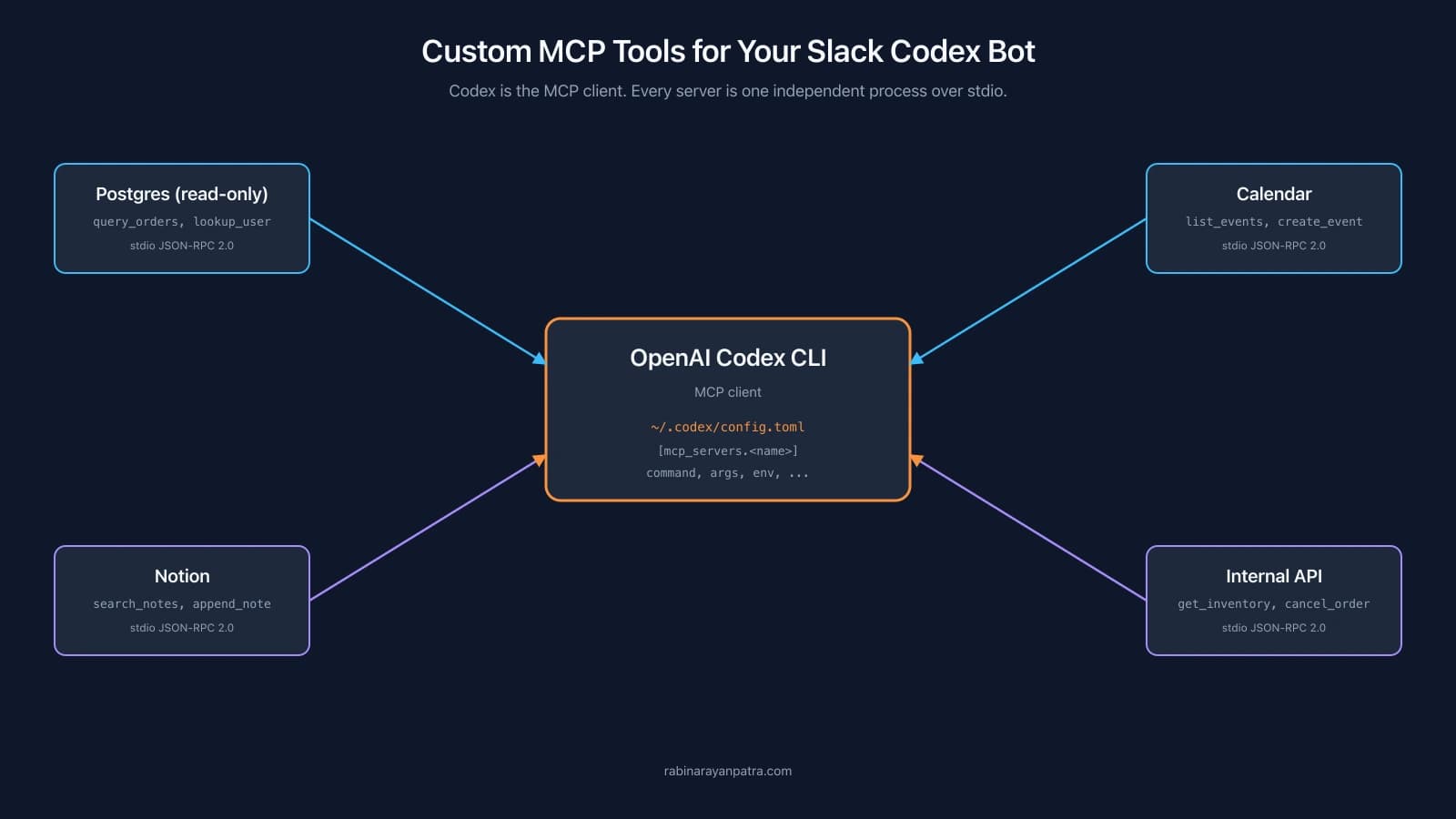

A Slack bot wired to a CLI agent already gets you shell, file editing, and web search out of the box. The moment you point it at the rest of your stack, it becomes the only chat surface you need. is order 9182 still in payment_pending? answers from your read-only Postgres replica. add a 30-min sync with Prem next Tuesday afternoon writes to your calendar. pull the price for this Amazon listing runs a small scraper. None of that involves changing the Slack glue script, the agent CLI binary, or even restarting the bot.
The reason that works is the Model Context Protocol. Every modern agent CLI ships as an MCP client, and any process that speaks JSON-RPC 2.0 over stdio becomes a tool source. This post is the companion to the Slack AI bot setup guide and walks through building, wiring, and operating custom MCP servers for that bot, regardless of whether the agent on the other end is OpenAI Codex, Anthropic Claude Code, or Cursor.
What you get by the end: a fifteen-line Python MCP server that exposes two tools, three short config snippets that wire it into Codex, Claude Code, and Cursor respectively, and an operational pattern that makes the bot safe to share with a small team. The MCP server you write is identical across agents; only the registration file changes.
Why add custom MCP tools when the agent already ships with shell and web_search?
Because shell is the worst possible interface for everything except shell. Asking the agent to figure out which Postgres column to filter on, write the right psql invocation, and parse the result every time you want to look up an order is a recipe for slow runs, hallucinated column names, and the occasional accidentally dropped table. A purpose-built query_orders(status) tool is one line of Python on your side, runs in milliseconds, and is impossible for the model to misuse.
The deeper reason is shape. A tool description tells the LLM what arguments to send and what kind of result to expect. A tool runs deterministically on your hardware with your credentials and your access rules. Together, those two facts mean the agent stops guessing about your internal systems and starts behaving like a thin orchestration layer over functions you have already tested. The model picks the right tool, fills in the arguments, and reads the output. You wrote the function in the language you already use.
Production teams that have used MCP for a few months almost all converge on the same pattern. Wrap read-only paths to internal APIs as MCP tools. Wrap a handful of write paths but gate them behind approvals. Leave everything else to shell. The Slack bot becomes a fast read interface over the systems where reading is cheap and writing is risky, and that is exactly what most chat-driven workflows actually need.
What is MCP and how does an agent CLI talk to MCP servers?
Model Context Protocol is an open spec that defines a JSON-RPC 2.0 conversation between an MCP client and one or more MCP servers. Anthropic published the original spec, and OpenAI's Codex CLI, Anthropic's Claude Code, and Cursor have all implemented the client side. The protocol itself is small: a server advertises a tool catalog with names, descriptions, and JSON schemas, and the client invokes tools by name with arguments.
For any of these CLIs, MCP servers live as child processes that the agent spawns over stdio at session start. The wire format is JSON-RPC 2.0, one message per line, with method names like tools/list and tools/call. From inside the agent session, every MCP tool shows up next to the built-in tools, and the LLM picks whichever one fits the prompt. You do not have to teach the model what your tool does; the docstring you wrote becomes the description it reads.
A few constraints worth knowing before you write anything. MCP servers run as separate processes for a reason: they isolate your tool dependencies from the agent runtime, let you write servers in any language with a JSON-RPC library, and survive a crash without taking the agent down. The agent spawns them on demand and keeps the standard-streams open for the duration of the session. The only thing you ship is the executable and the config that points the agent at it.
How do you build a minimal MCP server in 15 lines of Python?
Install the official Python SDK, write two decorated functions, call mcp.run(). That is the entire scaffold. The SDK auto-generates JSON Schema from your type hints and uses the docstring as the tool description, so a clean signature is the entire UI for the LLM. The same server binary works under any MCP-compliant client.
pip install "mcp[cli]"Save this as ~/my_tools/mcp_server.py:
"""my_tools/mcp_server.py - two-tool MCP server."""
from mcp.server.fastmcp import FastMCP

mcp = FastMCP('my-tools')


@mcp.tool()
def get_weather(city: str) -> str:
    """Current weather for a city. Returns a one-line string."""
    # ...call your weather API here
    return f'sunny in {city}, 24C'


@mcp.tool()
def list_my_tickets(status: str = 'open') -> list[str]:
    """List tickets I own. status: open | closed | all. Defaults to open."""
    # ...query your ticket system here
    return ['TKT-101', 'TKT-205']


if __name__ == '__main__':
mcp.run() # speaks JSON-RPC over stdin/stdoutThat is a working MCP server. Tool names, descriptions, and input schemas are derived from the Python signatures and docstrings. Test it independently of any agent with a quick echo from another shell:
echo '{"jsonrpc":"2.0","id":1,"method":"tools/list"}' | python ~/my_tools/mcp_server.pyYou should see a JSON-RPC response listing get_weather and list_my_tickets with their full schemas. If that works, the server is ready to wire into whichever agent you are running.
Two small details that catch first-timers. The mcp.run() function uses stdio transport by default, which is what every CLI agent expects. If you instead try mcp.run(transport='streamable-http') you switch to the HTTP transport for remote MCP servers, which is a different config story and not what we want for a local Slack bot. And anything you print() from your tools goes to stdout, which is the wire. Use logging with a StreamHandler pointed at stderr instead, or you will corrupt the JSON-RPC stream and watch the agent disconnect.
How do you wire the same MCP server into Codex, Claude Code, and Cursor?
Each agent CLI reads MCP server definitions from its own config file, but the entry shape is conceptually the same: a name, a command, and optional args and env. The server binary stays put; only the three registration files change.
For OpenAI Codex CLI, add a table to ~/.codex/config.toml:
# ~/.codex/config.toml
[mcp_servers.my-tools]
command = "python"
args = ["/Users/you/my_tools/mcp_server.py"]
startup_timeout_sec = 10
tool_timeout_sec = 60Or use the CLI-managed alternative:
codex mcp add my-tools -- python /Users/you/my_tools/mcp_server.pyFor Anthropic Claude Code, drop a .mcp.json at the project root (or anywhere you point Claude with --mcp-config <file>):
{
  "mcpServers": {
    "my-tools": {
      "command": "python",
      "args": ["/Users/you/my_tools/mcp_server.py"]
    }
  }
}For Cursor, the file is .cursor/mcp.json in the project root, with the same JSON shape:
{
  "mcpServers": {
    "my-tools": {
      "command": "python",
      "args": ["/Users/you/my_tools/mcp_server.py"]
    }
  }
}A few config options I reach for almost every time on the Codex side. startup_timeout_sec defaults to ten seconds, which is tight if your server hits a database on import; bump it to thirty if you see startup timeouts. tool_timeout_sec defaults to sixty and is the per-call timeout for any single tool invocation; raise it for tools that touch slow downstream APIs but never set it to infinity because that converts a stuck call into a hung agent. env and env_vars together let you pass secrets without inlining them in the args list, which matters because the args show up in every Codex log line. Claude Code and Cursor expose similar timeout and env knobs in their JSON config; consult their respective references for the exact key names.
After the config change, run codex mcp list (Codex) or restart your claude -p / cursor-agent -p invocation to confirm the new server is picked up. A successful wire-up shows your two tool names in the response alongside the built-in tools. From inside the Slack bot, no glue-script change is needed: the moment the agent picks up the new server on its next spawn, the bot can use the tools.
What custom MCP tools should you build first for a Slack AI bot?
The high-value tools are the boring ones. Anything you currently look up by opening a dashboard tab, copy-pasting a SQL query, or running a curl command three times a week is a candidate. The shape of the function does not matter; the description and the schema do.
A short list of tools that consistently pay off on day one of a self-hosted Slack agent:
| Tool category | Example tool signatures | Why it earns its keep in Slack |
|---|---|---|
| Read-only database | query_orders(status), lookup_user(email) | Answers ops questions like "are there any pending orders for this account?" in seconds. |
| Calendar and tasks | list_events(window), create_event(title, when, with) | "Schedule a 30-min sync with Prem next Tuesday afternoon" lands on the calendar without leaving Slack. |
| Internal API wrapper | get_inventory(sku), cancel_order(id, reason) | Bot becomes the safest interface to your APIs because every call is logged and gated. |
| Note systems | search_notes(query), append_to_note(title, body) | "Add this finding to my project notes" works from any thread without app switching. |
| Site scrapers | scrape_amazon_listing(url), fetch_pdf_text(url) | One-liner replacements for the read-only side of headless-browser scripts you already run locally. |
| Home automation | set_thermostat(c), turn_on_lights(room) | A Home Assistant MCP server makes the bot a smart-home interface that travels with Slack. |
Two principles I keep coming back to. Treat tools as pure functions where possible, idempotent and side-effect-free, because the model will call them eagerly when the prompt sounds even vaguely related. Validate every argument inside the function body and raise with a clear message on bad input, because the JSON Schema is advisory and the LLM does occasionally hallucinate a value that does not match the type hint. Errors propagate back to the model as text, so a sentence that explains what went wrong is often enough for the model to retry with a corrected argument or back off cleanly.
How do you gate destructive MCP tools behind Slack Approve and Deny buttons?
Combine the agent-level approval flag with a per-server policy in the agent's config. The approval request flows through the same JSON event stream as approvals for built-in tools like shell, so the existing Approve and Deny block in your Slack bot picks them up without any code changes.
On Codex, the config delta is one line per server:
[mcp_servers.my-tools]
command = "python"
args = ["/Users/you/my_tools/mcp_server.py"]
default_tools_approval_mode = "on-request"Then run the agent with --ask-for-approval on-request. You can also set the global approval_policy = "on-request" at the top of config.toml, which makes every tool ask before running.
On Claude Code, gate sensitive tools through the CLI permission flags instead. Run with --permission-mode acceptEdits to let safe file edits through without prompting, and use --allowedTools "Bash(git diff *),Read,Edit" to constrain what the agent can do without an approval prompt. Anything outside the --allowedTools allowlist triggers a permission request, which your Slack glue can intercept the same way it does for Codex.
On Cursor, leave --approve-mcps off (the default) for any server that exposes write tools. Cursor will prompt for approval on each tool call, and the prompt becomes a button block in Slack. For the read-only query_orders server you can pass --approve-mcps to skip the prompt and let queries fly.
The companion post on the Slack AI bot setup covers the Slack-side handler that posts the buttons and writes the decision back to the agent; the MCP side does not need any extra code.
For tools that are clearly safe, like read-only queries, you can let them run without prompting on every agent. The mental model is: every write or external mutation goes through the Slack-button gate, every read goes through automatically. That is the right default for most teams. Once you have a few thousand approved tool calls of history, you can decide whether to relax specific tools to auto-approve based on observed patterns.
If you want per-tool control finer than the per-server default, split the server into two: one server for the auto-approve tools, one for the gated ones, each with its own approval policy in the relevant config file. It is more files but cleaner config, and it makes the policy obvious to anyone reading the JSON or TOML.
What production traps will bite you with MCP servers in a Slack bot?
The traps cluster around three sharp edges: stdio hygiene, startup latency, and approval scoping. The fixes are short, but they all show up the first time you run a real workload.
Stdio hygiene comes first because it breaks the loudest. Every print call from your server lands on the agent's stdin and corrupts the JSON-RPC stream, which then disconnects the server mid-session. Configure Python logging with a StreamHandler(sys.stderr) at module load and never call print() from inside a tool. Catch broad exceptions inside each tool and return a sensible error string rather than letting an uncaught exception write a traceback to stdout.
Startup latency adds up when you wire several MCP servers into the same config. Most agents spawn every configured server on session start, so a server that imports SQLAlchemy and opens a database connection at module load adds a second to every CLI invocation. Defer the heavy imports to inside the tool functions, or use startup_timeout_sec (Codex) and the equivalent in Claude Code or Cursor to raise the budget for the slow servers and accept the latency hit. For the Slack bot, a quick spawn is what makes the experience feel snappy, so prefer lazy initialization over upfront connection pools.
Approval scoping is the third trap. The per-server approval policy applies to every tool that server exposes. If you wired a read-only server and a write server under the same registration, every read goes through the same approval flow as every write, and your users will rage-click Approve. Split servers along the read-write axis from day one. It is one extra config entry per server and it makes the operational story honest.
A few smaller details that earn their keep. Treat the MCP server as a deployable artifact and pin its version in requirements.txt, because the JSON-RPC method names have shifted across MCP spec revisions and breaking changes propagate through the client side of the wire. Keep one shared mcp.tool() decorator registry per server so the LLM never sees duplicate tool names. Log every tool call to a file with timestamp, user, tool name, and arguments, because the audit trail is what makes the bot safe to share beyond yourself.
Where does this leave the Slack AI bot?
A bot wired to a CLI agent is already useful. The same bot wired to half a dozen carefully chosen MCP tools is a different category of useful, because every question that used to require switching to a dashboard tab now answers in the same thread you were already in. The pattern scales from one tool to twenty without adding any Slack code, because the LLM does the dispatch and the glue is invisible. And because MCP is agent-agnostic, the work you do here outlives any one CLI: if you switch from Codex to Claude Code or Cursor next quarter, the server stays put, only the registration file changes.
If you stopped at the basic Slack bot in the companion post, the next move is one read-only MCP tool for whichever system you find yourself logging into the most. Pick the boring one. Wrap one read path. Wire it into the relevant config file for the agent you are running. Watch your Slack thread answer a question that used to take three tab switches. The moment that lands, the rest of the tool catalog writes itself.
For more on the protocol and ecosystem, see the MCP specification site, the Python MCP SDK on GitHub, and the Codex MCP configuration reference. For the broader Slack glue side that this post builds on, the companion guide is linked below.
Keep Reading
- How to Build a Self-Hosted Slack AI Bot with any CLI Agent. The base bot this post extends, including Socket Mode setup, the basic glue, the approval flow, and the systemd or launchd service config.
- How to Build a Stateless MCP Server for the 2026-07-28 Spec. A deeper look at the MCP server side, covering the newest stateless transport that future agent versions will speak.
- How to Build an Interactive MCP App with the MCP Apps SDK. What changes when an MCP server hosts an interactive UI rather than only tool functions, useful context for richer Slack workflows.