
Every Python project I join eventually hits the same wall. Someone adds flake8, drops the config into pyproject.toml like every other modern tool expects, runs it, and nothing happens. No error, no warning, just flake8 quietly ignoring the entire file. Then the confusion starts.
This guide walks through how to configure flake8 properly in 2026: what it actually is, where its config really lives, why pyproject.toml is the one file it refuses to read, and whether you should still reach for it now that Ruff exists. Everything here is checked against flake8 7.3.0, released June 2025.
What is flake8 and what does it actually check?
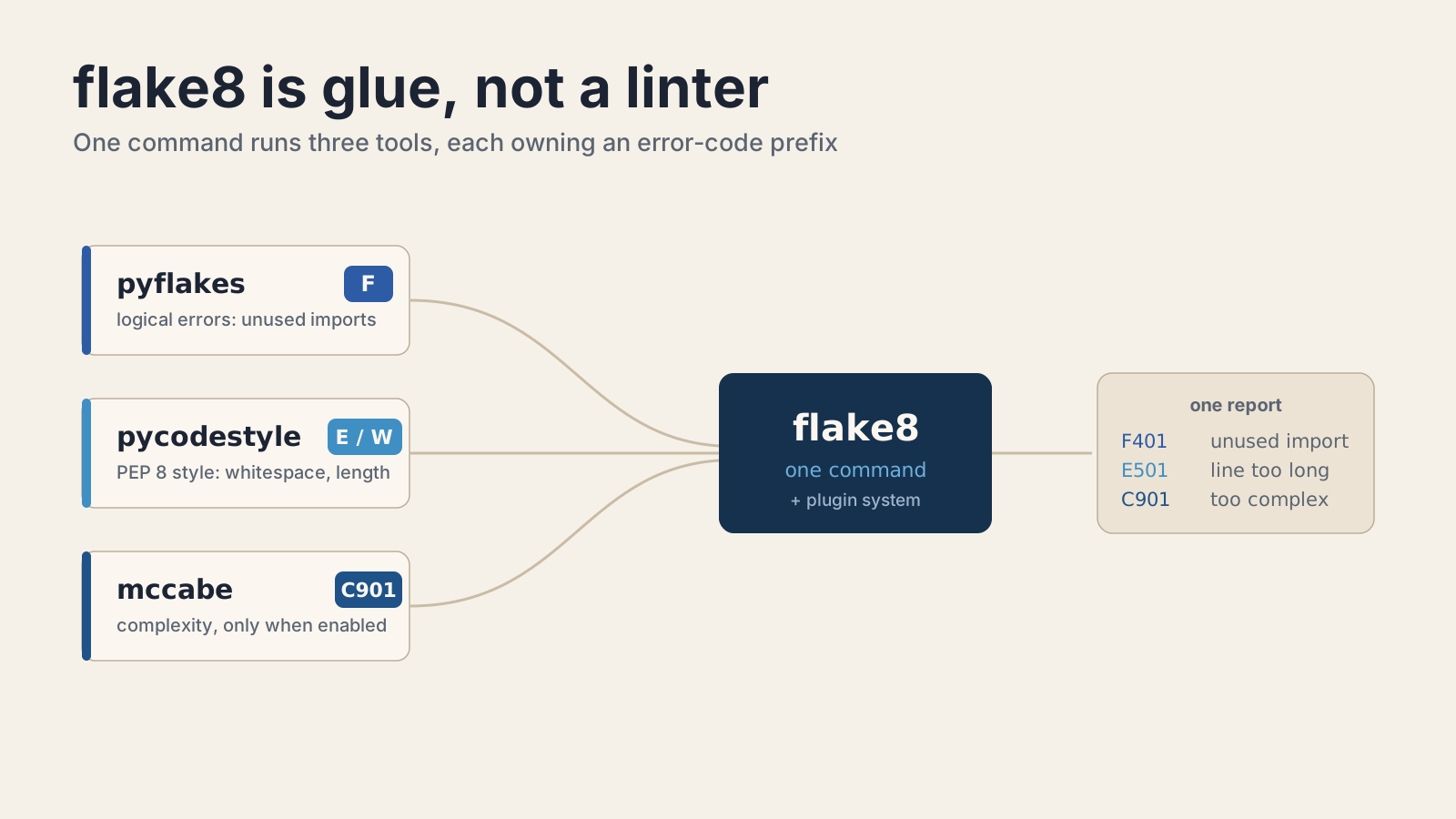
flake8 is not one linter. It is a wrapper that glues three separate tools together behind a single command, then adds a plugin system on top. When you run flake8, you are really running pyflakes, pycodestyle, and mccabe in one pass.
Each tool owns a code prefix, and knowing them makes every flake8 report readable:
- pyflakes finds logical errors: unused imports, undefined names, unused variables. Its codes start with F.
- pycodestyle checks PEP 8 style: whitespace, indentation, line length. It was once called pep8. Its codes start with E (errors) and W (warnings).
- mccabe measures cyclomatic complexity. It emits exactly one code, C901, and only when you turn it on.
flake8 adds one code of its own: E999, which means the file failed to compile at all (a syntax error). So when you see F401, that is pyflakes telling you about an unused import. E501 is pycodestyle complaining about line length. C901 is mccabe saying a function is too complex.
flake8 7.3.0 pins those dependencies tightly: pyflakes 3.4.x, pycodestyle 2.14.x, and mccabe 0.7.x. It runs on Python 3.9 and up. The project lives under PyCQA (the Python Code Quality Authority) and is maintained by Anthony Sottile and Ian Cordasco.
How do you install and run flake8?
Install it with pip and point it at your code. That is the whole starting workflow:
pip install flake8
flake8 .That runs flake8 across the current directory. You can target a specific path or module too:
flake8 src/
python -m flake8 src/The python -m flake8 form is worth remembering. It guarantees you run the flake8 installed in the current environment, which matters the moment you have more than one Python around. On a fresh run with no config, flake8 uses its defaults: 79-character lines and a small built-in ignore list. Most teams change both, which is where config comes in.
Where does flake8 look for its configuration?
flake8 reads three config files, all in INI format under a [flake8] section: setup.cfg, tox.ini, and a dedicated .flake8 file. It does not read anything else, and it does not merge them. It picks one.
I default to a standalone .flake8 file because it keeps linter config out of files that mean other things. Here is a realistic starting point, close to what the official docs recommend:
[flake8]
max-line-length = 88
extend-ignore = E203
exclude = .git,__pycache__,docs/source/conf.py,old,build,dist
max-complexity = 10
per-file-ignores =
__init__.py: F401A few of those options carry sharp edges, so here is what each one actually does:
max-line-lengthdefaults to 79. Setting it to 88 matches Black, which is why most projects use that number.extend-ignoreadds codes to the ignore list without wiping the defaults.ignore(noextend-) replaces the entire default list, which usually is not what you want. Reach for theextend-forms.extend-selectworks the same way for turning checks on. It was added in flake8 4.0.0.excludetakes comma-separated paths and globs that flake8 skips entirely.per-file-ignoreslets you relax rules per file. The__init__.py: F401line above silences unused-import warnings in package init files, where re-exporting is normal.max-complexityturns on the mccabe check. It is off until you set it, soC901never fires until you add a line likemax-complexity = 10.
The extend-ignore = E203 in that example is there for a reason. E203 flags whitespace before a colon, which collides with how Black formats slices. Turning it off is the standard fix for running flake8 and Black together.
Why won't flake8 read your pyproject.toml?
flake8 does not read pyproject.toml, and that is a deliberate decision, not a missing feature. This is the single most common flake8 problem I see, and the answer surprises people: the maintainer has kept the request open for years and does not intend to add it as-is.
The relevant thread is PyCQA/flake8 issue #234, and it is still open. Anthony Sottile's position is direct: "I don't think toml is the way especially with pip continuing to have weird behaviour when the file even exists." His technical objection is real. The mere presence of a pyproject.toml file changes how pip builds a package, because it can force an isolated PEP 517 build. He listed two conditions that would need to hold before he would reconsider: pip no longer changing its behavior based on the file existing, and a standard-library TOML parser. Python 3.11 added tomllib, so half of that is now true, but flake8 7.3.0 still will not read the file.
So what do you do if your project standardizes on pyproject.toml and you want flake8 config to live there too? Use a plugin.
pip install Flake8-pyprojectFlake8-pyproject lets you put your config under a [tool.flake8] section and either keeps working with the normal flake8 command or gives you a flake8p entry point:
[tool.flake8]
max-line-length = 88
extend-ignore = ["E203"]
exclude = [".git", "__pycache__", "build", "dist"]There is also pyproject-flake8 (the pflake8 command), which monkey-patches flake8 to read the file. Both work. I lean toward Flake8-pyproject because it is the lighter touch, but understand that either one is a workaround layered on top of a tool that, by design, still does not natively support the format.
How do you silence a specific warning inline?
Add a # noqa comment to the line, and be specific about which code you are silencing. flake8 gives you two forms, and the difference matters.
A bare # noqa silences every error on that line:
import os # noqaA coded # noqa: E501 silences only that check. Anything else on the line still gets reported, which is exactly what you want:
url = "https://example.com/a/very/long/path/that/breaks/the/line/limit" # noqa: E501You can list several codes with commas, like # noqa: E731,E123, and the comment is case-insensitive. I always prefer the coded form. A bare # noqa is a blunt instrument that hides real bugs the day someone adds a second problem to that line. If you ever need to audit what your # noqa comments are actually hiding, run with --disable-noqa and flake8 reports everything as if the comments were not there.
How do you run flake8 in pre-commit and CI?
Wire flake8 into pre-commit so it runs before code ever reaches a branch. The official hook is published in the flake8 repo, and the setup is a few lines in .pre-commit-config.yaml:
-   repo: https://github.com/pycqa/flake8
    rev: 7.3.0
    hooks:
- id: flake8The docs show rev: '' as a placeholder, but always pin it to a real tag like 7.3.0. An unpinned linter version means your CI can start failing on a Tuesday because a new release added a check, and nobody changed a line of code. For CI itself, there is nothing special to configure. The same flake8 . command that runs locally runs in a GitHub Actions step, reads the same config file, and exits non-zero on any violation. If you are hardening a pipeline, the same discipline I described in enabling npm trusted publishing with OIDC applies here: pin your tool versions and let the config file be the single source of truth.
Which flake8 plugins are worth adding?
Plugins extend flake8 with new checks under their own code prefixes, and installing one is just a pip install into the same environment. Most start reporting immediately, no config required. You can confirm what loaded by running flake8 --version, which lists every active plugin.
The ones I reach for most:
- flake8-bugbear (prefix
B) catches likely bugs and questionable design that pyflakes misses, like mutable default arguments. - flake8-comprehensions (
C4) flags list and dict comprehensions that could be simpler. - flake8-docstrings (
D) checks PEP 257 docstring conventions by wrapping pydocstyle. - pep8-naming (
N) enforces naming conventions for classes, functions, and variables. - flake8-bandit adds security checks, and flake8-comprehensions and flake8-simplify clean up common code smells.
Once a plugin is installed, its codes behave like any other. Turn them on or off with select, ignore, extend-select, and extend-ignore in your config. That is the real strength of flake8: the checker set is yours to compose.
Should you still use flake8 in 2026?
Use flake8 if you depend on a plugin Ruff has not reimplemented. Otherwise, Ruff is probably the better default. That is the honest answer, and it comes straight from Ruff's own documentation rather than my opinion.
Ruff is a linter written in Rust that advertises being "10-100x faster than existing linters (like Flake8)." Its FAQ is refreshingly precise about compatibility. Ruff is a drop-in replacement for flake8 when you use it without many plugins, alongside Black, on Python 3 code. Under those conditions it "implements every rule in Flake8," including all the pyflakes F rules and a large subset of the E and W style rules.
But Ruff names its own limit clearly: "Ruff's primary limitation vis-a-vis Flake8 is that it does not support custom lint rules." That is the line that keeps flake8 alive. If your team relies on an internal flake8 plugin, or a niche community one Ruff has not ported, flake8 is still the tool that can run it. The same goes for a stable, working setup where migration churn buys you nothing. Speed is real, but a linter you have already tuned and trust has value too.
I have migrated projects to Ruff and kept others on flake8, and both calls were right for their context. The mistake is treating it as a moral question. Pick the tool that runs the checks you need, and let the benchmark difference decide only when the checks are equal.
For the details behind everything here, see the flake8 documentation, the still-open pyproject.toml discussion in issue #234, and Ruff's FAQ on flake8 compatibility.
Keep Reading
- How to Enable npm Trusted Publishing with GitHub Actions OIDC. Another piece of a hardened CI pipeline, where pinned tool versions matter just as much.
- How to Check Out Fork PRs Safely in actions/checkout v7. Running linters on untrusted pull requests without opening a security hole.
- How to Serve a React SPA from FastAPI with app.frontend(). More practical Python tooling, this time on the web-serving side.