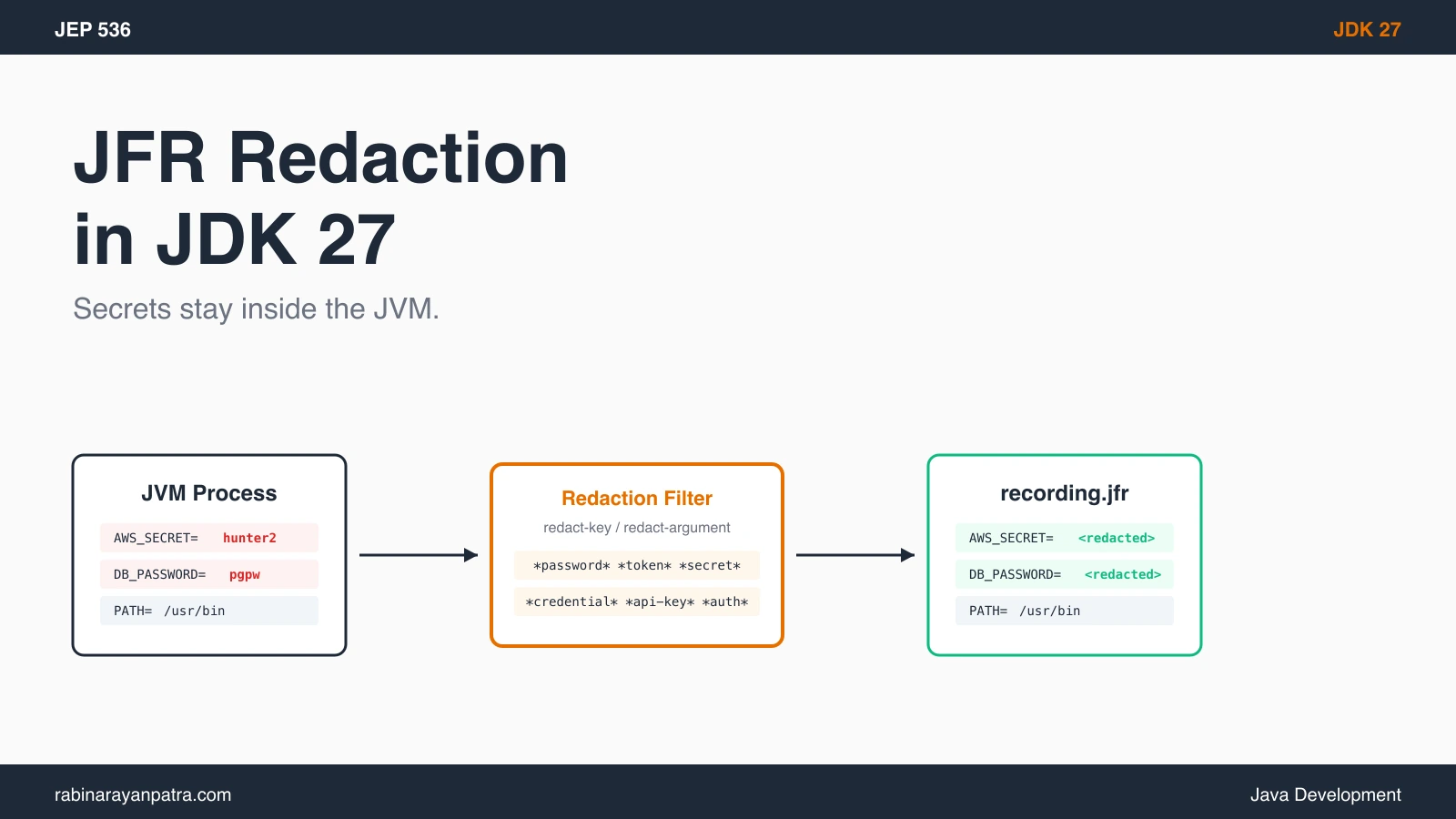

A few months back I shipped a JFR profile to a vendor support ticket. Two days later they came back asking why my AWS access key was in the dump. Turns out Flight Recorder captures every environment variable at startup by default. The AWS_ACCESS_KEY_ID, the JDBC password, the Slack webhook token, all of it sitting in plain text inside recording.jfr.
Rotating keys on a Friday because I forgot what JFR captures was not how I wanted to spend the weekend.
JDK 27 finally fixes this. JEP 536 makes the JVM redact known secret-shaped names from JFR before the recording ever touches disk. No more post-processing scripts. No more "send me the JFR but scrub it first" instructions in tickets. I rebuilt the leak reproduction on JDK 27 Rampdown Phase One, set up a Spring Boot 4.1 service, and put the full redaction config together for this post.
What is JEP 536 and how does it redact secrets in JFR?
JEP 536 enhances Java Flight Recorder to redact sensitive command-line arguments, environment variables, and system properties before the recording file is written to disk. The proposal advanced from Proposed-to-Target to Targeted for JDK 27 in early June 2026 and is included in the Rampdown Phase One build that locks the feature set for the September 2026 release.
JFR has always captured your process bootstrap. Three event types in particular pick up secrets:
jdk.InitialEnvironmentVariable: every env var the JVM saw at launchjdk.InitialSystemProperty: every-Dflag plus the JVM-set propsjdk.JVMInformation: the full command line that started the process
Until JDK 27, the values went straight into the recording file. If you ran java -Dapi.token=hunter2 -jar app.jar or your container set SPRING_DATASOURCE_PASSWORD=hunter2, both ended up in plain text inside any JFR dump anyone could capture.
JEP 536 introduces a filter that runs inside the JVM before the event is written. Two sub-options of -XX:FlightRecorderOptions drive it:
redact-keymatches against the name of an env var, system property, or-Dkey. A match redacts the value.redact-argumentmatches against the value of a command-line argument. A match redacts the whole argument.
The defaults are deliberately greedy. Out of the box the key filter covers patterns like *auth*, *password*, *passwd*, *pwd*, *passphrase*, *token*, *secret*, *credential*, *api-key*, *api_key*, *apikey*, *client-secret*, *private-key*, and *jaas*config*. That covers the names most Java apps actually use. Custom names like INTERNAL_SESSION slip through, which is why the extension syntax matters.
How do you enable default JFR redaction in JDK 27?
Default JFR redaction is on automatically in JDK 27 with no extra flags required. You start a recording the same way you always have:
java -XX:StartFlightRecording=duration=60s,filename=app.jfr \
-jar app.jarInspect what landed in the file with the jfr tool that ships with the JDK:
jfr print --events jdk.InitialEnvironmentVariable app.jfr | head -20On JDK 27 with redaction active, sensitive entries come out as <redacted>:
jdk.InitialEnvironmentVariable {
  startTime = 2026-08-21T09:14:22.001Z
  key = "AWS_SECRET_ACCESS_KEY"
  value = "<redacted>"
}
jdk.InitialEnvironmentVariable {
  startTime = 2026-08-21T09:14:22.001Z
  key = "PATH"
  value = "/usr/local/bin:/usr/bin:/bin"
}
PATH is not on the filter, so it shows through. AWS_SECRET_ACCESS_KEY matches *secret* and gets masked. The key stays visible so you can still tell what was set, just not the value.
For comparison, the same recording on JDK 26 would have printed the actual key value in plain text. Devs running JDK 27 in production right after release will see redaction working without any operational change.
How do you add custom redaction filters?
You add custom filters by passing your patterns to redact-key or redact-argument and prefixing the first one with + to extend the defaults instead of replacing them. The syntax goes into -XX:FlightRecorderOptions using its colon-separated form:
java -XX:FlightRecorderOptions:redact-key='+*confidential*' \
     -XX:StartFlightRecording=duration=60s,filename=app.jfr \
-jar app.jarThe + tells JFR to extend the defaults. Without it, your filter replaces them entirely:
# DANGER: replaces all defaults. Now only INTERNAL_TOKEN is masked.
java -XX:FlightRecorderOptions:redact-key='INTERNAL_TOKEN' \
-jar app.jarMultiple patterns join with ;. Wildcards use *. To extend the defaults with two custom names:
java -XX:FlightRecorderOptions:redact-key='+INTERNAL_TOKEN;*license*' \
-jar app.jarIf you ever need to disable redaction entirely (testing, debugging the filter), pass none:
java -XX:FlightRecorderOptions:'redact-key=none,redact-argument=none' \
-jar app.jarI'd avoid disabling globally. If you need to see an unredacted value during a debug session, capture a fresh recording with the explicit none option in a controlled environment.
How do you redact command-line arguments that contain credentials?
Use redact-argument with a glob pattern that matches the argument shape, such as http://*:*@* for a URL with embedded user:password. By default JFR captures every argument whole inside jdk.JVMInformation. Add an argument filter to mask the matched value:
java -XX:FlightRecorderOptions:redact-argument='http://*:*@*;https://*:*@*' \
-jar app.jar https://admin:hunter2@example.com/apiThe matched argument shows up as <redacted> in the dump. Glob matching applies to the full value, so design patterns that bracket the credentials with enough context to avoid false positives. JDBC URLs are another common case:
java -XX:FlightRecorderOptions:redact-argument='+jdbc:*://*:*@*' \
-jar app.jarThe + again tells JFR to keep its default argument filter and add the JDBC pattern on top.
For Slack webhooks, GitHub tokens passed positionally, or any internal CLI tool with --token=xxx shapes, you build the same way: match the surrounding structure tightly, let the secret get masked.
How do you load redaction filters from a file?
Prefix the filename with @ and pass it through redact-key or redact-argument to load patterns from disk:
java '-XX:FlightRecorderOptions:redact-key=@/etc/jfr-redact-keys.txt,redact-argument=@/etc/jfr-redact-args.txt' \
-jar app.jarThe file holds filters using the same ;-separated syntax as inline values. A typical key file at /etc/jfr-redact-keys.txt:
+*license*;*internal*token*;ACCESS_KEY_ID;SLACK_WEBHOOK
The leading + extends defaults exactly like inline. There is no comment marker in the spec, so don't add #-style lines.
I keep the redaction files in the same Ansible role that provisions our JDK runtimes. That way the redaction policy stays version-controlled alongside the rest of the JVM tuning. A baseline file for our services looks like this:
+*confidential*;INTERNAL_API_TOKEN;GITHUB_APP_PRIVATE_KEY;DD_API_KEY;NEW_RELIC_LICENSE_KEY;*encryption*material*
Ship this file with your container image, point redact-key=@/path/to/keys at it, and every Flight Recorder dump from that image is safe to attach to a support ticket.
How do you verify JFR redaction in a Spring Boot service?
Set a known secret-named environment variable, run your Spring Boot 4.1 service with JFR enabled, then inspect the recording with jfr print to confirm the value shows as <redacted>. Here is a minimal repro you can run locally on JDK 27 Early Access.
@SpringBootApplication
public class DemoApplication {
    public static void main(String[] args) {
        SpringApplication.run(DemoApplication.class, args);
    }
}With application.properties:
spring.datasource.url=jdbc:postgresql://localhost:5432/demo
spring.datasource.username=demo
spring.datasource.password=${SPRING_DATASOURCE_PASSWORD}Set the secret in the environment and launch with JFR:
export SPRING_DATASOURCE_PASSWORD='hunter2-jdbc'
export INTERNAL_SESSION_TOKEN='not-a-real-token'

java -XX:FlightRecorderOptions:redact-key='+*session*token*' \
     -XX:StartFlightRecording=duration=30s,filename=demo.jfr \
-jar target/demo-0.0.1-SNAPSHOT.jarAfter the recording window closes, inspect the relevant events:
jfr print --events jdk.InitialEnvironmentVariable demo.jfr \
| grep -A 2 -E 'SPRING_DATASOURCE_PASSWORD|INTERNAL_SESSION_TOKEN|PATH'You should see:
jdk.InitialEnvironmentVariable {
  key = "SPRING_DATASOURCE_PASSWORD"
  value = "<redacted>"
}
jdk.InitialEnvironmentVariable {
  key = "INTERNAL_SESSION_TOKEN"
  value = "<redacted>"
}
jdk.InitialEnvironmentVariable {
  key = "PATH"
  value = "/usr/local/bin:/usr/bin:/bin"
}
SPRING_DATASOURCE_PASSWORD is caught by the default *password* filter. INTERNAL_SESSION_TOKEN is caught by the custom +*session*token* extension. PATH is untouched because it isn't sensitive.
I keep this exact reproduction inside the integration test suite for our base Java image. CI runs it on every JDK upgrade and fails the build if the redacted values aren't <redacted>. That catches a future regression or a misconfigured Dockerfile that accidentally drops the redaction flags.
What does JFR redaction NOT cover?
JFR redaction handles only command-line arguments, environment variables, and system properties. Heap dumps, custom event payloads, and any data you push into your own JFR events remain your responsibility.
A few specific traps I've watched teams trip on:
- Heap dumps.
-XX:+HeapDumpOnOutOfMemoryErrorproduces an.hproffile outside of JFR's scope. Strings holding secrets at OOM time go straight to disk. Treat heap dumps with the same care as raw JFRs. - Custom JFR events. If your code defines a
@Name("com.example.RequestEvent")and pushes the request body into it, JEP 536 has nothing to do with that payload. You sanitize the body before you callevent.commit(). The same goes for any libraries you embed that emit JFR events. - Method sampling argument captures. JFR's method profiler does not capture argument values by default. If you've extended the profiler or use a third-party agent that does, you re-create the leak. Confirm what your agent records.
- Thread names. Some libraries inject identifiers into thread names. If those identifiers double as secret tokens, they show up in stack samples regardless of JEP 536. Audit thread names if your stack runs anything custom.
- Constants in stack traces. Constant strings in bytecode aren't captured by JFR directly, but they may end up in heap dumps or error messages that flow into logs.
JEP 536 closes the most embarrassing leak path. It doesn't replace a thoughtful secrets policy. Treat any process dump as sensitive by default.
How do you redact older JFR recordings captured before JDK 27?
JEP 536 isn't backported to JDK 21 or JDK 26, and the JFR file format does not retroactively redact already-captured events. Two practical options.
First, treat the older recordings as secret-bearing artifacts. Encrypt them at rest. Restrict access. Rotate any credentials you suspect were captured. If a JFR sat unredacted in S3 for six months, the affected keys are blast-radius candidates whether the file was opened or not.
Second, regenerate the profile on JDK 27 once you upgrade. Reproducing the original incident on the new runtime gets you a clean recording without changing your investigation. For production services running an older LTS, this is the only path. There is no in-place "redact this old file" tool because the redaction depends on JVM-level pattern matching at capture time.
If you want the redaction earlier than your LTS upgrade plan allows, you can run a single non-LTS JDK 27 service for diagnostic-capture purposes only. I've done this for a payment service where rotating leaked credentials was costlier than running two JVM versions side by side for a quarter.
What should you do next with JFR redaction in JDK 27?
Audit every Java service running on JDK 27 to confirm the default filter covers your secret naming convention, then add custom redact-key entries for any internal name that escapes it. The default filter is tuned to common patterns (*password*, *token*, *secret*) but it doesn't know your INTERNAL_API_TOKEN or LICENSE_PUBKEY_FINGERPRINT.
The rollout pattern I'd recommend:
- Dry-run in dev. Spin up your service on JDK 27 with default redaction. Capture a 30-second JFR. Grep the output for any value that should have been redacted but wasn't.
- Author a filter file. Put your internal patterns into
/etc/jfr-redact-keys.txtand/etc/jfr-redact-args.txt. Commit them to the repo that builds your base image. - Wire it into the JVM args. Add
-XX:FlightRecorderOptions:redact-key=@...,redact-argument=@...to your container entrypoint or systemd unit. - Add a CI guard. Run the Spring Boot reproduction from earlier in this post as an integration test. Fail the build if any non-
<redacted>value lands in the dump for a secret-named key. - Document the policy. Tell your incident-response team that JDK 27 JFRs are safe to share with vendors. Older JFRs aren't.
That sequence took us about a sprint to ship across 14 services. The dollar cost of one accidental key disclosure pays it back a hundred times over.
For more on JEP 536 and the JDK 27 release plan, see the JEP 536 specification, the openjdk-dev candidate-JEP thread, and InfoQ's Java News Roundup confirming the JDK 27 targeting.
Keep Reading
- How to Use Post-Quantum TLS in Java 27 (JEP 527). Pairs with this for the full JDK 27 security upgrade story.
- How to Read and Write PEM Files in Java (JDK 27 PEM API). Another JDK 27 security feature you'll want to know.
- Java 26 Structured Concurrency: What Changed in the Sixth Preview. Adjacent JEP work in the preview track.