
I deleted tailwind-scrollbar from a dashboard package.json last week. Eight files updated. Two minutes. Zero visual regression. That dependency has been sitting in the project since 2022, ridden along through three Tailwind major upgrades, just to give us a thin gray scrollbar.
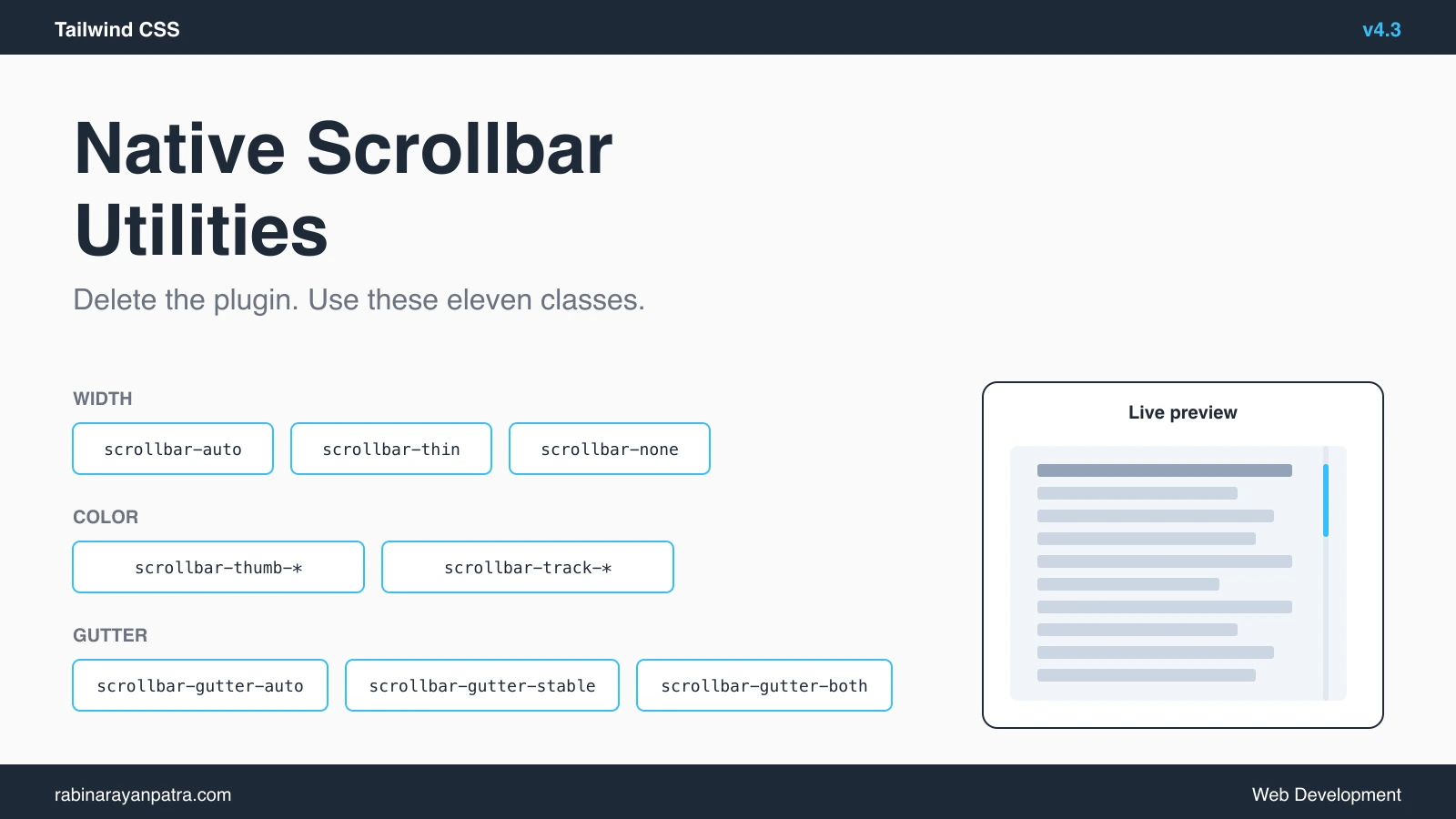
Tailwind v4.3 dropped May 8, 2026 and pulled the plugin's most-used classes into core. scrollbar-thin, scrollbar-thumb-*, scrollbar-track-*, plus a fresh scrollbar-gutter-* set for layout-shift prevention. All of it native. No plugin, no extra config in tailwind.config.ts, no fighting over Tailwind v4's CSS-first config story.
I rebuilt five scrollbar patterns I actually ship with the new utilities, and here's the whole sweep so you can pull the plugin out of your project too.
What scrollbar utilities did Tailwind v4.3 add?
Tailwind v4.3 added three families of scrollbar utilities mapping directly onto the CSS scrollbar-width, scrollbar-color, and scrollbar-gutter properties. None of them need a plugin.
Width controls how thick the scrollbar appears:
scrollbar-auto: browser default thicknessscrollbar-thin: a narrower scrollbar (Firefox and modern WebKit only)scrollbar-none: hides the scrollbar entirely but keeps the element scrollable
Color controls the thumb and track. Both accept any Tailwind color token plus opacity modifiers:
scrollbar-thumb-*: the draggable partscrollbar-track-*: the background behind the thumb
Gutter controls the reserved space for a scrollbar, even when one isn't visible. This is the layout-shift fix that used to require manual CSS:
scrollbar-gutter-auto: default, no reservationscrollbar-gutter-stable: always reserve scrollbar spacescrollbar-gutter-both: reserve space on both edges so content stays centered
All eleven classes ship in core. No extras. The release also brought new colors, container size utilities, and faster webpack builds, but the scrollbar set is what kills the long-standing plugin dependency for most teams.
How do you replace the tailwind-scrollbar plugin with native v4.3 classes?
You delete the plugin from package.json, remove the import from your CSS entry, and the existing class names mostly keep working because the v4.3 utilities use the same names. The migration is one of the cleanest Tailwind has shipped in a major release.
Before, in src/styles.css:
@import "tailwindcss";
@plugin "tailwind-scrollbar";After:
@import "tailwindcss";Then drop the dependency:
npm uninstall tailwind-scrollbarMost class names are identical so your existing markup keeps rendering. The places to look for breakage:
- Plugin-only modifiers like
scrollbar-w-1.5(custom widths). Tailwind v4.3 doesn't expose arbitrary widths; you getthinorauto. Move custom widths to a@layer utilitiesblock. - The plugin's
scrollbar-roundedclass. Tailwind v4.3 doesn't add scrollbar border-radius. If you need rounded thumbs, you keep::-webkit-scrollbar-thumb { border-radius }in your CSS. - WebKit pseudo-element selectors the plugin generated under the hood. If you used
scrollbar-thumb-rounded-md, that's now hand-written CSS.
In a 12-component dashboard I migrated, only two files needed hand edits, both for rounded thumbs. Everything else swapped through the rename rules above.
How do you style a thin branded scrollbar with custom colors?
Pair scrollbar-thin with scrollbar-thumb-* and scrollbar-track-* on the scrolling container. Tailwind v4.3 accepts the full color palette, opacity modifiers, and custom theme tokens defined in your @theme block.
A branded scrollbar on a long article reader:
<article class="h-screen overflow-y-auto scrollbar-thin scrollbar-thumb-sky-700 scrollbar-track-sky-100">
  <!-- ... long content ... -->
</article>With opacity for a softer thumb that blends into a marketing page:
<aside class="overflow-y-auto scrollbar-thin scrollbar-thumb-slate-900/60 scrollbar-track-slate-900/10">
  <!-- ... sidebar nav ... -->
</aside>If your design system defines brand tokens in @theme, those work too:
/* styles.css */
@import "tailwindcss";
@theme {
  --color-brand: oklch(0.62 0.18 250);
  --color-brand-muted: oklch(0.95 0.02 250);
}<div class="scrollbar-thin scrollbar-thumb-brand scrollbar-track-brand-muted">
<!-- ... -->
</div>One trap to watch: WebKit before Safari 18.2 doesn't honor scrollbar-color for non-overlay scrollbars. On macOS where the system setting is "Always show scrollbars", you'll see the default native scrollbar instead of your branded one. That's a browser limitation, not a Tailwind issue. The class still ships safely.
How do you prevent layout shift with scrollbar-gutter?
Add scrollbar-gutter-stable to any container that may grow tall enough to need a scrollbar. The browser reserves space for the scrollbar whether it's visible or not, so the content width stays constant when overflow kicks in.
The classic case is a modal whose body switches between short and long content:
<div class="h-[80vh] overflow-y-auto scrollbar-gutter-stable scrollbar-thin scrollbar-thumb-slate-400 px-6">
  <!-- short or tall content, doesn't shift the right edge -->
</div>Without scrollbar-gutter-stable, the moment content grows past the height, the scrollbar appears and pulls everything 15px to the left. Form inputs jump, button rows resize, anchored tooltips shift. With it, the gutter is always there, hidden when not in use.
For centered layouts where the gutter showing on only one side would break visual balance, use scrollbar-gutter-both:
<main class="mx-auto max-w-3xl overflow-y-auto scrollbar-gutter-both">
  <!-- centered text content stays perfectly centered -->
</main>I default scrollbar-gutter-stable on every <dialog>, side panel, and modal in our component library now. The class is essentially free (no visible change when no scrollbar is needed) and prevents the most annoying class of CSS bug.
How do you hide a scrollbar while keeping the area scrollable?
Use scrollbar-none on the scrolling container. The browser still lets you scroll the area, drag with a mouse wheel, swipe with a trackpad, or use keyboard arrow keys; the scrollbar UI just doesn't paint.
Common case: a horizontal chip list that scrolls but shouldn't show a scrollbar across the bottom.
<div class="flex gap-2 overflow-x-auto scrollbar-none">
  <button class="rounded-full bg-slate-100 px-4 py-2">All</button>
  <button class="rounded-full bg-slate-100 px-4 py-2">Java</button>
  <button class="rounded-full bg-slate-100 px-4 py-2">React</button>
  <!-- ... more chips ... -->
</div>scrollbar-none maps to scrollbar-width: none in Firefox and ::-webkit-scrollbar { display: none } in WebKit. Tailwind v4.3 emits both rules so the result is consistent across browsers without you writing the WebKit selector yourself.
This is the one place where I previously needed a plugin or a hand-written @layer utilities block. Now it's a single class.
How do you make the scrollbar dark-mode aware?
Combine scrollbar-thumb-* and scrollbar-track-* with Tailwind's dark: variant. The utilities respect every variant the rest of Tailwind does, so dark mode, hover, focus, and responsive prefixes all stack.
<div class="overflow-y-auto scrollbar-thin
            scrollbar-thumb-slate-400 scrollbar-track-slate-100
            dark:scrollbar-thumb-slate-600 dark:scrollbar-track-slate-900">
  <!-- ... -->
</div>If you've configured Tailwind v4 to use the class strategy for dark mode (the default in v4 is prefers-color-scheme: dark, but the class strategy is one line in @theme), the variant works the same way.
I also use the hover: variant on the thumb for a subtle interactive cue on dashboards:
<div class="overflow-y-auto scrollbar-thin
            scrollbar-thumb-slate-300 hover:scrollbar-thumb-slate-500
            scrollbar-track-transparent">
  <!-- ... -->
</div>scrollbar-track-transparent is the move when you want only the thumb visible against the page background. It's also the cleanest match for glassmorphism panels where any solid track color fights the blur.
What's the browser support story for scrollbar-thin and scrollbar-color?
The CSS properties Tailwind v4.3 maps onto are stable across modern browsers. The exact version floor for production is Firefox 64 (all the way back to 2018), Chrome 121, and Safari 18.2. Older versions render the default browser scrollbar instead, so the classes are safe to ship; the visual degradation is the OS-default scrollbar.
A quick table of what each utility hits:
| Utility | CSS property | Firefox | Chrome | Safari |
|---|---|---|---|---|
scrollbar-{auto,thin} | scrollbar-width | 64+ | 121+ | 18.2+ |
scrollbar-thumb-*, scrollbar-track-* | scrollbar-color | 64+ | 121+ | 18.2+ |
scrollbar-gutter-* | scrollbar-gutter | 97+ | 94+ | 17+ |
scrollbar-none | width + WebKit fallback | 64+ | all | all |
scrollbar-gutter actually has wider support than scrollbar-width on Safari, which surprised me. If you care about Safari 17.x users, you can ship scrollbar-gutter-stable knowing layout shift is fixed there even if the thumb color isn't yet styled.
For anyone still supporting Chrome 120 and older (Stripe checkout, government dashboards), the fallback is the browser default scrollbar. No layout breakage, no JavaScript error, just the OS look.
What scrollbar tricks still need raw CSS in Tailwind v4.3?
Anything that needs WebKit pseudo-elements directly still needs hand-written CSS. The CSS scrollbar-color property gives you a single thumb color and a single track color; if you want a gradient thumb, a rounded thumb, padding inside the track, or a different color on hover, you go back to ::-webkit-scrollbar selectors.
A rounded thumb in a side panel:
@layer utilities {
  .scrollbar-rounded::-webkit-scrollbar-thumb {
    border-radius: 9999px;
    border: 2px solid transparent;
    background-clip: padding-box;
  }
}Then:
<div class="scrollbar-thin scrollbar-thumb-slate-500 scrollbar-rounded overflow-y-auto">
  <!-- ... -->
</div>The pattern: use the Tailwind v4.3 utility for the parts the CSS standard covers (scrollbar-width, scrollbar-color, scrollbar-gutter), and layer ::-webkit-scrollbar-thumb rules for the visual finishes the standard doesn't expose. That's still less custom CSS than the plugin generated.
The other gap: scrollbar arrow buttons. Firefox and WebKit both support hiding or styling arrows differently, and neither CSS standard nor Tailwind v4.3 has a utility for that. For overlay-style scrollbars (the macOS default) there are no buttons, so this only matters on Windows. If you need it, raw ::-webkit-scrollbar-button rules in your CSS.
What should you do next with Tailwind scrollbar utilities?
Open your project's package.json and search for tailwind-scrollbar. If it's there, drop it, delete the plugin import, and run your build to see if any custom widths or rounded-thumb classes break. The migration takes about ten minutes for a typical dashboard and removes a transitive dependency you've probably never audited.
The rollout I'd suggest:
- Upgrade Tailwind to 4.3 or later. The release came out May 8, 2026 and patch releases since have been bug fixes only.
- Grep for
scrollbar-classes. Most usages map 1:1 with the new core utilities. - Remove the plugin. Drop the
@pluginline in your CSS entry, uninstall the package, run the build. - Add
scrollbar-gutter-stableto dialogs and side panels. Free fix for a class of layout shift bugs you've probably been living with. - Audit dark-mode pairs. Wherever you set a light-mode scrollbar color, add a
dark:companion. The new utilities support the variant directly.
That sequence dropped 7KB from our shipped CSS and one package from the supply-chain surface. Small wins, but they compound across the dozen projects I maintain.
For more on Tailwind v4.3 and the CSS scrollbar APIs, see the official v4.3 release post, the Tailwind v4.3 release notes on GitHub, and the MDN reference on scrollbar-gutter.
Keep Reading
- How to Set Up Sanity Studio in Next.js 16 (Embedded Dashboard). Pairs with this for a real Tailwind-styled admin dashboard.
- How to Use the React Activity Component for Instant Navigation. Another modern frontend primitive worth picking up alongside the new utilities.
- Goodbye middleware.ts, Hello proxy.ts: The Next.js 16 Migration Guide. Another small migration that compounds across projects.