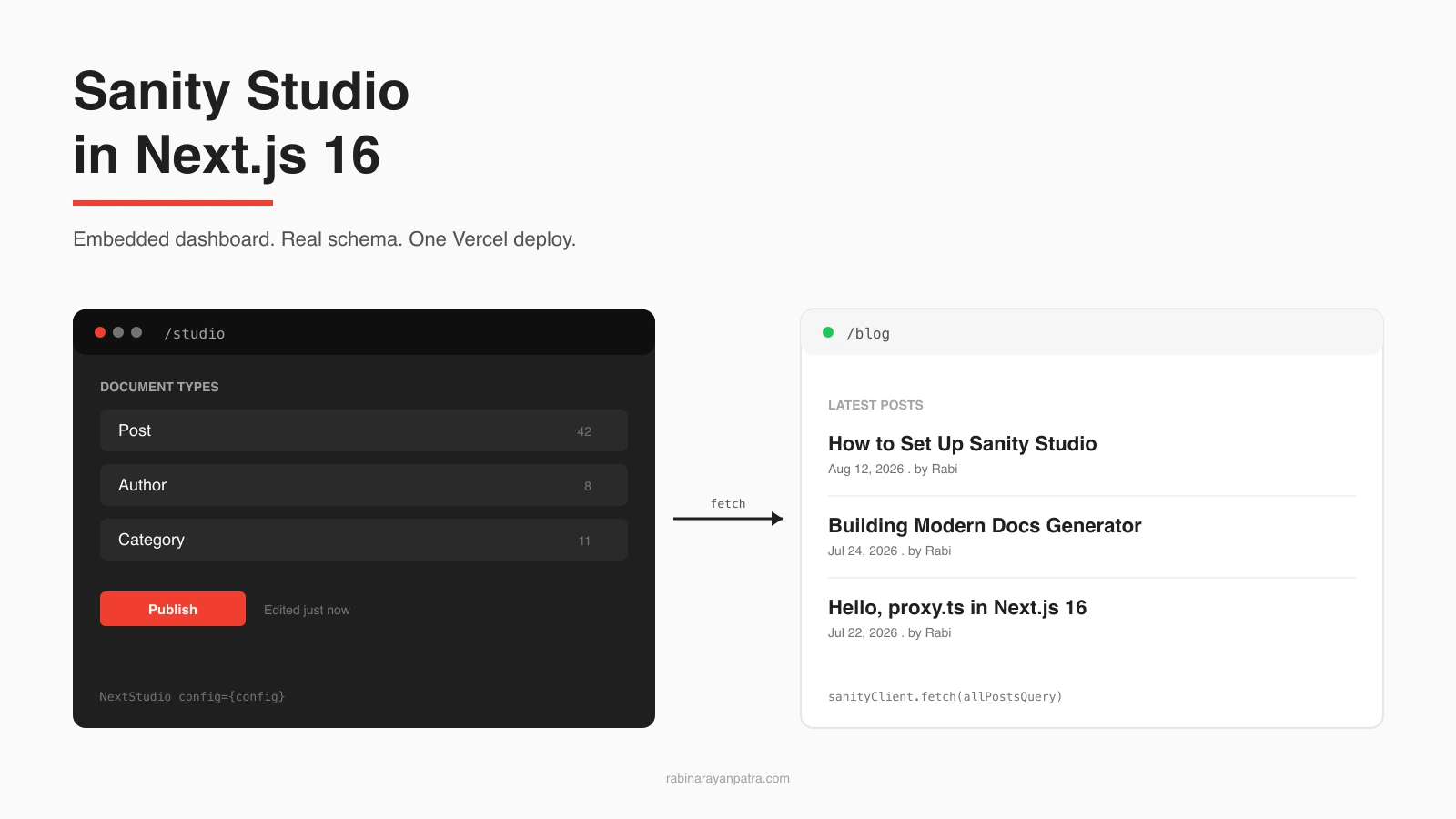

The default mental model for a headless CMS is two places: the CMS dashboard lives over there on the vendor domain, and your site lives over here on Vercel. Editors bounce between tabs, you copy environment variables between systems, and somebody always forgets to allowlist a domain in CORS.
Sanity does not require any of that. The Studio is a React app you ship inside your Next.js project. One catch-all route mounts the editor at /studio, your schemas live in TypeScript next to the rest of your code, and the whole thing deploys on the same Vercel push that ships your blog. This post walks through the full setup for Next.js 16: install, config, a real post + author + category schema, querying from a Server Component, the CORS fix every first-time user hits, and the Vercel deploy.
I built this exact integration into a small content site I run, and I will use that as the running example. If you already have a Next.js 16 app and want a working CMS dashboard inside it by the end of the next hour, you are in the right place.
What is Sanity Studio and why embed it in Next.js?
Sanity Studio is the editor UI that ships with Sanity, a hosted content platform that splits cleanly into two pieces: an open-source React app for editors, and a managed document store called the Content Lake. The Studio is the part you customize. The Lake is the part you query.
The reason to embed it in Next.js, instead of running it on the default sanity.studio subdomain, is that almost every project ends up wanting the same three things. Editors should sign in once on the same domain as the site. Schemas should live in TypeScript next to the components that render them. Deploys should be one Vercel push, not two. Embedding gets you all three for the cost of one catch-all route.
The latest stable release is sanity@5.30.0, with the official Next.js toolkit at next-sanity@13.0.11 as of June 2026. Both target the App Router and React 19, and Sanity migrated its own docs platform to Next.js 16 earlier this year, so the integration path is well-trodden.
What do you need before installing Sanity in Next.js 16?
You need a working Next.js 16 App Router project on Node 20 or newer, plus a free Sanity account. That is the entire prerequisite list.
Concretely:
- Node 20+. The current Studio package drops support for Node 18 and 19. Check with
node -v. - A Next.js 16 app on the App Router. Pages Router works too with a different route file, but this guide assumes App Router because that is what Next.js 16 starters default to.
- A free Sanity account at
sanity.io. The free tier gives you a project, a dataset, three editor seats, and 10k API requests per month, which is enough for a personal site. - A package manager. I use
npm, butpnpmandyarnwork without changes.
If you are starting from scratch, the rest of this guide assumes the same shape as a typical Next.js 16 app: a src/app directory, TypeScript on, Tailwind optional. The same steps apply if you keep app at the repo root.
How do you scaffold Sanity Studio inside an existing Next.js app?
Run npx sanity@latest init at the root of your Next.js project, then install the Next.js bridge package separately. The init command creates the Sanity project on the server, writes a starter sanity.config.ts, and adds a sanity/ directory with example schemas.
The full sequence from a clean Next.js 16 repo:
# 1. Provision the project and write starter config
npx sanity@latest init

# 2. Install the Next.js bridge and the image URL helper
npm install next-sanity @sanity/image-urlWhen sanity init runs, it walks you through a short CLI prompt:
- Sign in with email, GitHub, or Google (browser tab opens).
- Pick "Create new project" and give it a name.
- Pick
productionas the default dataset. - Choose "Yes" when it asks to add the example schema (you will replace it shortly).
- Pick TypeScript and the
npmpackage manager when prompted.
The CLI prints two values at the end: a project ID (an eight-character string) and a dataset name (production). Drop them into .env.local exactly as they are:
# .env.local
NEXT_PUBLIC_SANITY_PROJECT_ID=your_project_id
NEXT_PUBLIC_SANITY_DATASET=production
SANITY_API_READ_TOKEN=optional_for_draftsThe NEXT_PUBLIC_ prefix is required. The Studio runs in the browser and needs to read both values from process.env at build time. The third variable is only needed later if you want the public site to render unpublished drafts for previews.
How do you wire the embedded Studio route at /studio?
Create two files: sanity.config.ts at the project root, and a catch-all route at app/studio/[[...tool]]/page.tsx. The route imports the config and hands it to the NextStudio component, which does the actual rendering.
The config file is where you declare the project ID, dataset, base path, plugins, and your schema list. A minimal version for a blog looks like this:
// sanity.config.ts
import { defineConfig } from 'sanity';
import { structureTool } from 'sanity/structure';
import { visionTool } from '@sanity/vision';
import { schemaTypes } from './sanity/schemaTypes';

export default defineConfig({
  name: 'default',
  title: 'My Blog Studio',
  projectId: process.env.NEXT_PUBLIC_SANITY_PROJECT_ID!,
  dataset: process.env.NEXT_PUBLIC_SANITY_DATASET!,
  basePath: '/studio',
  plugins: [structureTool(), visionTool()],
  schema: { types: schemaTypes },
});Two things matter here. basePath: '/studio' tells the Studio where it is mounted, so internal links point at /studio/structure/post and not the root. plugins always includes structureTool() (the document list and editor) and, for development, visionTool() (a GROQ query playground).
The route file is short. It imports the config, exports the metadata and viewport that next-sanity already prepared, and renders the Studio:
// app/studio/[[...tool]]/page.tsx
import { NextStudio } from 'next-sanity/studio';
import config from '../../../sanity.config';

export const dynamic = 'force-static';
export { metadata, viewport } from 'next-sanity/studio';

export default function StudioPage() {
  return <NextStudio config={config} />;
}force-static makes the route itself a static shell. The Studio is a heavy client bundle and there is no benefit to re-rendering the shell on every request. The actual editor work happens client-side once the shell ships.
Once these two files exist, start the dev server with npm run dev and open http://localhost:3000/studio. The Studio loads, asks you to sign in, and then shows the document list. Right now the list is empty because you have not defined any schema types yet.
Source: Sanity Learn: Day one with Sanity Studio
The screenshot above is from the official Sanity learn course, showing the Studio chrome and the document creation menu populated by schema types. Once you add the schemas in the next section, your menu will show Post, Author, and Category in place of those examples.
This three-layer architecture is the part that makes the embedded approach worthwhile. The same browser session talks to two Next.js routes that talk to the same Sanity project, with the editor on the write path and the public pages on the read path:
How do you write a real content schema (post + author + category)?
Create a sanity/schemaTypes/ directory with one file per document type, then export them as an array from sanity/schemaTypes/index.ts. Each file describes the shape of one document using the defineType and defineField helpers from the sanity package.
For a blog you want three documents. A post holds the article. An author holds the person who wrote it. A category groups posts. Posts reference authors and categories, so editors fill in those fields with a dropdown instead of free text.
Start with post.ts:
// sanity/schemaTypes/post.ts
import { defineField, defineType } from 'sanity';

export const post = defineType({
  name: 'post',
  title: 'Post',
  type: 'document',
  fields: [
    defineField({
      name: 'title',
      type: 'string',
      validation: (r) => r.required().max(80),
    }),
    defineField({
      name: 'slug',
      type: 'slug',
      options: { source: 'title', maxLength: 96 },
      validation: (r) => r.required(),
    }),
    defineField({ name: 'author', type: 'reference', to: [{ type: 'author' }] }),
    defineField({
      name: 'category',
      type: 'reference',
      to: [{ type: 'category' }],
    }),
    defineField({
      name: 'mainImage',
      type: 'image',
      options: { hotspot: true },
      fields: [{ name: 'alt', type: 'string', title: 'Alt text' }],
    }),
    defineField({ name: 'publishedAt', type: 'datetime' }),
    defineField({ name: 'body', type: 'blockContent' }),
  ],
});A few choices worth flagging. validation: r => r.required().max(80) runs in the Studio in real time, so editors see the red warning the moment a title is empty or too long. options: { source: 'title' } on the slug field wires up the "Generate" button, which converts the title to a URL slug. options: { hotspot: true } on the image field lets editors pick a focal point so Sanity can crop responsively without cutting off heads.
author.ts and category.ts are smaller:
// sanity/schemaTypes/author.ts
import { defineField, defineType } from 'sanity';

export const author = defineType({
  name: 'author',
  title: 'Author',
  type: 'document',
  fields: [
    defineField({ name: 'name', type: 'string', validation: (r) => r.required() }),
    defineField({
      name: 'slug',
      type: 'slug',
      options: { source: 'name' },
      validation: (r) => r.required(),
    }),
    defineField({ name: 'avatar', type: 'image', options: { hotspot: true } }),
    defineField({ name: 'bio', type: 'text', rows: 3 }),
  ],
});// sanity/schemaTypes/category.ts
import { defineField, defineType } from 'sanity';
export const category = defineType({
name: 'category',
title: 'Category',
type: 'document',
fields: [
defineField({ name: 'title', type: 'string', validation: (r) => r.required() }),
defineField({
name: 'slug',
type: 'slug',
options: { source: 'title' },
validation: (r) => r.required(),
}),
defineField({ name: 'description', type: 'text', rows: 2 }),
],
});The blockContent type that the post body uses is the portable text format Sanity ships for rich text. It is a one-line export:
// sanity/schemaTypes/blockContent.ts
import { defineType } from 'sanity';

export const blockContent = defineType({
  name: 'blockContent',
  title: 'Block Content',
  type: 'array',
  of: [{ type: 'block' }, { type: 'image', options: { hotspot: true } }],
});The index file wires them together:
// sanity/schemaTypes/index.ts
import { post } from './post';
import { author } from './author';
import { category } from './category';
import { blockContent } from './blockContent';

export const schemaTypes = [post, author, category, blockContent];Reload http://localhost:3000/studio. The Studio picks up the new types and the document list now shows Post, Author, and Category. Create one of each. The reference fields will let you link a post to the author and category you just made.
Source: Sanity Learn: Day one with Sanity Studio
This is what the editor looks like for a real document: the list pane on the left, the document with its declared fields on the right, drafts and publish state at the top. With the schema above, your screen looks the same shape, with your post fields in place of the Name shown here.
How do you query Sanity content from a Server Component?
Create a thin client wrapper at lib/sanity/client.ts, then import it from any Server Component that needs to render content. The client uses GROQ, Sanity's query language, which feels like JSON Path with projections.
The wrapper is short:
// lib/sanity/client.ts
import { createClient } from 'next-sanity';

export const sanityClient = createClient({
  projectId: process.env.NEXT_PUBLIC_SANITY_PROJECT_ID!,
  dataset: process.env.NEXT_PUBLIC_SANITY_DATASET!,
  apiVersion: '2026-06-01',
  useCdn: true,
});

export const allPostsQuery = `*[_type == "post"] | order(publishedAt desc) {
  _id,
  title,
  "slug": slug.current,
  publishedAt,
  "author": author->name,
  "category": category->title
}`;A few specifics. apiVersion is a calendar date that pins query behavior, so a Sanity-side change does not silently alter your responses. Update it when you adopt a new feature. useCdn: true reads from the public CDN, which is fast and free for published content. Set it to false for draft previews where you want fresh data.
GROQ itself is compact. *[_type == "post"] filters every document by type. The | pipe sorts. The projection block at the end picks fields and rewrites them: "slug": slug.current flattens the slug object to a string, and "author": author->name follows the reference and pulls the author's name in one query.
A Server Component that lists posts is then just:
// app/blog/page.tsx
import { sanityClient, allPostsQuery } from '@/lib/sanity/client';

type PostRow = {
  _id: string;
  title: string;
  slug: string;
  publishedAt: string;
  author: string;
  category: string;
};

export default async function BlogIndexPage() {
  const posts = await sanityClient.fetch<PostRow[]>(allPostsQuery);
  return (
    <ul>
      {posts.map((p) => (
        <li key={p._id}>
          <a href={`/blog/${p.slug}`}>{p.title}</a>
          <span>
            {' '}
            by {p.author} in {p.category}
          </span>
        </li>
      ))}
    </ul>
  );
}This is a Server Component, so the query runs at request time on Vercel, not in the browser. The response is HTML by the time it reaches the user. For static caching, swap to Cache Components with 'use cache' and a cacheTag keyed off post, and trigger revalidation from a Sanity webhook on publish.
How do you configure CORS so the Studio talks to your project?
Open manage.sanity.io, pick your project, go to API, scroll to CORS origins, and add every origin where the embedded Studio will run. Each entry needs the "Allow credentials" toggle turned on.
The minimum allowlist for a Vercel-hosted Next.js app is three rows:
| Origin | When it matters | Allow credentials |
|---|---|---|
http://localhost:3000 | Local dev | ON |
https://www.your-domain.com | Production | ON |
https://preview-*.your-domain.vercel.app | Vercel preview URLs | ON |
The reason "Allow credentials" must be ON is that the embedded Studio sends the Sanity editor session cookie on every API call. Without that toggle, the browser strips the cookie before sending the request, Sanity sees an anonymous call, and you get a blank Studio with a console error like CORS policy: No 'Access-Control-Allow-Credentials' header is present on the requested resource. It is the single most common failure when first setting up the embedded Studio.
Restart npm run dev after adding the localhost entry. The dev server picks up the new CORS allowance on the next page load, and the Studio finishes mounting instead of stalling on the login screen.
How do you deploy the embedded Studio to Vercel?
Add the two NEXT_PUBLIC_SANITY_* env vars to your Vercel project, push the branch, and the embedded Studio is reachable at your-domain.com/studio as soon as the deploy goes green. There is no separate Sanity build step.
The full Vercel checklist:
- Environment variables. In the Vercel dashboard, go to your project, then Settings, then Environment Variables. Add
NEXT_PUBLIC_SANITY_PROJECT_IDandNEXT_PUBLIC_SANITY_DATASETfor all three environments (Production, Preview, Development). AddSANITY_API_READ_TOKENonly if you wired the draft preview flow. - CORS for production and preview URLs. Back in
manage.sanity.io, make sure bothhttps://www.your-domain.comandhttps://*-your-team.vercel.appare in the CORS allowlist with credentials on. Preview URLs change per commit, so the wildcard saves you from re-adding them on every branch. - Push. The next push triggers a Vercel build. The build compiles the Studio bundle as part of the Next.js build and ships it as a static route, so cold starts are not part of the editor experience.
- Test the editor. Open
https://www.your-domain.com/studio, sign in, create a document, and confirm the content shows up on the public route.
You can skip the hosted sanity.studio deployment entirely. That product is useful when you want the editor on a different domain from the marketing site (for example, when the marketing site is on a different stack), but for a single Next.js app, the embedded route is fewer moving parts.
What are the common pitfalls in a Next.js 16 + Sanity setup?
Most first-run problems come from four places: missing env vars at build time, missing CORS entries, the wrong apiVersion, and treating the Studio as a normal Next.js route.
In order of how often I have hit them:
process.env.NEXT_PUBLIC_SANITY_PROJECT_IDis undefined in production. Vercel does not read.env.local. Set the variables in the dashboard with theNEXT_PUBLIC_prefix exactly, then redeploy. A redeploy is required for env changes to take effect.- CORS blank screen on preview URLs. Vercel preview URLs change per branch. Add
https://*-your-team.vercel.apponce instead of one entry per branch. - Stale data after publishing. If you have ISR or Cache Components on the read path, publish events do not invalidate them automatically. Wire a Sanity webhook to a Next.js route that calls
revalidateTagorupdateTagon publish. - Studio is wrapped in your site layout. The catch-all route under
app/studio/[[...tool]]/page.tsxinherits any layout above it. If your root layout adds a navbar or padding, the Studio renders inside it. Wrap the Studio route in its own segment with a layout that returns the children as-is, so the editor takes the full viewport.
If you build the site on the same Next.js 16 stack I write about, you have probably already seen related setups in the proxy.ts post about routing middleware and the docs generator post about content-driven pages. The Sanity Studio embed is the read/write half of the same problem those posts cover from the routing and rendering sides.
What did we just build?
A real CMS dashboard at /studio inside a Next.js 16 app, backed by a typed schema for posts, authors, and categories, queried from Server Components, with CORS configured for local and production, deployed on the same Vercel build as the public site. No extra infrastructure, no second domain, no separate auth flow. The whole thing fits in two config files, one route, and a sanity/ directory.
The next step depends on what you ship next. If editors will write drafts you want to preview before publishing, set up the Presentation tool and a draft-mode route on the Next.js side. If you want to render rich text from the body field, install @portabletext/react and write a custom renderer for your design system. If you want full-text search, add searchTool to the plugins list and you get a search bar in the Studio header for free.
For reference, the primary docs I used while writing this are the official Next.js integration guide, the embedding Sanity Studio doc, the Sanity Studio installation requirements, the next-sanity toolkit on GitHub, and the Sanity platform changelog covering the Next.js 16 migration. The Studio screenshots in this post are from the Day One with Sanity Studio learn course on the Sanity site.