
I opened my laptop Wednesday morning to a PR that had already fixed its own CI failure. Claude had seen the red X, read the error, written the fix, and pushed it to the branch. I hadn't touched anything since the night before.
That's the idea behind Routines, the standout announcement from Anthropic's Code with Claude 2026 conference on May 6 in San Francisco. And if you're using Claude Code regularly, it changes how your days actually run.
This post covers what shipped, how the individual features work, and what you should actually try first.
What are Claude Code Routines?
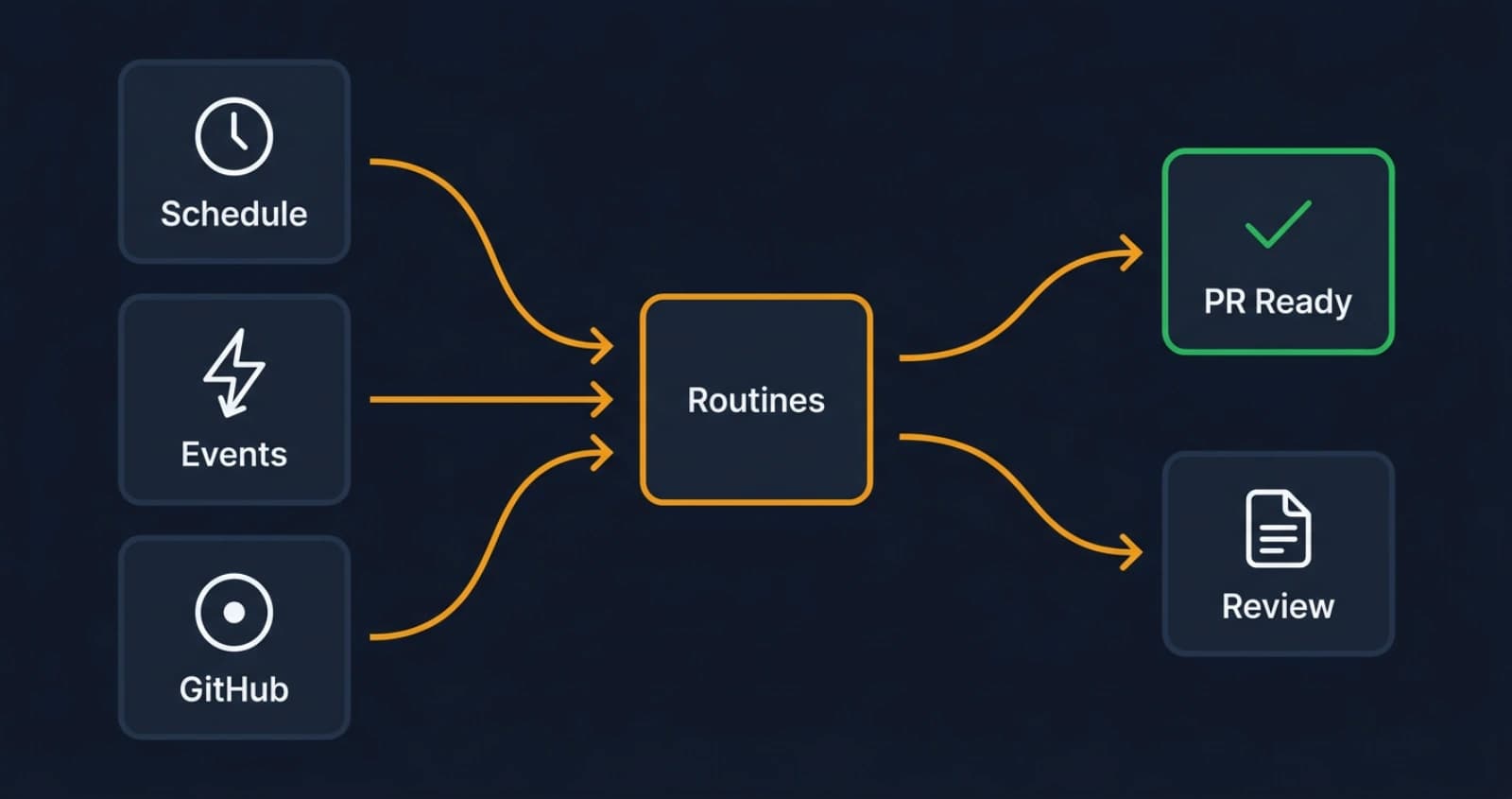
Routines are saved Claude Code configurations that trigger on a schedule, an API call, or a GitHub event, running on Anthropic's cloud infrastructure while your laptop is off.
The typical use cases: a nightly scan of open PRs flagging anything stale, an automatic code review triggered when a PR opens against main, a weekly dependency audit that files issues for anything out of date, or a doc sync that runs after every merge to keep documentation aligned with the code.
Boris Cherny, who leads Claude Code at Anthropic, described the target experience: "Developers can setup async automations and wake up to PRs that are ready to merge." You finish your day, the work continues without you, and you pick it up in the morning with less noise.
The key difference from a simple cron job is that Claude has full context of your repository. It isn't running a script with hard-coded rules. It's reading your code, your PR descriptions, your test output, and making judgment calls the same way it would in an interactive session.
What kinds of automations make sense?
The clearest wins are for work that's mechanical and repetitive but still requires reading code:
- Morning PR triage: Claude reviews every open PR, summarizes what's blocking it, and flags the ones that need your attention.
- Nightly CI failure analysis: If builds broke overnight, Claude reads the logs, categorizes the failures, and prepares a report.
- Post-merge doc sync: After a PR merges, Claude checks whether the docs still match the changed code and opens an issue (or a PR) if they don't.
- Security review on open PRs: Claude runs a security pass on any PR that touches auth, payments, or data handling.
These are things most teams want but never get around to automating because the tooling complexity isn't worth it for a one-person project. Routines make it worth it.
How does the CI auto-fix feature work?
When CI fails on your PR, Claude reads the error output, investigates what broke, writes a fix, and pushes it to the branch with an explanation of what it changed. The stated goal from the team: "The person who owns the PR is never going to see a red X."
In practice, Claude is watching your PR pipeline. A test failure gets diagnosed and patched. A lint error gets fixed and pushed. An import that broke after a rename gets traced back and updated. It's not redesigning your code. It's handling the mechanical cleanup that usually eats 15 minutes of your morning.
A companion feature, auto-merge, takes it one step further. Once all checks pass, Claude can merge the PR automatically. You configure whether you want the auto-fix only, the auto-merge only, or the full pipeline. The default is conservative: fix and wait for your approval to merge.
A few things to understand about what it won't do well: if CI is failing because a database migration conflicts with a new schema expectation, that's a judgment call Claude shouldn't make alone. If the failure is architectural, it'll flag it and wait rather than guess. The feature is designed for the common case of fixable failures, and from my experience, that covers the majority of CI red marks on any active branch.
How does Code Review work in the desktop app?
Claude Code Review shipped alongside Routines and is already in use across every team at Anthropic. It reviews your local diff before you push, leaving comments in the desktop diff view directly.
The comments surface bugs it spotted, suggestions for the change, and potential issues. You can ask Claude to address any of its own comments and it'll revise the diff. It's an interactive loop before the code ever leaves your machine.
I've been using it on this portfolio's codebase and the most useful thing it does is catch what you stop seeing after staring at the same file for an hour. A variable that shadows a parameter. A missing null check on an API response. The kind of thing that gets through your own review because your brain fills in the expected behavior.
It doesn't replace a human reviewer for architectural decisions. For the mechanical layer of review, though, it's catching things before they hit your team and before they hit CI.
What else shipped at Code with Claude 2026?
Beyond the workflow automation features, a few other changes are worth knowing.
Rate limits: Claude Code five-hour limits were doubled for Pro, Max, Team, and Enterprise plans. Peak-hours throttling for Pro and Max accounts is gone. Opus API rate limits got a substantial increase.
Capacity: The rate limit headroom comes from the SpaceX Colossus data center partnership. Anthropic is taking on more than 300 megawatts from Colossus, translating to over 220,000 NVIDIA GPUs coming online within the month. The API volume signal that drove this: Anthropic's API usage is up 17x year over year.
Managed agent capabilities: Anthropic announced three new features for multi-agent work. Multi-agent orchestration (public beta) lets you spin up fleets of agents for complex tasks. Outcomes (public beta) lets you set success criteria so Claude iterates independently until it meets them. Dreaming (research preview) is more experimental: Claude inspects its own previous sessions, identifies what it missed, and self-improves over time.
The scale context: Mercado Libre has 23,000 engineers and is targeting 90% autonomous coding by Q3 2026. That number tells you what direction the industry is moving, and why Anthropic needed the Colossus capacity this month.
The conference itself continues: London on May 19, Tokyo on June 10. Additional features may ship through May.
Where should you start with these features?
If you're already on Claude Code Max or Pro, the doubled rate limits are already in effect. Nothing to configure.
For Routines and CI auto-fix, rollout is happening through May. The fastest way to evaluate CI auto-fix: pick a branch where you're actively working and CI fails regularly. Let Claude handle the mechanical failures. You'll see quickly what it gets right and where it needs a clearer repo setup.
For Code Review, it's in the desktop app now. Open a diff you're about to push, run the review, and compare what it flags to your own manual pass. You'll know in about five minutes whether it's catching things you'd miss.
The one thing I'd push back on: it's tempting to automate everything immediately. Start with one Routine that solves a specific pain point, watch how it behaves over a week, then add more. Claude Code has full repo context, but the automation is only as good as the task definition you give it.
My setup: CI auto-fix on the dev branch, morning PR summary routine, and Code Review before every push. That's it for now. The rate limits being doubled means I'm not holding back on interactive sessions to save headroom, which is the real quality-of-life change from this release.
For more details on how Routines and CI auto-fix work, see Claude Code's documentation at code.claude.com and Simon Willison's Code with Claude 2026 live blog. Anthropic's blog post Preview, review, and merge with Claude Code covers the desktop Code Review and auto-merge pipeline.
Keep Reading
- Claude Skills vs MCP vs Projects: What's the Difference?. Understand how Routines fit into Claude's broader tool architecture before building automations on top of it.
- Vercel AI Gateway Deep Dive. If you're building on the Claude API behind Routines, the AI Gateway handles routing, fallbacks, and observability at the API layer.
- Claude Opus 4.7 Release and Migration Guide. The model powering these features, and what changed in the version your Routines will run on.