
I spent a weekend rebuilding my blog's assistant setup three times. First with Claude Projects, then with an MCP server, then with Skills. Each time I thought I had the right answer. Each time I was wrong, but for a different reason.
The fourth attempt got me where I wanted to go, and the fix was embarrassing. I did not need to pick one. I needed all three, doing different jobs. This post is the guide I wish I had read before burning 20 hours figuring that out. If you are trying to decide between Claude Skills, MCP servers, and Projects, here is the honest comparison with token costs, pricing, and a decision framework that actually works.
Source: Anthropic Agent Skills documentation
What actually is a Claude Skill, an MCP server, and a Project?
A Claude Skill is a folder of instructions that Claude loads on demand, an MCP server is a program that exposes tools and data to Claude over a standard protocol, and a Project is a persistent workspace with a knowledge base and custom instructions scoped to one body of work. Same AI model, three different ways to extend what it knows and what it can do.
The cleanest framing I have seen comes from Anthropic's own team. They describe it like this. Projects say "here is what you need to know." Skills say "here is how to do things." MCP says "here is a tool you can use." If you want an even simpler analogy, MCP hands Claude a hammer, Skills teach it how to drive nails, and Projects are the workshop where the blueprints live.
Here is what each one actually looks like on disk or in the API.
A Skill is a folder with a SKILL.md file at the root. The top of that file is YAML frontmatter with two required fields, name and description. Everything below the frontmatter is markdown instructions. You can include helper files and executable scripts alongside SKILL.md, and Claude will read or run them only when the task needs them.
---
name: pdf-processing
description: Extract text and tables from PDF files, fill forms, merge documents. Use when working with PDF files or when the user mentions PDFs, forms, or document extraction.
---

# PDF Processing

## Quick start

Use pdfplumber to extract text from PDFs.

For advanced form filling, see [FORMS.md](FORMS.md).An MCP server is a separate process. It speaks JSON-RPC 2.0 over either stdin/stdout for local use or Streamable HTTP for remote use. Claude Code or Claude Desktop spawns an MCP client that connects to the server, negotiates capabilities, and then calls the tools the server exposes.
Architecture based on the Model Context Protocol architecture overview
{
  "jsonrpc": "2.0",
  "id": 3,
  "method": "tools/call",
  "params": {
    "name": "weather_current",
    "arguments": {
      "location": "San Francisco",
      "units": "imperial"
    }
  }
}A Project is a workspace inside claude.ai. You click New Project, give it a name, paste in custom instructions, and upload files to its knowledge base. Everything you upload becomes available in every chat inside that project. No YAML, no server, just a scoped conversation bucket with a big context window attached to it.
Those three shapes matter because they drive every tradeoff that follows. A folder of markdown is cheap to write and cheap to load. A separate process is powerful but expensive in both setup and context. A workspace is great for scoping but has no way to do things, only to remember things.
How does each one load into Claude's context?
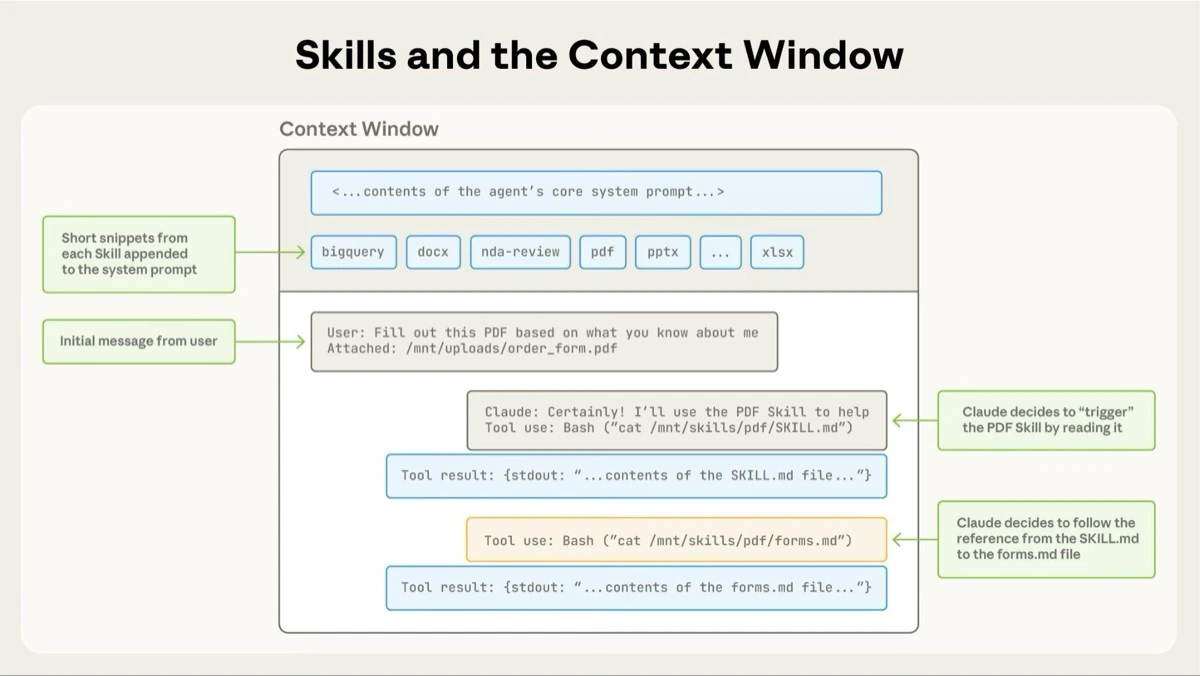
Skills load in three stages using progressive disclosure, MCP loads its entire tool schema upfront on every request, and Projects load their knowledge base statically whenever you are inside the project. This is the single most important difference between them, and nobody explains it clearly.
Let me break down exactly what enters Claude's context window in each case.
Skills use progressive disclosure. At startup, Claude only sees the name and description from the YAML frontmatter. That costs about 100 tokens per skill. You can install dozens of skills and Claude still only pays that flat 100-token entry fee for each one. When your request matches a skill's description, Claude reads the full SKILL.md body via bash. That adds under 5,000 tokens. If SKILL.md references another file, say FORMS.md or scripts/validate.py, Claude reads or runs that file only when the task actually needs it. Scripts are especially efficient. When Claude runs a script, the code itself never enters context. Only the script's output does.
Source: Anthropic Agent Skills documentation
MCP does the opposite. When Claude connects to an MCP server, it calls tools/list and loads the full JSON schema of every tool the server exposes. That schema stays in context for the whole session. GitHub's official MCP server, which exposes roughly 80 tools, costs tens of thousands of tokens just to load the tool definitions. You pay that upfront, every single conversation, whether you use GitHub or not.
Projects load their knowledge base statically. When you open a chat inside a project, the custom instructions and uploaded files are always in context. If your project knowledge base is small, it all fits. If it is large, Claude quietly switches to RAG mode and retrieves the relevant chunks instead, which can expand usable capacity by up to ten times but trades determinism for retrieval accuracy.
The practical consequence is simple. Skills scale to many capabilities without bloating context. MCP gives you raw power at a real token cost. Projects are static, so they work well when the knowledge base matches the work but feel wasteful when you keep opening a big project to ask small questions.
When should you reach for a Skill instead of a Project?
Reach for a Skill when you are encoding a repeatable procedure, and use a Project when you are scoping a body of knowledge. The split is procedure versus context. Skills travel with you. Projects pin context to one workspace.
Here is the test I use. If I find myself copying the same instruction block into three different chats, that instruction should be a Skill. If I keep uploading the same PDF to three different chats, that PDF should be in a Project. If I keep doing both, the Project holds the PDF and the Skill handles the instructions.
A concrete example from my own setup. I write blog posts on rabinarayanpatra.com, and I have strict standards for how every post should be structured. H2 headings must be questions. First sentence after each H2 must answer it. No em dashes. No AI-tell words from my banned list. I used to paste those rules into every chat. That was fine until I started writing posts across three different projects. Then I had the same rules pasted three times, drifting slightly each time.
I moved the rules into a Skill called blog-standards. Now any chat, in any project or none, can load those rules on demand. The project for my portfolio still exists, but it holds my actual post drafts and research, not the rules for writing them.
That split feels obvious in hindsight. Before I made it, I was using Projects as a dumping ground for both knowledge and procedure, and it was bloating every conversation.
Another clean test is portability. Skills work everywhere. Create a skill once, and it is available in regular chats, inside any project, across all surfaces where Skills are supported. Projects are scoped by definition. You cannot take a project with you into a regular chat. If the thing you are teaching Claude needs to apply in many contexts, it is a Skill.
When does MCP beat a Skill, and when does it lose?
MCP beats a Skill when Claude needs to reach external systems that Skills cannot touch, and MCP loses when the task is really about procedural knowledge dressed up as tool calls. The line is reachability. MCP can talk to your database, your Jira, your production API, your Slack. Skills cannot. Skills run in a sandbox without network access on the API, or with user-machine access in Claude Code.
Start with the cases where MCP is the right answer.
Claude needs to read data that lives somewhere else. A live database, a SaaS with an API, your company's Notion or Confluence. You want Claude to write to those same systems, like creating a Jira ticket or posting to Slack. You want the same integration to work across Claude Desktop, Claude Code, Cursor, VS Code, and any other MCP client. That last point matters more than people realize. MCP is an open standard under the Linux Foundation, and it has crossed 10,000 active servers with 97 million monthly SDK downloads. If you are going to invest in an integration, MCP is the one that outlives any single vendor's product decisions.
Now the other side.
I keep seeing teams reach for MCP when a Skill would have been faster, cheaper, and more reliable. The symptom is always the same. Someone builds an MCP server that is really a wrapper around a CLI or a local script, loads it into every session, pays the tool schema cost every conversation, and then uses it maybe once a week. Simon Willison nailed it when he wrote that "almost everything I might achieve with an MCP can be handled by a CLI tool instead." A Skill that wraps that same CLI costs 100 tokens to discover instead of tens of thousands to load.
The honest tradeoff:
- MCP cost: high token overhead, real setup effort, needs a running server, schema stays in context every session.
- MCP benefit: reaches anything, works across clients, open standard, large ecosystem.
- Skill cost: sandboxed, no network in API, filesystem model can feel weird at first.
- Skill benefit: near-zero idle context cost, fast to author, progressive disclosure scales to dozens of capabilities.
The rule I follow now: if the integration does not need a live external system, default to a Skill. Promote to MCP only when you actually need to reach out.
How do the three stack up on pricing and availability?
Projects are included in the Pro plan at $20 per month, Skills work on Pro and above, and MCP is built into Pro and all higher tiers. Everything except the underlying API usage is available on the cheapest paid plan, but each one has availability quirks worth knowing before you design around them.
Here is a clean breakdown of what ships where.
| Feature | Free | Pro ($20/mo) | Max ($100-200/mo) | Team ($20-100/seat) | Enterprise |
|---|---|---|---|---|---|
| Projects | Limited | Unlimited | Unlimited | Shared across team | Shared, 500K context |
| Skills (custom, Claude.ai) | No | Yes, per user | Yes, per user | Yes, per user | Yes, per user |
| Skills (Claude Code) | N/A | Filesystem, free | Filesystem, free | Filesystem, free | Filesystem, free |
| Skills (API) | N/A | Via API pricing | Via API pricing | Via API pricing | Via API pricing |
| MCP remote connectors | Limited | Yes | Yes | Yes | Yes |
| Context window | 200K | 200K (1M on Opus in Code) | 200K (1M on Opus in Code) | 200K | 500K on some models |
A few things this table does not capture that will bite you.
Custom Skills do not sync between surfaces. A Skill you upload to claude.ai is not available in the API. A Skill in Claude Code is not available in claude.ai. If you want the same skill in all three, you upload it three times. Anthropic's team has been clear that this is a known gap and not ideal.
Skills on claude.ai are individual per user. There is no org-wide admin distribution today. If you are a Team admin and you want every analyst on your team to use the same compliance-formatting skill, you currently have to tell each of them to upload it themselves. Skills in the Claude API are workspace-wide, so that experience is very different.
MCP servers you add to Claude Desktop or Claude Code live on your machine. Remote MCP servers are available on Pro and above. If you are on Free, your MCP options are limited to what ships built-in.
The API has its own constraints. Skills in the API require three beta headers (code-execution-2025-08-25, skills-2025-10-02, and files-api-2025-04-14), and the sandbox has no network access and no runtime package installation. Plan for that upfront. If your skill depends on making an HTTP call out to a third-party API, it will not work on the API side. You either move that external call to an MCP server, or you pick a different surface.
What are the real-world limitations nobody talks about?
Every one of these three has a sharp edge that the marketing pages do not mention, and you will hit all of them within a month of real use. The honest version. Skills cannot reach the network on the API. MCP burns context whether you use it or not. Projects cannot execute code.
Skills sandbox, laid out plainly:
- No network access on the Claude API.
- No runtime package installation on the Claude API. You get whatever is pre-installed.
- Maximum of 8 Skills per API request.
- Not covered by Zero Data Retention. Skill definitions and execution data are retained under standard policy.
- In Claude Code, skills have full network access, which is great for local use but is also why you should only install skills you wrote or trust.
MCP quirks that hurt:
- Schema cost compounds. Every connected server adds its tool schema to context. Three servers with 30 tools each is close to 100,000 tokens of tool definitions before you send a single user message.
- Streamable HTTP at scale still fights horizontal load balancers because sessions are stateful. The 2026 MCP roadmap lists this as a top-priority fix, but it is not solved yet.
- Security is real. A malicious MCP server can invoke tools in ways that do not match its stated purpose. The same warning applies to Skills, but MCP has a bigger attack surface because servers can be remote and updated independently.
Projects blind spots:
- No executable code. You cannot run a script inside a project the way a skill can.
- Custom instructions are not unlimited. Anthropic explicitly says to keep them concise. Large instruction blocks degrade response quality.
- RAG mode kicks in silently when your knowledge base exceeds context. That is good for capacity but bad for determinism. Sometimes the retrieval misses the chunk you needed.
- Team collaboration on projects is fine, but you cannot share a single project across organizations. Every team has its own.
The combined effect is that each of these tools has a narrow band of things it does better than the others, and a large set of things it does worse. That is why the decision tree at the end of this post matters more than any single-product deep dive.
How do you combine all three in a production workflow?
The production pattern is a Project for context, MCP for external data, and Skills for procedures applied to that data. Anthropic's own team recommends this combined usage, and every team I know who has built real Claude workflows on Opus 4.7 has converged on the same layering.
Here is how it plays out in a concrete example. Say you are generating a Q3 sales report for a B2B SaaS company. You want the report to pull live numbers, use last quarter's context, and come out in your company's template every time.
Project: a "Q3 Sales Analysis" project with last quarter's decks, your sales playbook, and custom instructions that tell Claude the audience, the tone, and what to omit.
MCP: a Salesforce MCP server and a Snowflake MCP server. When you ask for the numbers, Claude calls salesforce_opportunities_list and snowflake_query and gets live data back.
Skill: a quarterly-report-generator skill. Its SKILL.md says: "When the user asks for a quarterly report, structure the output with these sections, apply the brand styling in brand.md, chart revenue with scripts/chart.py, and format the deck with the pre-built pptx skill."
Ask Claude to "generate the Q3 sales report." The Project gives it the context ("audience is the board, do not include unannounced deals"). MCP gives it the live data ("here are the 47 closed-won deals from last quarter"). The Skill gives it the procedure ("apply the outline, render the charts, export to PowerPoint"). You could not pull that off with any one of the three alone.
A second example, closer to developer work. Code review on pull requests.
Project (optional): a per-repo project with the architecture notes and the team's coding standards documents.
MCP: the GitHub MCP server. Claude can read PRs, leave review comments, and check CI status.
Skill: a pr-review skill that spells out the review checklist, the tone for comments, and how to flag breaking changes versus stylistic nits.
The three-way split matches the three kinds of knowledge you are giving Claude. The Project says what the codebase is about. MCP gives it the keys to actually open files and leave comments. The Skill makes sure every review follows the same standard instead of whatever Claude feels like today.
Rakuten's finance team reported that they reduced report generation from a full day to about an hour by combining MCP data access with Skills for formatting. Not magic. Just the right layering.
Which one should you actually use?
If you are still deciding, use this tree. It sounds dumb when written out, but it has saved me from picking the wrong tool at least a dozen times.
Does Claude need to reach a system that is not on its local machine or sandbox?
- Yes. Use MCP. Connect the system. If there is already a community MCP server for it, use that. If not, write one. This is the only path.
- No. Continue.
Is the thing I am teaching Claude specific to one body of work, like a codebase or a client engagement?
- Yes. Put it in a Project. Upload the docs, write the instructions, keep it scoped.
- No. Continue.
Is it a procedure I want Claude to apply consistently across contexts?
- Yes. Make it a Skill. Write the SKILL.md, include helper scripts if needed, and let it load on demand.
- No. It is probably just a one-off prompt. Do not overbuild.
Three questions, one answer at the end, every time. If the answer is "more than one of these," you are in the combined-workflow case from the previous section.
A quick note on what I would not recommend. Do not use a Project for your company's style guide unless the style guide only applies to that project. Do not use an MCP server for a local script you could wrap in a Skill. Do not use a Skill to replace live data access. These are the three most common mistakes I see, and they all come from reaching for the wrong tool first.
Conclusion
The short version of everything above: Projects hold context, Skills teach procedures, MCP reaches external systems. Most developers I talk to are using one of the three and ignoring the other two. The best setups I have seen use all three, with a clear mental model of which layer owns which job.
My own view after a few months of real use. Skills are the quietly winning primitive. They are cheap to write, cheap to load, portable across surfaces in ways Projects never will be, and they solve the single biggest pain point I had with MCP, which was paying for capability I was not using. Progressive disclosure is genuinely the right architecture for agent knowledge. I expect most of what people are currently bolting onto MCP servers to migrate into Skills over the next year, with MCP staying as the system-of-record for connectivity rather than procedure. Worth watching which way Anthropic's own pre-built skills go next, because that signals which workflows they think should live inside Skills and which should stay as tools.
For the official reference on each, see the Agent Skills documentation, the Model Context Protocol architecture overview, and Anthropic's own Skills explained post comparing all five primitives. The 2026 MCP roadmap is also worth reading if you care about where the protocol is heading.
Keep Reading
- Claude Mythos and Project Glasswing — Anthropic's gated frontier model release, and what it means for how Claude capabilities are distributed.
- My Thoughts on Vibe Coding — how I actually use AI coding tools day to day, and where Skills fit into that flow.
- Google Antigravity: Why I Think It Changes Everything — the other big agentic platform story, and the closest competitor to this stack.
- Building a Modern Documentation Generator with Next.js 16 — the kind of personal project where a custom Skill pays off fast.