
I have been running Claude Code daily since v1, and the gap between v2.1.153 and v2.1.154 felt different. Opus 4.8 landed on May 28, 2026, and the same release shipped dynamic workflows. One is a model bump. The other rewires how you ask Claude to do work at all.
That second one is the bigger story.
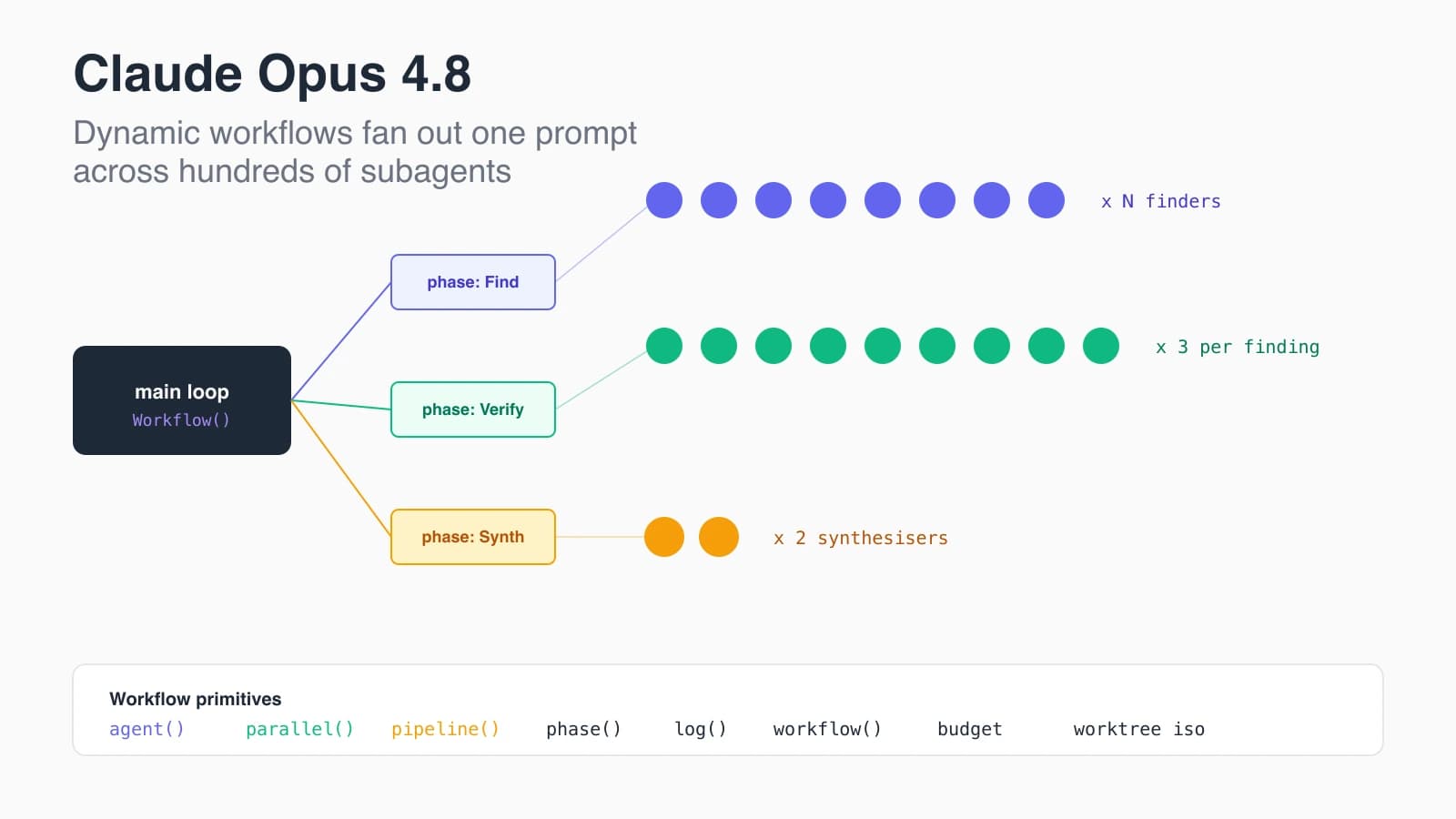
For nine months I had been writing what I called subagent-driven dev: spawn a subagent for each independent task, let the main loop pull results back, repeat. It worked. It also got brittle past ten or fifteen agents because every decision still funnelled through one main-loop context. With dynamic workflows, the main loop hands off a JavaScript script that owns the orchestration. The script runs deterministically. The subagents inside it run on Opus 4.8. The result is the first time I can spin up a hundred concurrent agents on one prompt and trust the structure.
This post breaks down what shipped: the model changes in Opus 4.8, the new workflow primitives in Claude Code 2.1.154, the fast-mode pricing cut, and where I think the old subagent-driven pattern gets retired.
What ships in Claude Opus 4.8?
Opus 4.8 ships as a focused refinement of 4.7 rather than a wholesale jump. Anthropic priced it identically to 4.7: $5 per million input tokens and $25 per million output tokens. The benchmarks tell most of the story.
The headline numbers from Anthropic's release post:
- OSWorld-Verified: 82.3 percent
- Online-Mind2Web: 84 percent
- Roughly 4x less likely than 4.7 to let flaws in code it wrote pass unremarked
Independent reviewers flagged the model's tendency to abstain on uncertain questions instead of confidently guessing. That single behaviour change is most of why the code-flaw number moves so much. Lower hallucination on edits means fewer broken tests after a long agent loop. Anyone who has had Opus 4.7 confidently rewrite a working test into a non-working one knows what that is worth.
Two infrastructure changes matter more for agent workloads than the benchmark numbers do.
First, the minimum cacheable prompt length dropped from 4096 tokens on 4.7 to 1024 tokens on 4.8. If you run many small subagents with stable instructions, you now hit prompt cache far earlier. In practice this is a noticeable cost cut on workflows that fan out wide.
Second, mid-conversation system messages now update instructions without restating the full prompt. The result is a preserved cache, fewer wasted tokens, and a cleaner path for multi-phase orchestration where the main agent shifts mode partway.
Fast mode is the other shoe. Opus 4.7 fast mode cost $30 per million input and $150 per million output. Opus 4.8 fast mode costs $10 in and $50 out: two times standard pricing for what Anthropic describes as 2.5x the speed. That is roughly 3x cheaper than the prior fast tier. Access is still gated behind the research-preview program with account-manager approval, which is the only part of the rollout I dislike.
For most agent workloads, those four changes move the floor. Better code correctness, cheaper cache, cheaper fast mode, and an instruction-update path that respects the cache. Stacked together they meaningfully change the economics of long-running agent loops.
What are dynamic workflows in Claude Code 2.1.154?
Dynamic workflows are JavaScript scripts you hand to Claude Code's Workflow tool. The script orchestrates many subagents in one session and runs in the background. The main loop sees a single tool call. Anthropic's release note for v2.1.154 puts it plainly:
Introducing dynamic workflows: ask Claude to create a workflow and it orchestrates work across tens to hundreds of agents in the background, so you can take on larger, more complex tasks.
The /workflows command lets you watch a live progress tree while the workflow runs. Subagents appear as nodes. Phase groupings show as collapsible sections. You can interrupt or kill any agent without bringing down the workflow.
The trigger keyword changed in v2.1.160 on June 2, 2026. Asking for a "workflow" in your own words still works, but the literal keyword that fires the tool became ultracode. When you type the trigger now, it highlights in violet in the prompt input so you know the tool is about to fire. There is also a /effort ultracode command and a config toggle so you can turn keyword triggering off entirely if you want to gate every run.
The architecturally interesting part is that workflows are not chat. They are deterministic code with a few well-chosen primitives. The model still does the hard semantic work inside each agent() call, but the control flow around those calls is yours.
How does the workflow scripting API work?
The Workflow tool accepts a JavaScript script that begins with a pure-literal meta export and then runs an async body. The body has access to four orchestration primitives and a few helpers.
Here is the shape of a minimal review workflow:
export const meta = {
  name: 'review-changes',
  description: 'Review changed files across dimensions and verify each finding',
  phases: [{ title: 'Review' }, { title: 'Verify' }],
}

const DIMENSIONS = [
  { key: 'bugs', prompt: 'Find bugs in the diff' },
  { key: 'perf', prompt: 'Find performance regressions in the diff' },
]

const results = await pipeline(
  DIMENSIONS,
  d => agent(d.prompt, { phase: 'Review', schema: FINDINGS_SCHEMA }),
  review => parallel(review.findings.map(f => () =>
    agent(`Adversarially verify: ${f.title}`, {
      phase: 'Verify',
      schema: VERDICT_SCHEMA,
    }).then(v => ({ ...f, verdict: v }))
  ))
)

return { confirmed: results.flat().filter(f => f.verdict?.isReal) }Three things to notice.
First, agent(prompt, opts) is the only way to call Opus 4.8 inside a workflow. The return value is either the agent's final text or a schema-validated object when you pass opts.schema. Validation happens at the tool-call layer, so the agent retries on a mismatch rather than pushing junk back to your script. This one feature kills most of the parsing glue I used to write around subagents.
Second, pipeline(items, ...stages) is non-blocking. Item A can be in stage three while item B is still in stage one. Total wall-clock is the slowest single-item chain, not the slowest stage per item summed across stages. Anyone who has built map-reduce loops will recognise the win immediately. The default should always be pipeline. Reach for parallel only when stage N needs every result from stage N-1 at once, like a dedup pass before expensive verification.
Third, the script is plain JS. No filesystem, no Date.now(), no Math.random(). The absence of those is not arbitrary. It is what makes the workflow journal deterministic so you can resume from any agent() boundary by re-running the script with resumeFromRunId. Same script and same args plus an unchanged prefix means cached results return instantly. I have used resume four times this month to recover from a flaky network blip mid-run, and each time the cache hit on the prefix saved real money.
The other primitives:
parallel(thunks): barrier across N concurrent agents. Use when stage N genuinely needs all of stage N-1.phase(title): opens a progress group for subsequentagent()calls.log(msg): narrator line in the progress tree, shown above the agent nodes.workflow(name, args): runs another workflow inline as a step and returns its result. Nesting is one level only.budget: an object that exposestotal,spent(), andremaining()for the run's token target. Use it for loops that scale depth to the user's budget.
Concurrency is capped at min(16, cpu_cores - 2) per workflow, with a lifetime ceiling of 1000 agents. The cap is a runaway backstop, not a limit you should ever hit by design. If your workflow needs that many agents, the pattern is probably wrong.
Why does fast mode cost three times less than before?
The fast-mode price cut is the most under-discussed change in the release. Opus 4.7 fast mode was effectively a research preview at a punitive rate: $30 in and $150 out, six times the standard rate. Almost nobody ran agent loops on it because the cost destroyed the economics.
Opus 4.8 fast mode is $10 in and $50 out, two times standard pricing, while delivering roughly 2.5x the throughput.
That ratio matters because dynamic workflows often spawn dozens of independent agents that all want to finish fast. On the old fast pricing, doing one workflow run a day on fast mode was a six-figure-per-year budget item. On the new pricing, the same run costs around a third of that. Anthropic effectively turned fast mode from a research toy into a workflow-grade tool.
The catch is access. Fast mode is still gated to research-preview accounts and needs account-manager approval. If you are on a starter or pro plan you cannot toggle it on. I expect this gate to come down within a quarter once Anthropic finishes scaling. Until then, fast mode is for orgs running serious agent volume.
When should you reach for a dynamic workflow?
Most people I have watched try workflows for the first time use them for the wrong shape of problem. Workflows are not better than a single agent for tasks with one clear scope. The overhead pays off only when the structure of the work needs more than one shape.
Three concrete cases where I now reach for a workflow by default:
- Adversarial verification. Find a list of issues with N independent finders, then run a separate agent per issue tasked with refuting it. If two of three refuters succeed, kill the finding. This catches plausible-but-wrong claims that a single agent would happily ship. The Workflow tool description itself names this as a quality pattern, and it is the single biggest workflow win I have found.
- Loop-until-dry exhaustive discovery. Spawn finders until K consecutive rounds find nothing new. Better than
while (count < 10)because the tail catches cases a counter cap silently misses. - Migration across many files. Pipeline transforms with
isolation: 'worktree'per agent so file mutations do not collide. Each agent gets a fresh git worktree, the tree is auto-cleaned if it left no changes, and the result lands cleanly back at the end.
The shape test I now apply: if I can describe the work as "fan out over N items, each independent, with a verify step," it is a workflow. If I describe it as "do this one thing well," it is a single subagent or just the main loop.
What does this mean for the subagent-driven dev pattern?
For me, subagent-driven dev becomes a subset of workflow-driven dev rather than its own pattern.
The old shape was: in the main loop, spawn a subagent per task, await results, decide next steps, repeat. That works fine for two or three subagents in a row. It falls apart past ten because every decision still funnels through one main-loop context that you cannot easily prune.
Workflows move the orchestration out of the main loop's mental space. The script is deterministic. The schema-validated outputs are exact. The progress tree shows you exactly where you are. The main loop sees one tool call and a final result.
I still write subagent-driven code for short tasks. I still launch a single Explore agent when I need a file lookup. But for review, migration, audit, and research, the script-based workflow is now the default in my repo. The fast-mode price cut means I am willing to fan out wider than I used to.
The pattern I expect to spread over the next quarter is workflow-as-skill: small, named, parameterised scripts in .claude/workflows/ that get invoked by workflow('name', args) from either the main loop or other workflows. A handful in my portfolio already exist: review-pr, audit-deps, summarise-issues. Each is fewer than fifty lines and replaces what used to be a multi-message agent loop.
There is also a quiet operational win. Workflows journal every agent boundary, so if a run dies halfway, I can resume from the last completed agent for free. I have lost zero work to a network blip since the feature shipped.
Where does Opus 4.8 leave the agent-loop pattern?
Opus 4.8 by itself is a refinement: better correctness, cheaper cache, cheaper fast mode. Dynamic workflows by themselves would have been valuable on Opus 4.7. The combination is the actual unlock. Cheaper agents plus deterministic orchestration is the first time I have felt comfortable trusting Claude Code with a hundred-agent task and walking away.
If you are running Claude Code daily, install v2.1.160 or later, write one workflow in your .claude/workflows/ directory, and try the fan-out shape on a real review or audit task. The first time pipeline() runs item A through stage three while item B is still in stage one, the new mental model clicks. After that, going back to single-agent loops feels slow.
For more on the release, see Anthropic's Opus 4.8 announcement, the Claude Code release notes, and Simon Willison's independent review of Opus 4.8.
Keep Reading
- Claude Opus 4.7 API Pricing, Benchmarks and Breaking Changes 2026. The migration baseline this post builds on.
- Claude Code Routines: Async CI Automation Just Became Real. Workflows are the natural counterpart to routines, one for orchestration and the other for scheduling.
- 10 Best Claude Skills for Developers in 2026. Skills work cleanly inside workflow agents via the
agentTypeoption.