
The first time I moved a few terabytes of backups to S3 Glacier Deep Archive, I felt clever. The storage bill dropped to almost nothing. Then a teammate asked for one file back, and I learned the other half of the story. It took most of a day to show up, and the restore cost more than a month of storage.
S3 Glacier isn't a single thing. It's three separate storage classes inside Amazon S3, each tuned for a different balance of retrieval speed and price. Pick the right one and you pay cents to keep data for years. Pick the wrong one and you either wait 48 hours for a file or pay a premium to rush it. This post compares S3 Glacier Instant vs Flexible vs Deep Archive on the three things that actually decide the choice: how fast you get data back, what it costs, and the rules that quietly bill you. All prices are us-east-1, taken from the AWS pricing feed dated June 2026.
What are the three S3 Glacier storage classes?
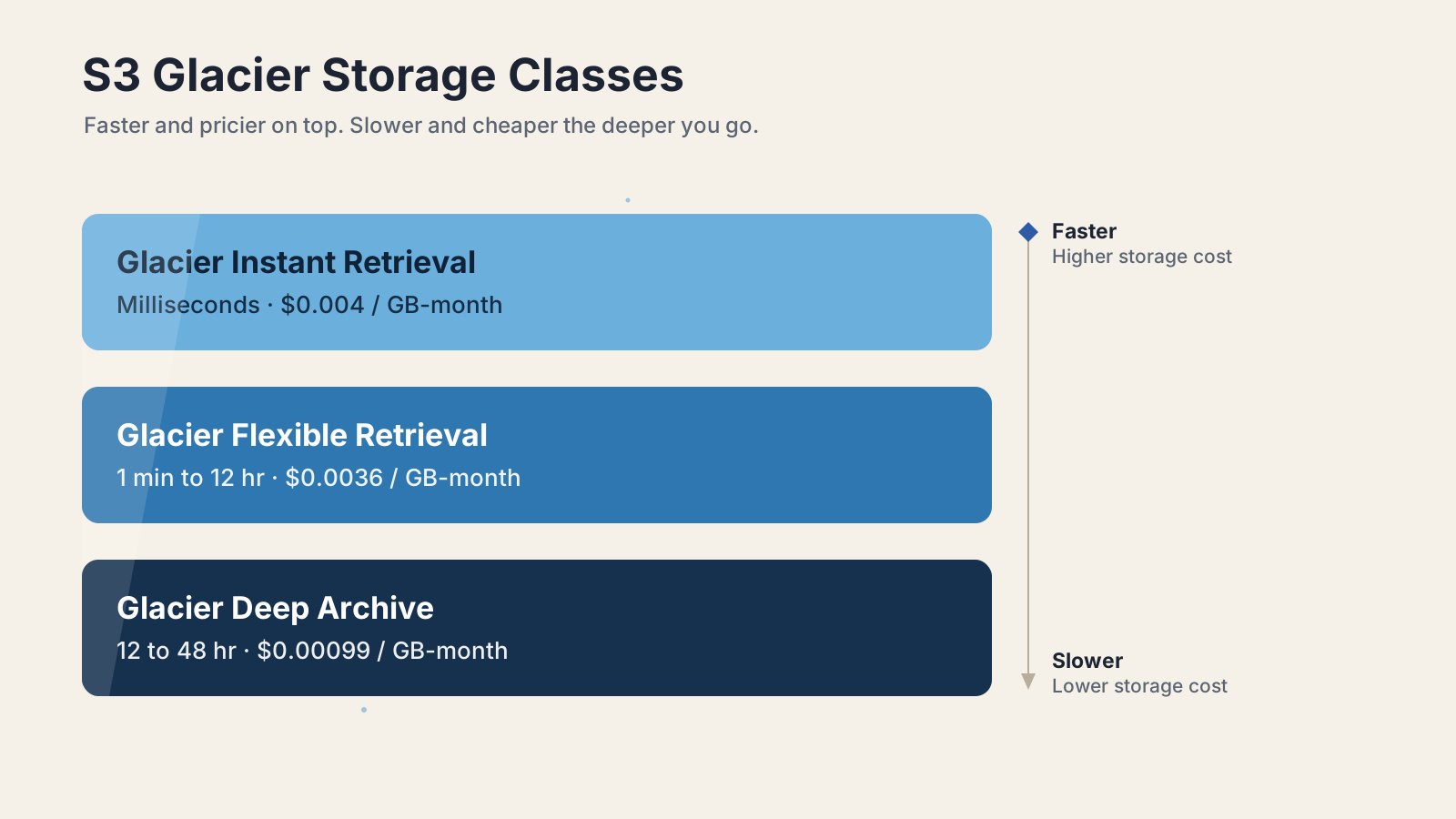
S3 Glacier is three storage classes: Glacier Instant Retrieval, Glacier Flexible Retrieval, and Glacier Deep Archive, ordered from fastest-and-priciest to slowest-and-cheapest. They all live inside normal S3 buckets, so you manage them with the same S3 API, console, encryption, and tagging you already use.
The names trip people up, and it's AWS's own fault. Back in late 2021 the class that used to be called plain "S3 Glacier" was renamed to S3 Glacier Flexible Retrieval, and a new faster class, Glacier Instant Retrieval, launched alongside it. So when someone says "just use Glacier," ask which one they mean.
Here is the shape of the three, with S3 Standard-IA thrown in for contrast since it's the class right above them:
| Class | Lifecycle enum | Retrieval | Min duration | Storage $/GB-month (us-east-1) |
|---|---|---|---|---|
| S3 Standard-IA | STANDARD_IA | Milliseconds (direct GET) | 30 days | $0.0125 |
| Glacier Instant Retrieval | GLACIER_IR | Milliseconds (direct GET) | 90 days | $0.004 |
| Glacier Flexible Retrieval | GLACIER | 1 min to 12 hours | 90 days | $0.0036 |
| Glacier Deep Archive | DEEP_ARCHIVE | 12 to 48 hours | 180 days | $0.00099 |
There's a trap hiding in that enum column. In lifecycle and storage-class APIs, GLACIER means Flexible Retrieval, and GLACIER_IR means Instant Retrieval. Lots of people assume GLACIER is the instant one because it has the shortest name. It isn't. If you write a lifecycle rule that transitions to GLACIER expecting millisecond reads, you'll get a class that needs a multi-hour restore.
One more distinction worth clearing up. There's an older standalone "Amazon Glacier" service built around vaults and a separate API. That is not the same as the S3 Glacier storage classes, and AWS stopped taking new customers for the legacy vault service in December 2025. For anything new, you want the S3 storage classes covered here, not vaults.
How fast can you retrieve data from each Glacier class?
Retrieval speed is the single biggest difference between the three classes, ranging from milliseconds to two days. Glacier Instant Retrieval behaves like S3 Standard: you call GET and the object comes back immediately, no restore step. The other two make you ask first, then wait.
Flexible Retrieval and Deep Archive offer retrieval tiers. You pick a tier when you request a restore, trading money for speed:
| Class and tier | Typical time |
|---|---|
| Glacier Instant Retrieval | Milliseconds (no restore) |
| Flexible: Expedited | 1 to 5 minutes |
| Flexible: Standard | 3 to 5 hours |
| Flexible: Bulk | 5 to 12 hours |
| Deep Archive: Standard | Within 12 hours |
| Deep Archive: Bulk | Within 48 hours |
A couple of details that bite people. Deep Archive has no Expedited tier at all, so the fastest you can pull data out is "within 12 hours" on Standard. And Flexible Expedited is quoted at 1 to 5 minutes for objects under 250 MB. Larger objects stream out at high throughput once the job starts, but the start is still near-instant for small ones.
There's also a free speed-up most people miss. Since 2023, Flexible Retrieval Standard restores triggered through S3 Batch Operations start returning objects within minutes instead of the usual 3 to 5 hours, at no extra cost. If you're restoring many objects at once, run it as a Batch Operations job rather than a loop of single restore calls.
How much does each S3 Glacier class cost?
Storage is the cheap, obvious number, and retrieval is where the surprises live. Deep Archive stores data for about a quarter of what Instant Retrieval costs, but the order flips when you read data back.
Storage per GB-month in us-east-1:
- Glacier Instant Retrieval: $0.004
- Glacier Flexible Retrieval: $0.0036
- Glacier Deep Archive: $0.00099
Retrieval cost per GB (the part that catches teams off guard):
- Instant Retrieval: $0.03 per GB
- Flexible Expedited: $0.03 per GB plus $10.00 per 1,000 requests
- Flexible Standard: $0.01 per GB
- Flexible Bulk: free
- Deep Archive Standard: $0.02 per GB
- Deep Archive Bulk: $0.0025 per GB
Notice that Flexible Bulk retrieval is free, which makes Flexible Retrieval a genuinely cheap place to park data you'll occasionally bulk-restore and can wait half a day for. And Expedited carries a steep per-request fee on top of the per-GB charge, so it's a rush button, not a default.
Here's a worked example to make the tradeoff concrete. Say you archive 10 TB and keep it for a year, then restore 200 GB once:
- Deep Archive: storage is 10,000 GB times $0.00099 times 12 months, about $119 for the year. A 200 GB Standard restore is 200 times $0.02, so $4 plus small request fees. Cheap to hold, cheap to read once, but you wait up to 12 hours.
- Glacier Instant Retrieval: storage is 10,000 GB times $0.004 times 12 months, about $480 for the year. Retrieval is a plain GET with no restore wait.
The storage gap is roughly 4x. If you read that data a handful of times a year and can't wait hours each time, the extra $360 a year is what instant access costs you. If you genuinely never touch it, that 4x is pure waste and Deep Archive wins easily.
What minimum durations and hidden fees should you watch for?
Every Glacier class bills a minimum storage duration, and deleting early doesn't save you money. Instant and Flexible Retrieval both charge a 90-day minimum, Deep Archive charges 180 days, and Standard-IA charges 30 days. If you delete, overwrite, or transition an object before its minimum, AWS charges a prorated fee for the remaining days as if the object had stayed.
The fee that surprised me most was per-object overhead. For Flexible Retrieval and Deep Archive, every archived object carries 40 KB of extra metadata: 32 KB billed at the Glacier rate and 8 KB billed at the S3 Standard rate. That's nothing for a 5 GB backup. It's brutal for ten million 4 KB files, where the overhead dwarfs the actual data. The fix is to aggregate small files into archives (tar, zip, or a columnar format) before they land in Glacier. Glacier Instant Retrieval skips this 40 KB model but bills a 128 KB minimum object size instead, so tiny objects are still a bad fit there.
One more cost that hides until restore day: while a Flexible or Deep Archive object is restored, you pay for both copies at once. The archived object keeps billing at its Glacier rate, and the temporary restored copy bills at the S3 Standard rate for the whole window you asked to keep it available. Ask for 30 days of availability on a big restore and that temporary copy is a real line item.
How do S3 Lifecycle rules move objects into Glacier?
S3 Lifecycle rules transition objects between classes automatically based on age, so you rarely change storage classes by hand. You attach a rule to a bucket or prefix, and S3 moves objects down the chain as they cross the day thresholds you set.
Transitions only flow one direction, from hotter to colder. Standard can go to any colder class, Flexible Retrieval can only move on to Deep Archive, and Deep Archive is the end of the line. To move data back up, you restore a copy and rewrite it with the new class. There's also a floor: objects must sit in Standard for at least 30 days before a rule can move them to Standard-IA or One Zone-IA, though you can transition straight to a Glacier class from day one.
A typical "age out the logs" rule looks like this:
{
  "Rules": [
    {
      "ID": "archive-logs",
      "Filter": { "Prefix": "logs/" },
      "Status": "Enabled",
      "Transitions": [
        { "Days": 30, "StorageClass": "STANDARD_IA" },
        { "Days": 90, "StorageClass": "GLACIER" },
        { "Days": 180, "StorageClass": "DEEP_ARCHIVE" }
      ]
    }
  ]
}Apply it with the CLI:
aws s3api put-bucket-lifecycle-configuration \
  --bucket my-archive-bucket \
--lifecycle-configuration file://lifecycle.jsonTwo details save real money here. Remember the 90 and 180-day minimums when you set thresholds, because transitioning an object to Deep Archive on day 95 and deleting it on day 120 still bills the full 180 days. And as of September 2024, S3 no longer transitions objects smaller than 128 KB by default, so a bucket full of tiny files may quietly skip the rule unless you override the size filter. If you want this whole setup in version control instead of the console, define the bucket and its lifecycle rules with AWS CloudFormation so the policy ships with your infrastructure.
How do you restore an archived object from Glacier?
For Flexible Retrieval and Deep Archive, you POST a restore request, wait for the tier's retrieval time, then download a temporary copy. Instant Retrieval skips all of this, since a normal GET works directly.
The restore call names how many days the temporary copy should stay available and which tier to use:
aws s3api restore-object \
  --bucket my-archive-bucket \
  --key logs/2026/app.log.gz \
--restore-request '{"Days":7,"GlacierJobParameters":{"Tier":"Standard"}}'While the restore runs and after it finishes, the object's storage class stays GLACIER or DEEP_ARCHIVE. The restore doesn't move the object, it just creates a readable copy next to it. You check progress with head-object, which reports Restore: ongoing-request="true" while the job runs and flips to false with an expiry date once the copy is ready:
aws s3api head-object \
  --bucket my-archive-bucket \
--key logs/2026/app.log.gzWhen the number of Days you asked for runs out, S3 deletes the temporary copy and you're back to just the archived object. If you actually want the data to stay hot, copy the restored object to a non-archive class like Standard or Standard-IA before the window closes. This restore model is unique to the Glacier classes, and it's one more reason the broader S3 feature set is worth understanding before you commit data to cold storage.
Which S3 Glacier class should you actually pick?
Match the class to how often you read the data and how long you can wait, not to the storage price alone. The three classes map cleanly onto three access patterns:
- Glacier Instant Retrieval: you access the data about once a quarter, but when you do you need it in milliseconds. Think medical images, news media archives, or user files that are rarely opened but must load instantly when they are. You pay roughly 4x the Deep Archive storage rate for that immediacy.
- Glacier Flexible Retrieval: you read the data once or twice a year and can wait minutes to hours. Backups, large datasets you reprocess occasionally, anything where a Bulk restore (free, up to 12 hours) is fine. This is the practical default for most archives.
- Glacier Deep Archive: you almost never read the data and you're keeping it for compliance, legal hold, or long-term disaster recovery. You can wait up to 48 hours, and the 180-day minimum is irrelevant because the data lives for years.
The mistake I see most often is reaching for Deep Archive purely because the storage number is smallest. If there's any real chance you'll need the data inside a day, that choice turns a five-minute task into a next-day one, and the cheap storage line never makes up for the operational pain.
What should you check before moving data to Glacier?
Model the retrieval before you write the lifecycle rule, not after. Storage cost is the number everyone compares, but it's the cheap, visible one. Retrieval cost and retrieval time are invisible right up until the day you actually need the data, which tends to be the worst possible day to discover that a restore takes 48 hours or costs more than you expected.
My rule of thumb: if I can't say out loud how I'll get the data back, how fast that will be, and what it costs, the data isn't ready for Glacier yet. Write down the realistic restore scenario (how much, how often, how fast) and let that pick the class. Do that, and S3 Glacier goes from a billing trap to one of the best deals in cloud storage.
For the exact figures, see the AWS docs on S3 storage classes, the S3 Glacier storage classes guide, the retrieval options reference, and the live Amazon S3 pricing page.
Keep Reading
- Amazon S3 Files: AWS Just Turned Object Storage Into a File System. How S3 keeps growing past plain object storage, the same service these Glacier classes live in.
- How to Create Your First AWS CloudFormation Stack (2026). Put your bucket and lifecycle rules in version-controlled infrastructure instead of clicking through the console.
- What Is Infrastructure as Code? A Beginner's Guide for 2026. The foundation for managing S3 lifecycle policies and storage classes as code.